PIE Framework
Open Source Assessment Items
A modern, open-source framework for assessment item rendering that combines the interactive richness of commercial platforms with the flexibility of open standards. Built on Web Components and distributed as framework-agnostic custom elements.
Why PIE
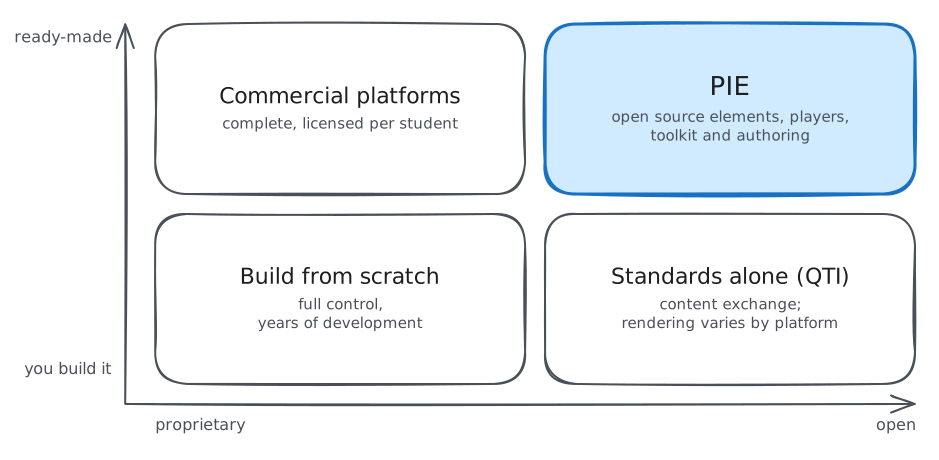
Today's assessments demand interactive question types — graphing, drag-and-drop, mathematical expression input — delivered accessibly through browsers to millions of students. Organizations building assessment platforms face a difficult choice.
The Challenge
Commercial Platforms
Comprehensive solutions but with significant per-student licensing costs and limited customization.
Standards Alone (QTI)
QTI defines an exchange format; each platform supplies its own rendering and authoring.
Build from Scratch
Complete control but years of development to cover the range of content types with production quality and accessibility.
The PIE Solution
Open Source & Free
MIT licensed, with no per-student fees, and full source access and modification rights. Optional calculator and cloud read-aloud providers carry their own terms.
Modern & Interactive
31 element types, 30 of them with WYSIWYG authoring views, composable players and an assessment toolkit.
Enterprise Proven
PIE powers assessment delivery at enterprise scale, serving hundreds of millions of student interactions annually across approximately 40% of U.S. schools.
What PIE Provides
Elements, players and tools for delivering and authoring interactive assessments
Secure Delivery for High Stakes
Each element's controller turns the stored model into a view model for the current mode and role. By default the controllers run in the browser, which suits practice and formative use. A hosted player loads elements without their controllers and renders models your server has processed; with answer keys stripped from those models and scores computed on your server, neither the key nor the scoring logic reaches the browser.
31 Element Types
From multiple choice and inline dropdowns to graphing, charting, math entry and drag-and-drop. Each ships a delivery view and a controller; 30 ship an authoring view.
Composable Players
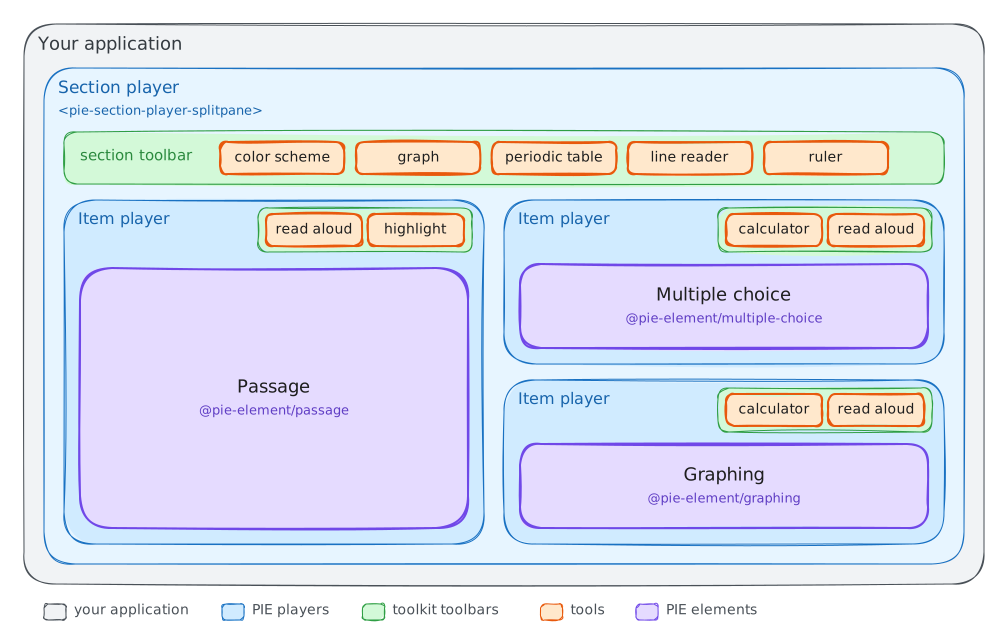
The item player renders one item. Section players lay out a page of items and passages, with tools and accommodations from the assessment toolkit. The print player renders printable versions. Hosts assemble these into their own assessment experience; a reference assessment player shows one way to do it.
Accessibility
WCAG 2.2 AA, PNP-driven accommodations, read-aloud with highlighting, sign-language alternates.
Theming
One theme element, ten accessible color schemes, font scaling, adapters for your design system.
Localization
Interface locale, content language and authored language alternates.
Timed media
Video stimuli whose playback reveals items and pauses for answers.
Security & CSP
Server-side scoring with stripped models, and the origins a strict CSP must allow.
Instrumentation
Telemetry into your own observability backend, and debugger panels for development.
Core Architecture
PIE renders and scores items in the browser, and ships server packages for read-aloud synthesis; element controllers can also run on your server for secure delivery. You bring the backend: content storage, authentication, session storage, reporting and infrastructure.
PIE Provides
-
31 Element Types
Multiple choice, graphing, drag-and-drop, constructed response, and more
-
WYSIWYG Authoring Interfaces
Educators build content in visual editors, with a live preview the host renders beside them
-
Item, Section and Print Players
The item player renders one item, section players lay out pages of items and passages with tools, and the print player renders printable versions
-
Assessment Toolkit
Calculator, text-to-speech, accommodations, and more — coordinated through a centralized ToolkitCoordinator, around a section player or a single item player
-
QTI-Inspired Models
Sections and assessments follow QTI 3.0's test parts, sections and item references
You Provide
-
Item Storage & Retrieval
Your CMS, item bank, or content repository
-
Authentication & Authorization
User management, permissions, session handling
-
Session Storage
Durable storage for the learner sessions the players hand back
-
Assessment Shell
Navigation, timing and submission, assembled around the players
-
Server-Side Scoring for High Stakes
For hosted delivery: a server that runs the element controllers, strips answer keys from models and computes scores
-
Provider Accounts
A Desmos API key and license for the default calculator, a GeoGebra license, or the bundled open-source Cortex calculator; a synthesis endpoint,
/api/ttsby default, for server read-aloud -
Reporting & Analytics
Score reports, analytics, learning insights
-
Infrastructure & Hosting
Your servers, databases, deployment pipeline
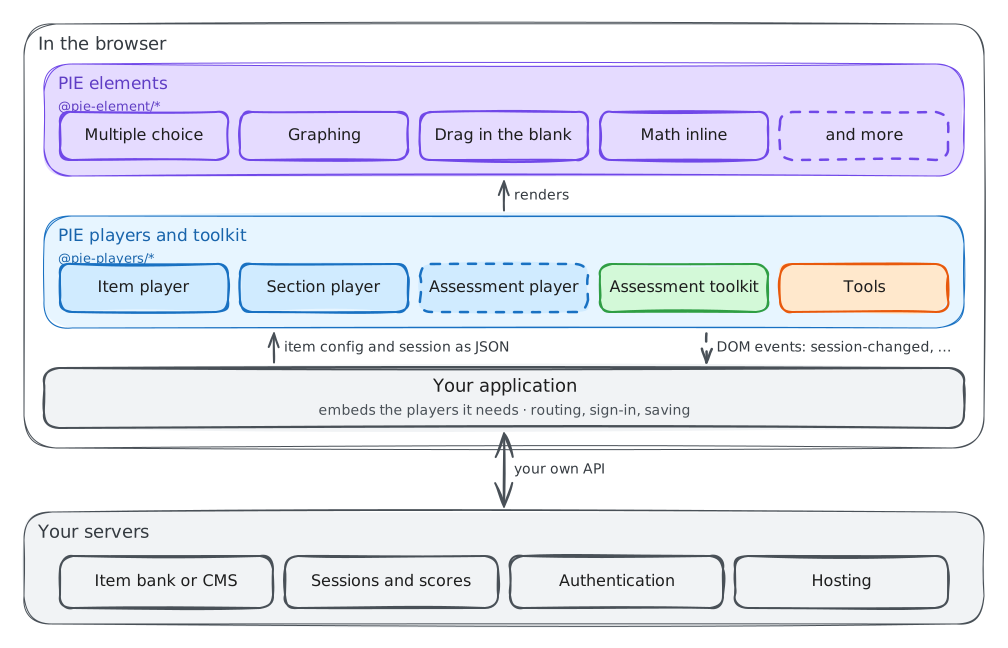
This separation means PIE integrates with any backend technology. Your authoring CMS and production delivery system can be unified or separate — PIE works because it speaks JSON and emits standard events.
PIE Elements: The Question Type Framework
31 element types: 26 question types plus passages, video stimulus and three rubric elements. Each element ships a delivery view and a controller. All but Match List
ship an authoring view, and 12 ship a print view rendered by <pie-print>.
Choice and text
10 elements
- Multiple Choice
- EBSR
- Inline Dropdown
- and 7 more
Math
3 elements
- Math Inline
- Math Templated
- Fraction Model
Matching and ordering
7 elements
- Match
- Match List
- Categorize
- and 4 more
Graphs and images
6 elements
- Graphing
- Graphing Solution Set
- Number Line
- and 3 more
Content and scoring
5 elements
- Passage
- Video Stimulus
- Rubric
- and 2 more
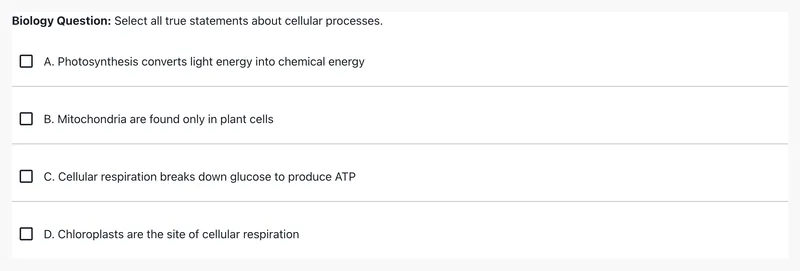
Multiple Choice
Choose one or more answers from a list.
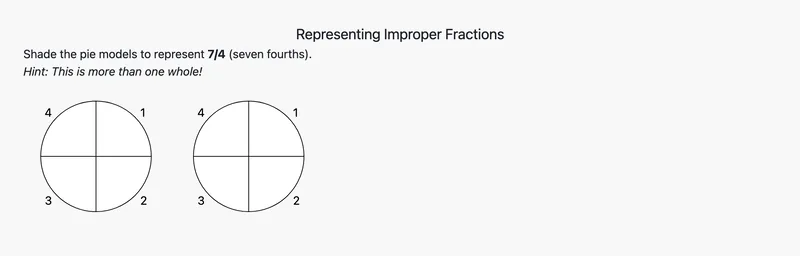
Fraction Model
Shade parts of a model to show a fraction.
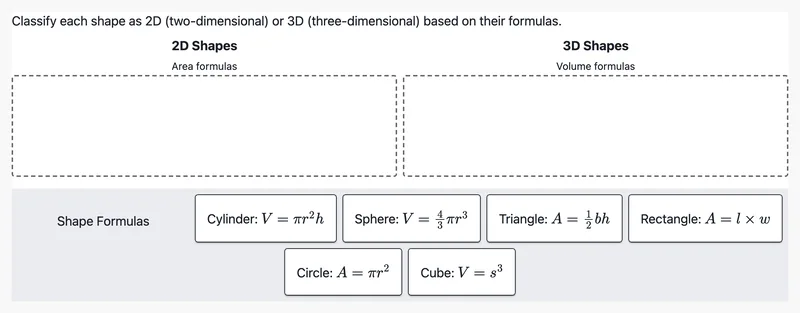
Categorize
Sort items into categories by dragging.
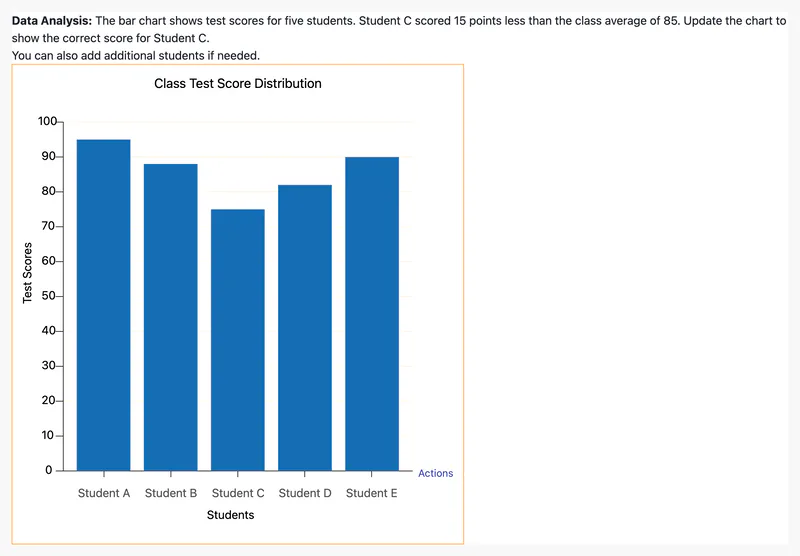
Charting
Set bar heights to complete a chart.
QTI Interoperability
PIE-QTI, a sibling project, provides QTI item and assessment players for QTI 2.2 and 3.0 content (pre-1.0; certification in progress), ingests QTI 2.1, and converts between QTI and PIE.
- Version-Agnostic Architecture — Auto-detects QTI version from XML and maps both QTI 2.x (camelCase) and QTI 3.0 (kebab-case with
qti-prefix) to a shared canonical model - QTI Item & Assessment Players — extractors for all 21 QTI 2.2 interaction types and 78 response-processing expression kinds; coverage is broad but not yet fully conformant
- Bidirectional Transforms — plugin-based transform packages and a CLI (in development) for converting between QTI and PIE
- QTI 3.0 Influence on PIE — QTI 3.0 accessibility catalogs shaped the toolkit's catalog model, and its personal needs profiles follow AfA PNP 3.0, the model QTI 3.0 uses
PIE-QTI
QTI 2.2 and 3.0 item and assessment players (pre-1.0) with version detection and shared response processing, plus transforms between QTI and PIE.
Trusted Partners
PIE is sponsored and developed in collaboration with leading organizations in educational technology.
PIE's primary sponsor and largest production user, serving approximately 40% of U.S. schools.
Learn More
Implementation partner since 2017. MCRO has been instrumental in developing PIE from concept to production-ready framework.
Learn More