Structure of PIE Elements
Understanding how PIE elements are architected: delivery UI, authoring UI, controllers, and security patterns.
Element Components Overview
Every PIE element is composed of three main components that work together to provide a complete question type experience:
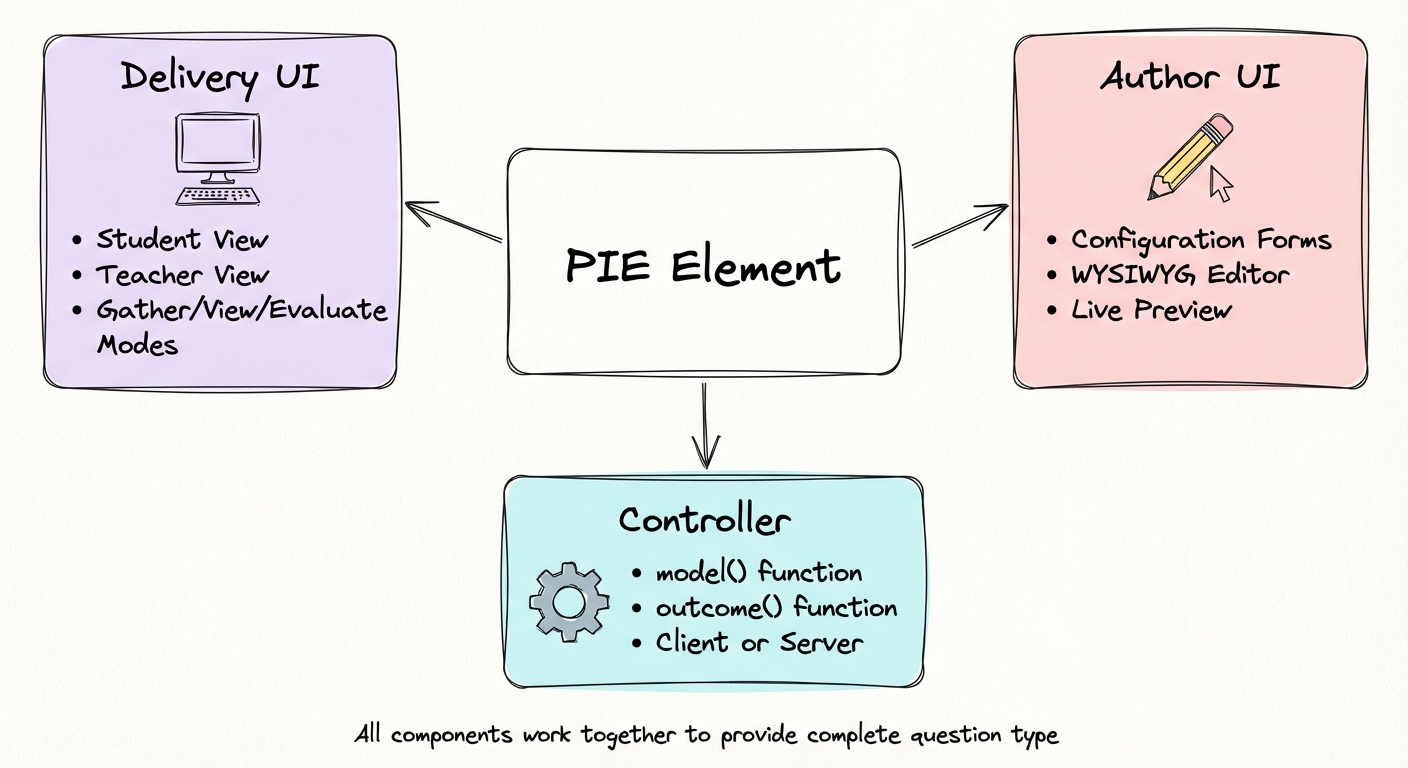
Delivery UI
The interactive interface students and teachers see during assessment delivery.
- • Student view (answer questions)
- • Teacher view (monitor progress)
- • Mode-aware (gather/view/evaluate)
- • Web Component (framework-agnostic)
Author UI
Configuration interface where educators create and edit question content.
- • WYSIWYG editing experience
- • Form controls and visual editors
- • Live preview integration
- • Rich text support
- • Validation and error handling
Controller
JavaScript/TypeScript logic that transforms data and calculates scores securely.
- •
model()function - •
outcome()function - • Client or server execution
- • Security filtering by role
- • Framework-agnostic (pure JS/TS)
Controller Architecture
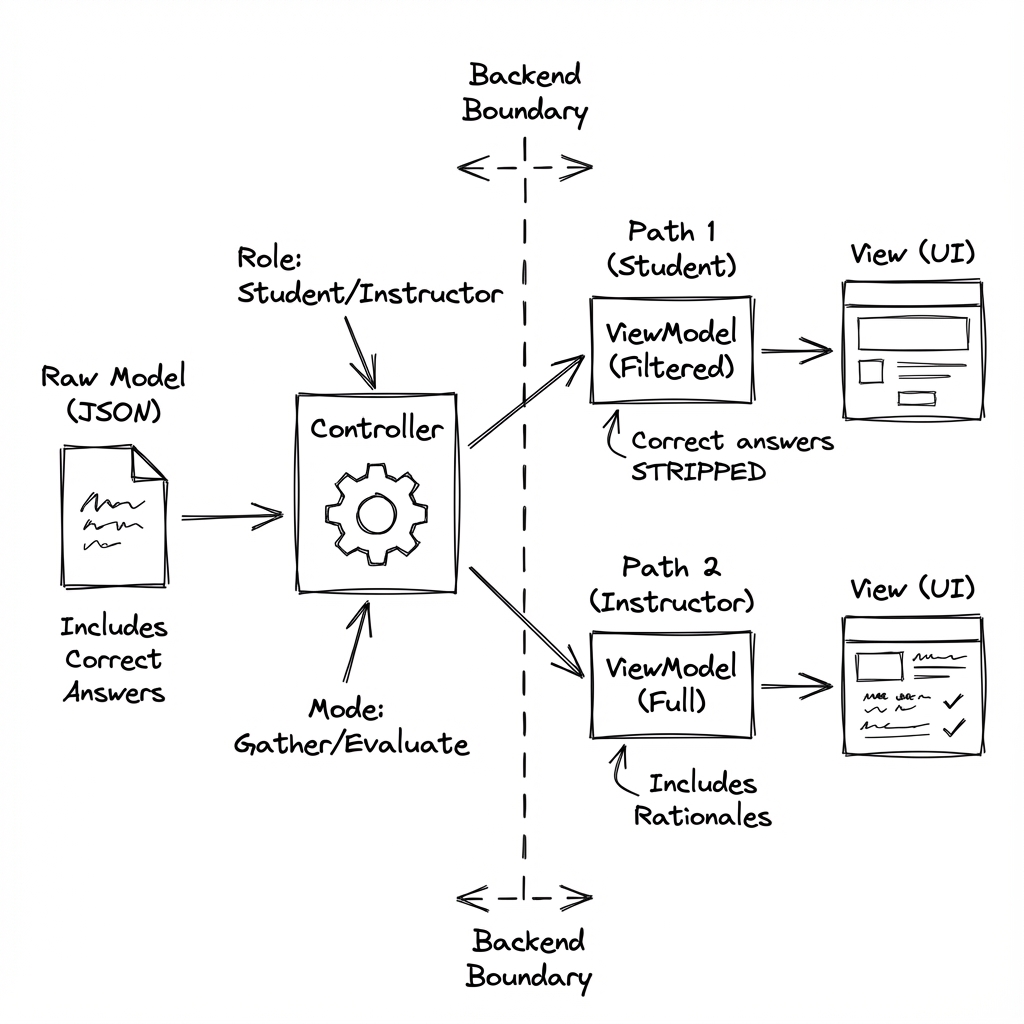
Controllers are the "brain" of PIE elements. They transform question data based on context and calculate scores while maintaining security.
Why Controllers are Separate
Controllers are implemented as standalone JavaScript/TypeScript functions, separate from the UI components. This separation enables:
- Flexible deployment: Run on client for testing or server for security
- Security control: Keep correct answers server-side for high-stakes tests
- Framework independence: Pure JavaScript works anywhere
- Testability: Easy to unit test without UI dependencies
Controller Functions
model(question, session, env)
Transforms the question configuration into a view model for the UI based on the current environment (mode and role).
- • Filters sensitive data (correct answers for students)
- • Includes/excludes feedback based on mode
- • Adapts UI hints based on role
- • Returns only what the user should see
outcome(question, session, env)
Calculates the score (0.0-1.0) and provides feedback based on the student's response.
- • Compares response to correct answer
- • Calculates partial credit if applicable
- • Returns score and completion status
- • Provides correctness feedback
MVVM Security Model
PIE implements a Model-View-ViewModel (MVVM) pattern with controllers acting as security gateways.
Client-Side Execution
Controllers run in the browser for development and low-stakes scenarios.
Use cases:
- Practice quizzes
- Formative assessments
- Development and testing
- Immediate feedback scenarios
Server-Side Execution
Controllers run on your backend for high-stakes assessments requiring answer security.
Use cases:
- State accountability tests
- Certification exams
- Summative assessments
- Any high-security scenario
Security Consideration
For high-stakes assessments, always run controllers server-side.
Delivery UI
The delivery UI is implemented as an HTML5 Web Component (Custom Element), making it framework-agnostic and universally compatible.
Web Components Standard
PIE elements are packaged as Custom Elements following the Web Components specification:
- • Native browser standard (no polyfills needed)
- • Works with React, Vue, Angular, Svelte, vanilla JS
- • Encapsulated styles (optional shadow DOM)
- • Standard DOM APIs for integration
Element Properties
Communication Pattern
Properties (Input)
model- View model from controllerconfiguration- UI settingsdisabled- Read-only mode
Events (Output)
session-changed- Response updatedmodel-updated- Model changedfocus- Element focused
Methods
insertImage()- Add imagesfocus()- Set focusvalidate()- Check validity
Authoring UI
The authoring interface provides a WYSIWYG experience for educators to create and configure questions without writing code.
Configuration Forms
Standard form controls (inputs, selects, checkboxes) for setting element properties.
Rich Text Editors
WYSIWYG editors for prompts, feedback, and any formatted text content.
Live Preview
Real-time preview showing exactly how students will see the question.
High-Level Code Example
Here are simplified examples showing the structure of PIE element components. These are conceptual examples, not full implementations.