PIE Players and Assessment Toolkit
From individual elements to complete assessments: players orchestrate content delivery while the toolkit provides tools, accommodations, and test infrastructure.
Players Overview
While elements represent individual question types, players orchestrate how elements are rendered, managed, and integrated into assessment experiences. PIE provides players at three levels of granularity.
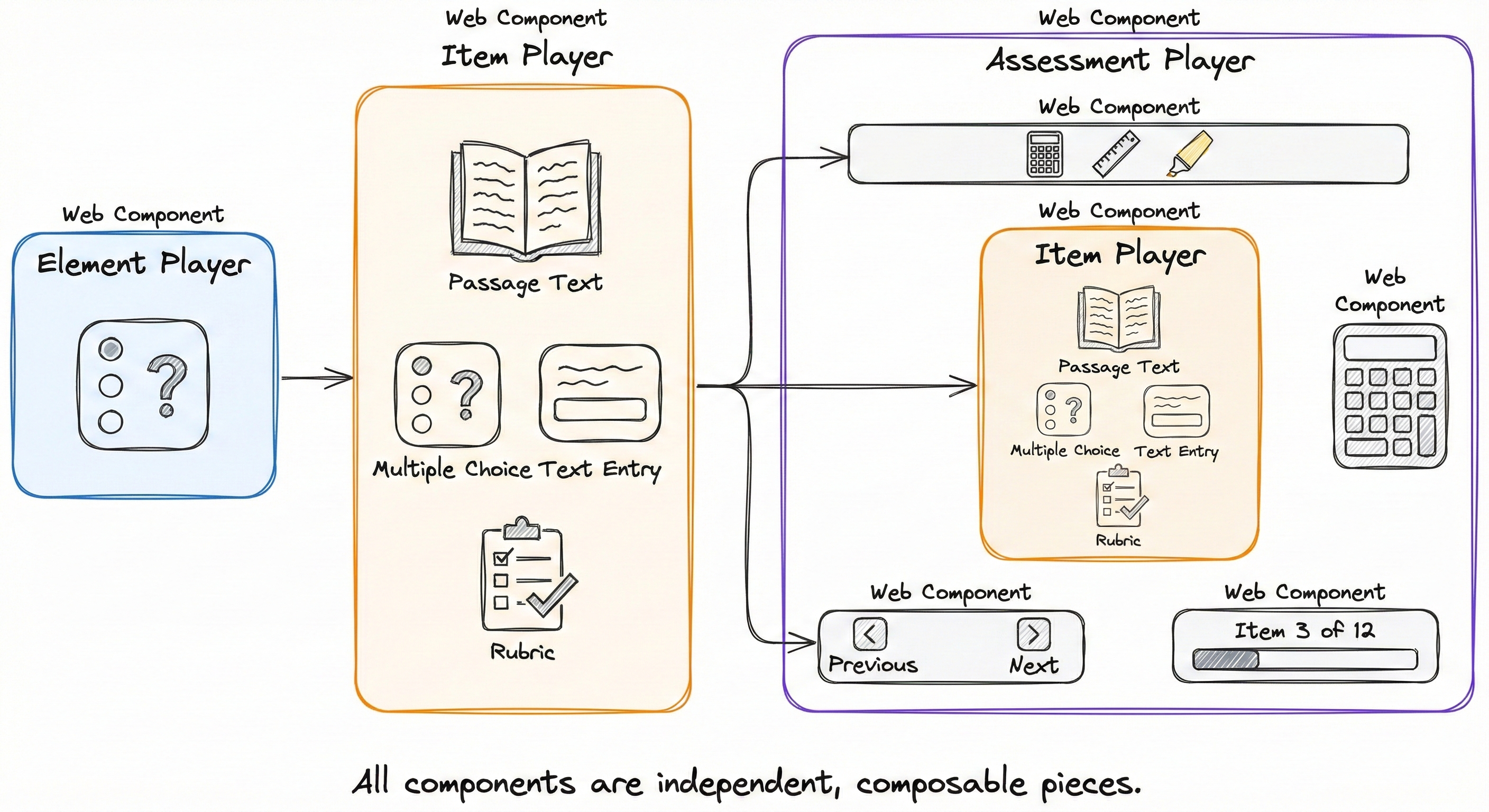
Element Player
Renders a single element (one question type). Primarily used for testing and development.
- • Loads element JavaScript bundle
- • Manages element state
- • Handles mode transitions
- • Emits session change events
Item Player
Renders complete assessment items with one or more questions, passages, and rubrics.
- • Manages multiple elements
- • Handles passages and rubrics
- • Unified session model
- • Built-in layout system
Assessment Player
Complete test delivery with navigation, tools, and accommodations. Reference implementation.
- • Item navigation
- • Toolkit integration
- • Timer and controls
- • Multi-item orchestration
Player Types
PIE provides multiple player implementations, each optimized for different deployment scenarios. All implement the same Web Component interface, making them interchangeable.
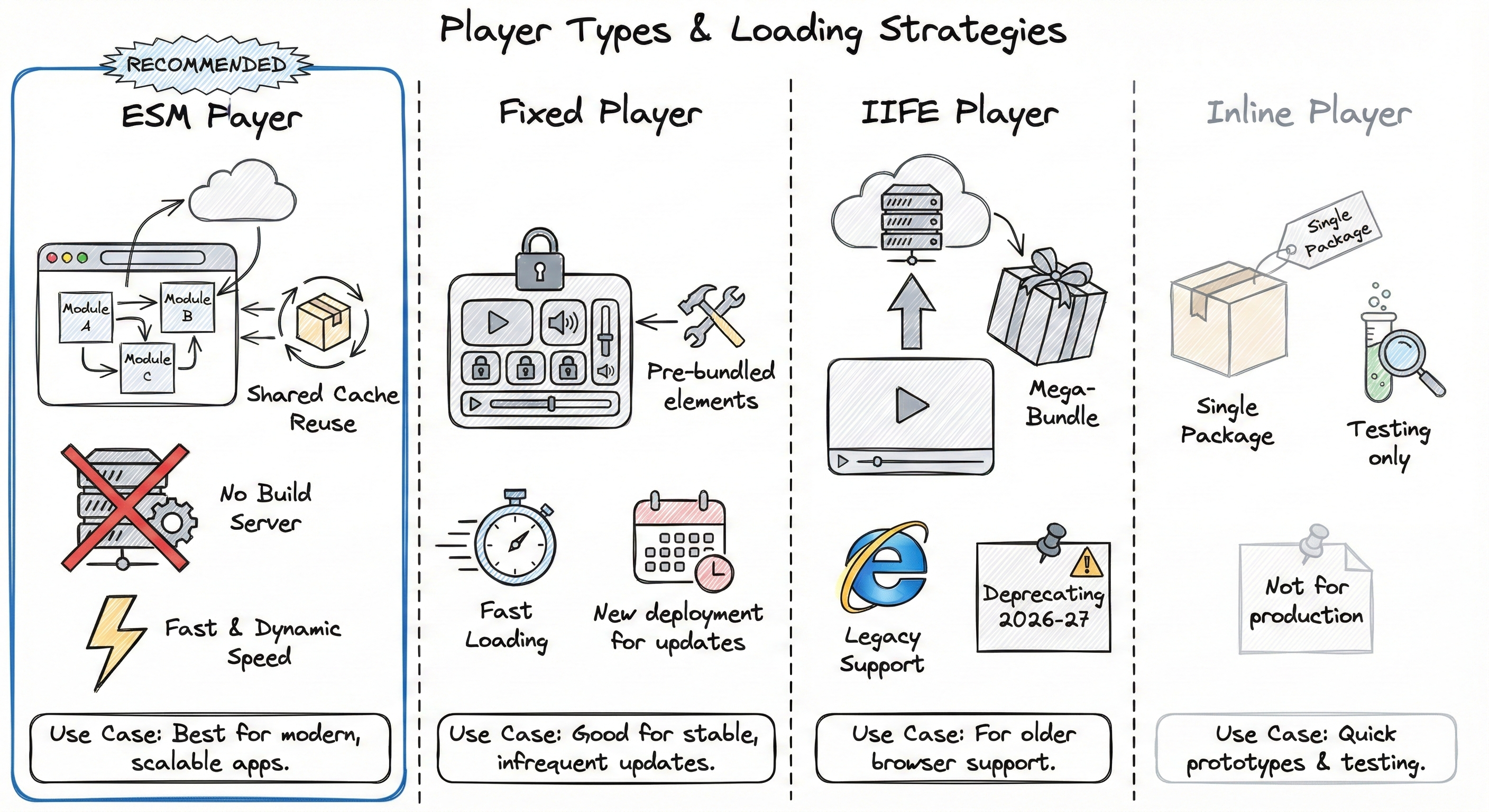
IIFE Player
Current StandardLoads pre-bundled element packages dynamically from a bundle hosting service. The current production-ready player with broad browser support and battle-tested reliability.
Benefits:
- Production-ready and stable
- Broad browser support
- Dynamic element loading
- Enterprise-proven at scale
Status:
- Current standard for production
- Will transition to legacy in 2026
- Fully supported through 2027+
- Recommended for new projects today
ESM Player
Coming Early 2026Uses native browser ESM (ECMAScript Modules) for loading PIE elements. Will offer smaller bundle sizes and better caching once ready for production.
Future Benefits:
- Much smaller, cacheable bundles
- Native browser module loading
- Better dependency caching
- Import maps for resolution
Current Status:
- In development
- Not recommended for production
- Expected stable: early 2026
- Will become new standard
Fixed Player
Elements are bundled directly into the player at build time. Optimal for performance-critical deployments with known question type sets.
Benefits:
- Zero runtime bundle loading
- Smallest API payload (data only)
- Fastest initial render
- Deterministic builds
Constraints:
- Fixed element versions
- Requires rebuild for updates
- Larger player bundle
- Less flexible
Assessment Toolkit Architecture
Real-world assessments require more than question rendering. The PIE Assessment Toolkit provides composable services for tools, accommodations, and complete test delivery.
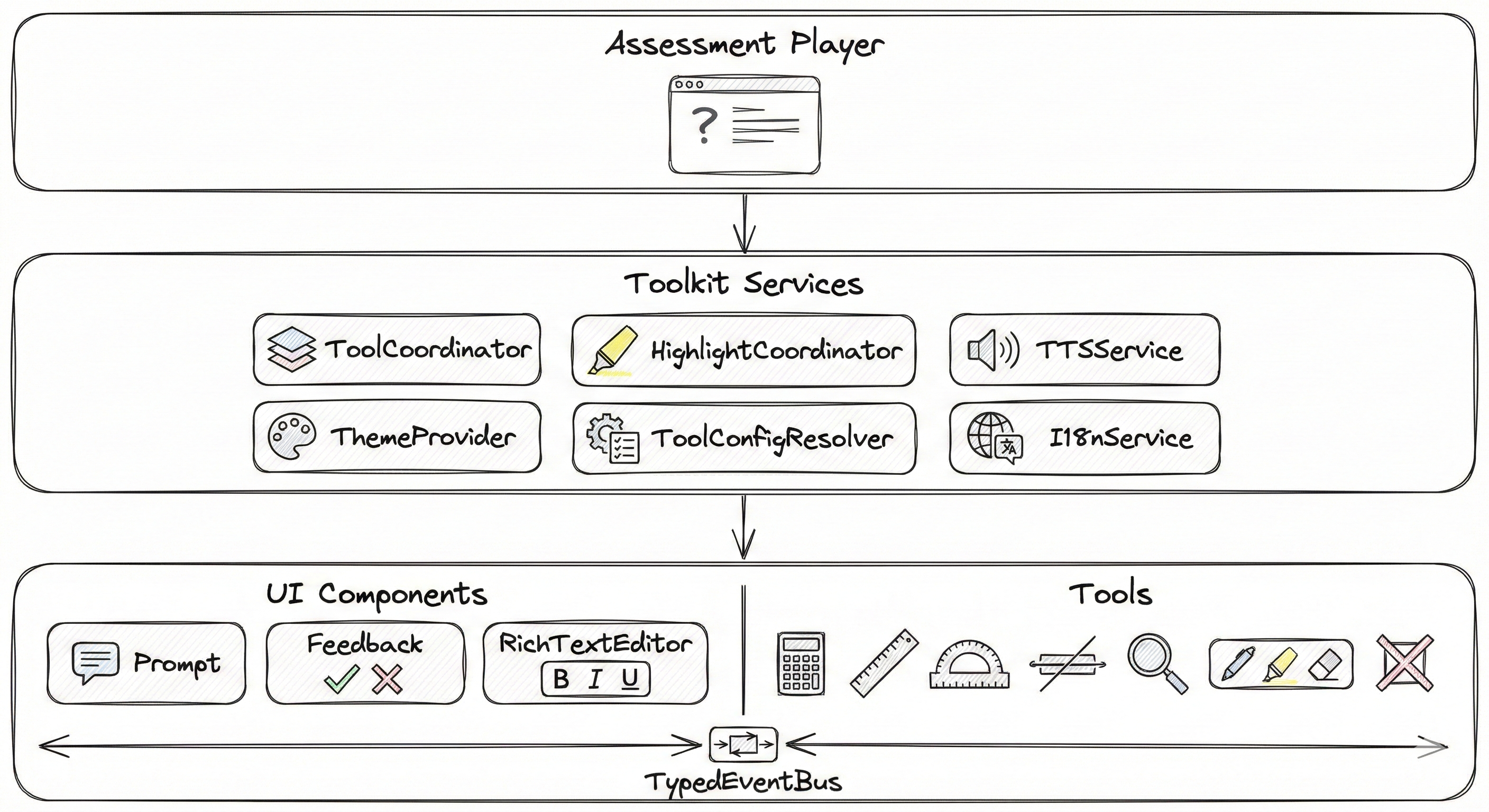
ToolCoordinator
Central service managing tool visibility and z-index layering for proper stacking of calculators, rulers, and other tools.
HighlightCoordinator
Manages text highlighting for TTS and annotations using CSS Custom Highlight API for framework-friendly overlays.
TTSService
Singleton text-to-speech service with word-level highlighting synchronization and voice control.
ThemeProvider
Accessibility theming for high contrast modes, color schemes, and font size adjustments via CSS custom properties.
ToolConfigResolver
Resolves three-tier accommodation configuration (student IEP/504, roster settings, item requirements).
TypedEventBus
Type-safe communication layer for component coordination without direct coupling.
Tools & Accommodations
The toolkit includes 15+ assessment tools organized in three tiers based on dependencies and functionality.
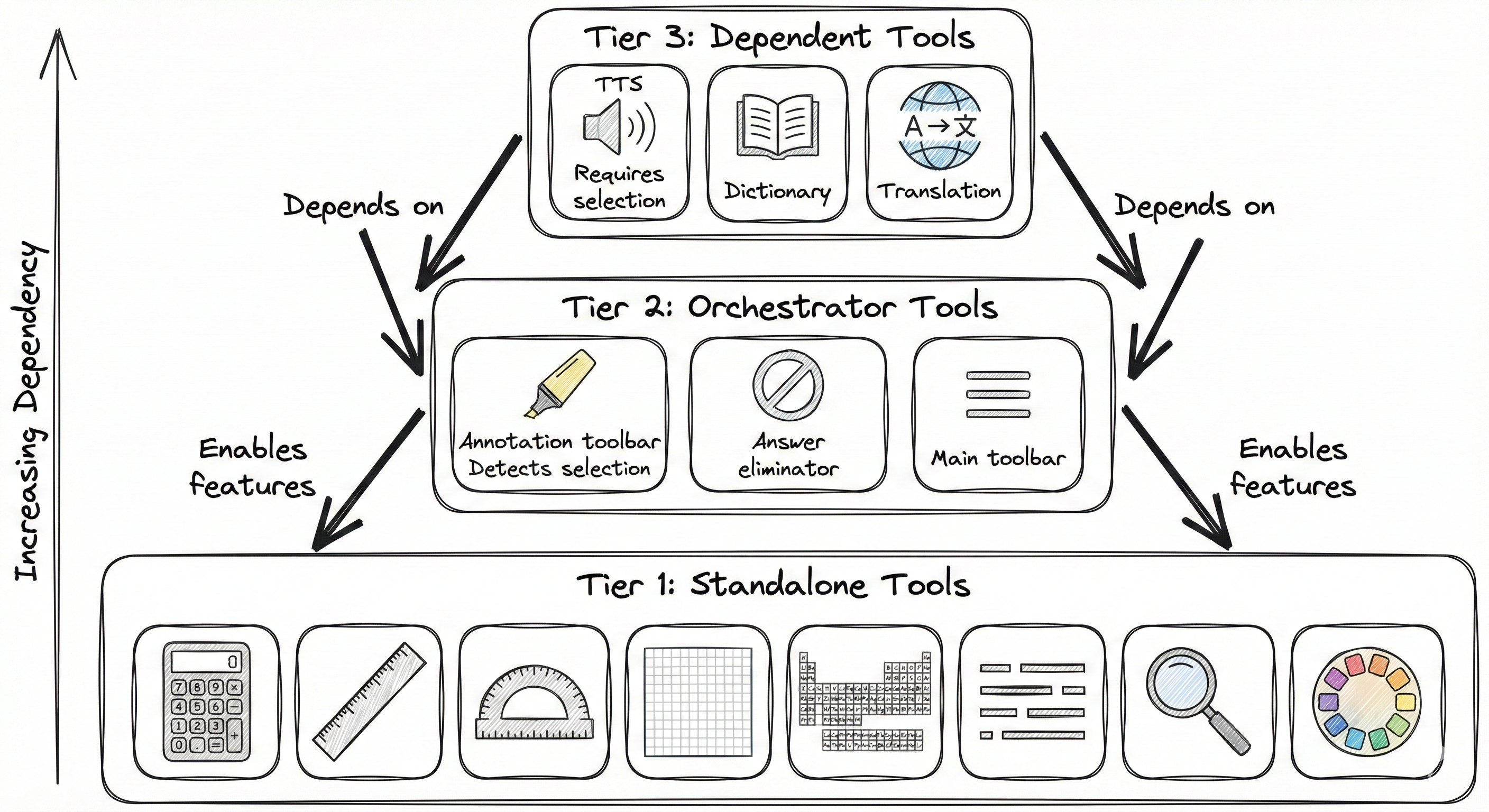
Standalone Tools
Direct user interaction, no dependencies
- • Calculator (scientific, graphing)
- • Ruler (metric, imperial)
- • Protractor
- • Periodic Table
- • Line Reader
- • Magnifier
- • Color Scheme selector
Orchestrator Tools
Enable other tools by detecting user intent
- • Annotation Toolbar (detects selection)
- • Answer Eliminator (manages masking)
- • Main Toolbar (launches tools)
Dependent Tools
Require Tier 2 input to function
- • Text-to-Speech (from selection)
- • Dictionary lookup
- • Translation
WCAG 2.2 Level AA Compliance
All toolkit features target WCAG 2.2 Level AA standards: keyboard navigation, screen reader support, color contrast, touch targets, and alternative content access.
Integration Patterns
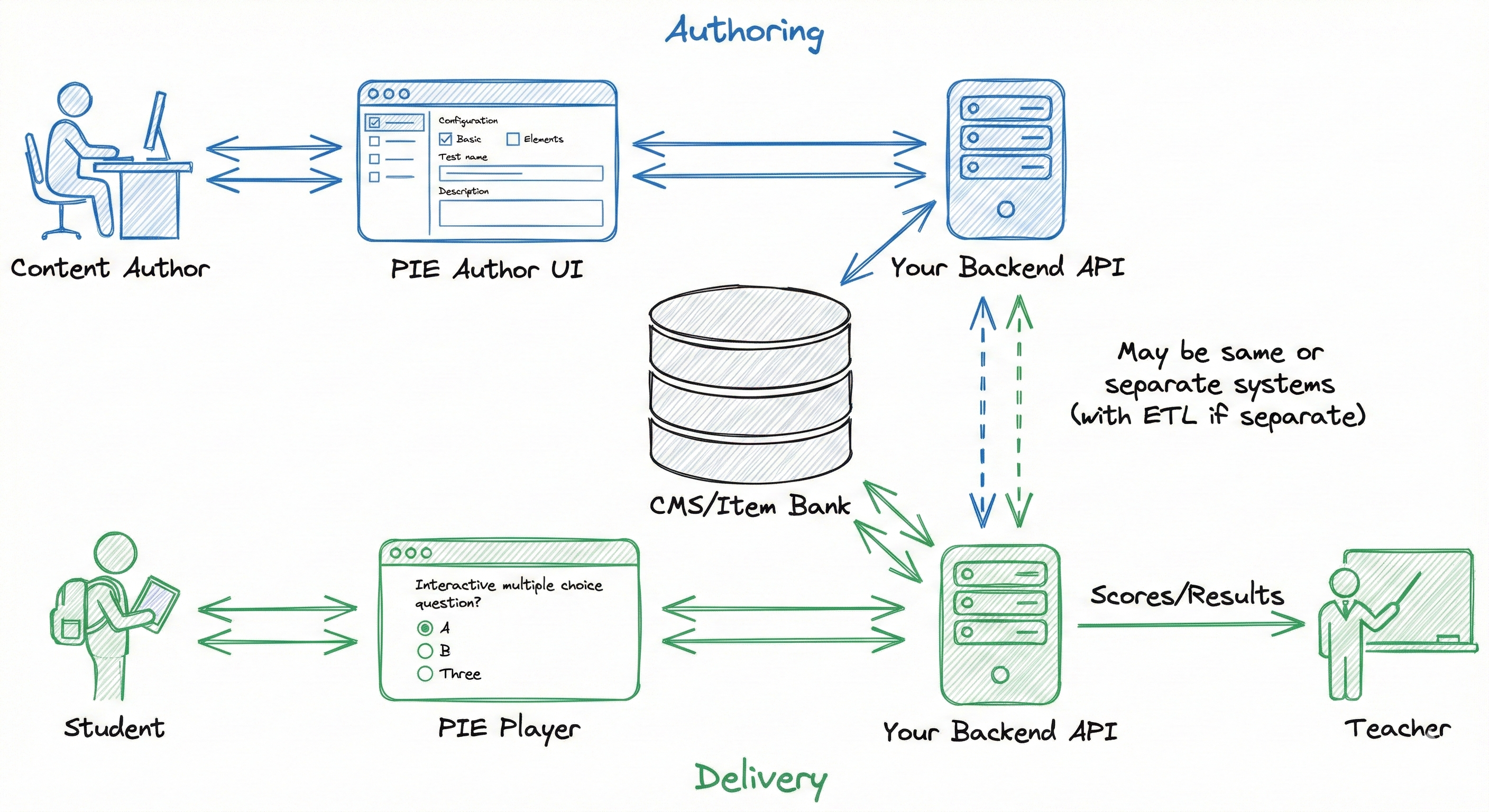
Players communicate through standard DOM APIs: properties for configuration, events for state changes, and methods for programmatic control.
Properties (Input)
Events (Output)
Methods (Control)
Three-Tier Accommodation Configuration
Tool availability is resolved from three sources with precedence rules: (1) Roster block (highest), (2) Item restrictions/requirements, (3) Student accommodations (IEP/504), (4) Roster defaults, (5) System defaults.
High-Level Integration Example
Next Steps
Items and Elements
Learn about PIE items and elements, and try a live interactive example with mode switching.
Element Structure
Deep dive into element architecture: delivery UI, authoring UI, controllers, and the MVVM security model.
Ready to Get Started?
Explore our GitHub repositories to see PIE players and toolkit in action, or check out the live playground to experiment with different configurations.