Integration & Architecture
PIE separates frontend concerns (rendering, interaction, accessibility) from backend concerns (persistence, authentication, business logic). Here's how the pieces connect.
Integration Surface
PIE's fundamental integration point is the Web Component standard. Players are distributed as custom HTML elements. Choose the level that matches your needs:
Section Player
The primary integration surface for most production deployments. Composes item rendering with tools, accommodations, and session management in a single element.
Assessment Player
Sits on top as the orchestrator for multi-section assessments. Manages navigation between sections, session continuity, and progress tracking.
Item Player
For simpler use cases: embedding a single question in a CMS, authoring workflows, or lightweight assessment views.
Separation of Concerns
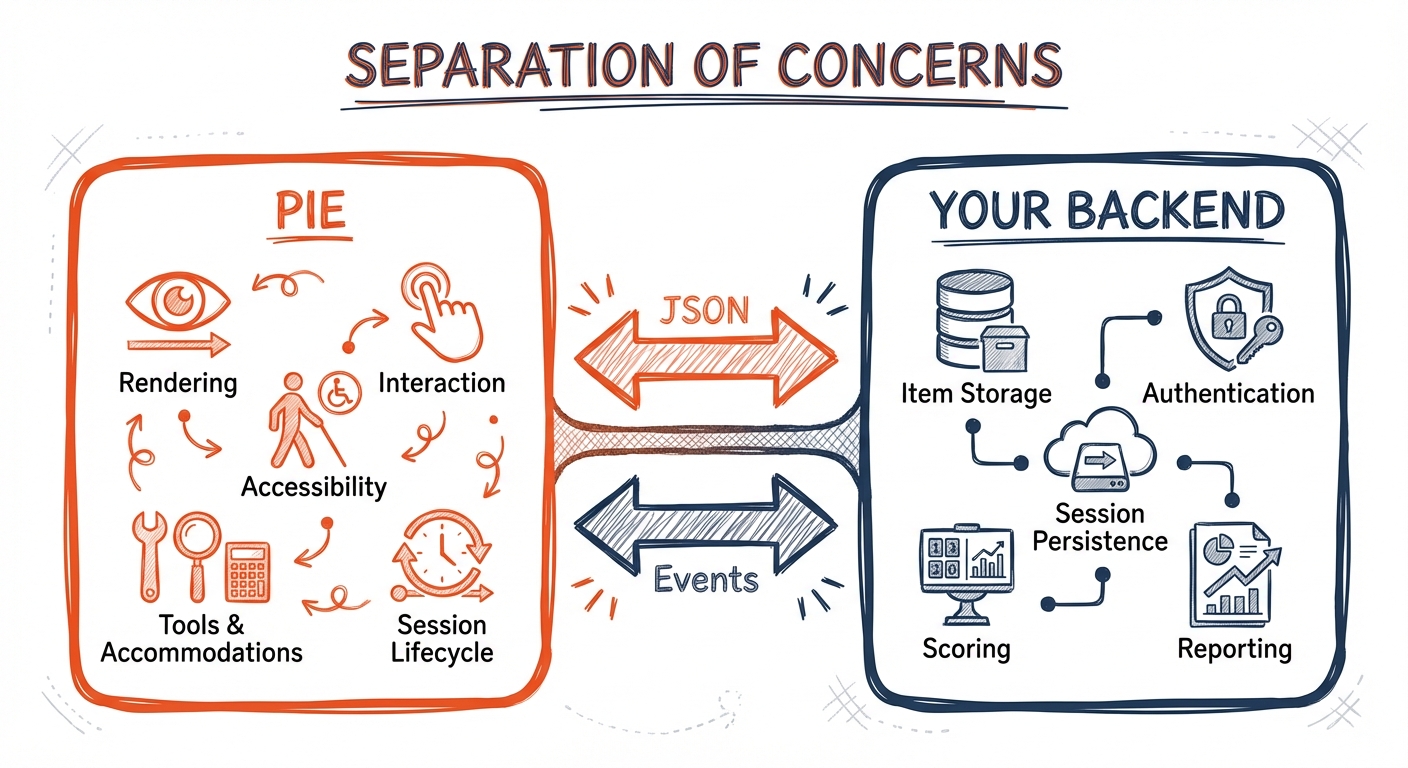
PIE Responsibilities
- Rendering — Display items with correct layout, styling, and behavior
- Composition — Compose items, passages, and tools into page-level views
- Interaction — Capture student responses through accessible interfaces
- Authoring — Configuration UIs for educators to create and modify content
- Accessibility — WCAG compliance, keyboard support, screen reader compatibility
- Tools & Accommodations — Coordinate calculators, TTS, annotation, color schemes
- Session Lifecycle — Hydration, persistence triggers, and replay within runtime scope
Your Backend Responsibilities
- Item Storage — Your item bank or CMS storing item configurations as JSON documents
- Authentication & Authorization — Users, permissions, sessions
- Assessment Administration — Test assignments, time limits, attempt counts
- Session Persistence — Store student responses via PIE's persistence hooks
- Scoring — Execute controller logic server-side for high-stakes assessments
- Reporting — Score reports, analytics, learning insights
The Controller API
Your application communicates with PIE through the section controller (or assessment controller), which provides a well-defined, typed API on top of the underlying Web Component plumbing. Because Web Components are browser-native, they work consistently across React, Vue, Angular, Svelte, and vanilla JavaScript.
While DOM events flow under the hood (this is how Web Components work), the controller interface is the intended integration surface for section and assessment player clients. Your code calls controller.subscribe(event => ...) rather than listening for DOM events on specific elements — decoupling your integration from internal DOM structure.
Properties
Pass configuration via element attributes or JS object properties
Controller Methods
Typed methods for session lifecycle and navigation
Controller subscribe() & Obtaining the Controller
Single subscribe() method with discriminated event types — a stable contract decoupled from internal DOM structure
ToolkitCoordinator & Session Persistence
Construct one coordinator per assessment context — manages tools, TTS, highlights, and session persistence via hooks
MVVM Security Model
PIE implements a Model-View-ViewModel pattern with controllers acting as security gateways. This pattern is crucial for high-stakes assessments where answer key security matters.
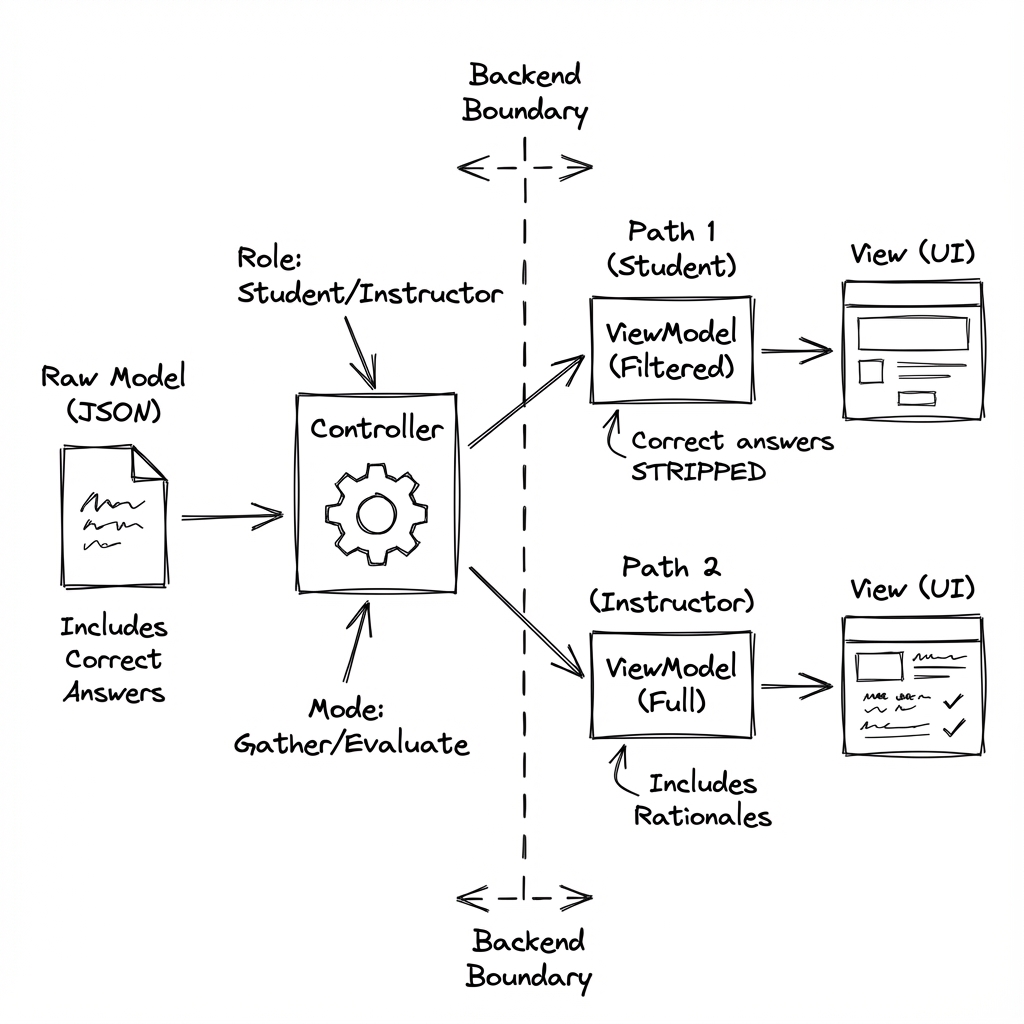
Client-Side Execution
Controllers run in the browser. Enables rapid development, immediate feedback, and works well for practice quizzes or formative assessments where answer security isn't critical.
Server-Side Execution
Controllers run on your backend. Your server receives the student's session data, executes the controller, calculates the score, and returns only the outcome. Correct answers never reach the browser.
Controller Functions
model(question, session, env)
Returns view model for rendering. Filters sensitive data based on role and mode.
outcome(question, session, env)
Returns score and feedback. Controls what feedback is visible to which roles.
env parameter specifies role (student/instructor) and mode (gather/view/evaluate), enabling context-sensitive security transformations.