Players
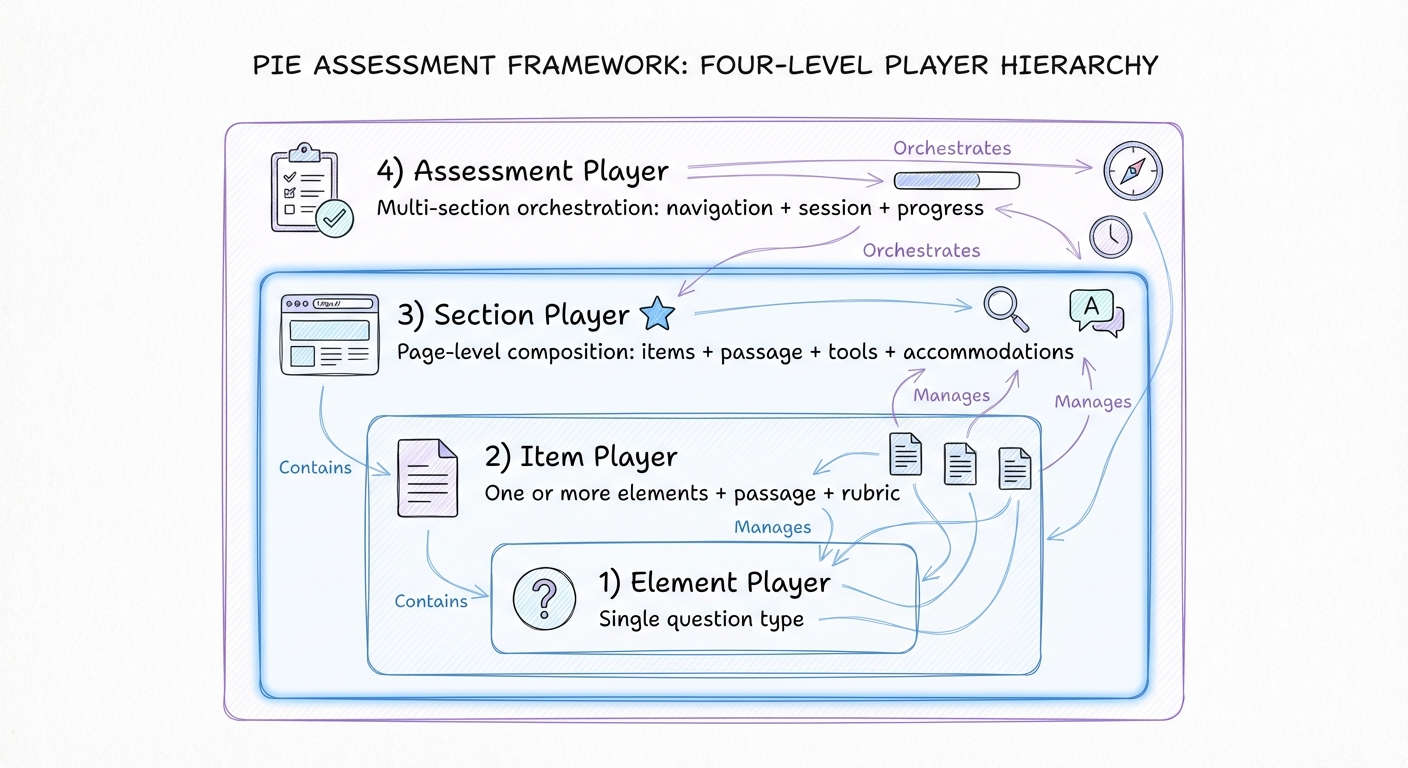
From individual questions to complete assessments — PIE provides players at four levels, each independently usable depending on your architecture needs.
Four-Level Player Hierarchy
You can adopt just the item player for embedding single questions, add the section player when you need page-level composition with tools, or use the full assessment player for multi-section test delivery. Each level is an independent Web Component.
Element Player
Renders a single element (one question type). Primarily used for testing and development. Loads the element's JavaScript bundle, manages its state, handles mode transitions, and emits events when responses change.
Item Player
Renders complete assessment items containing one or more question elements with optional passage content and rubrics. A single unified component (<pie-item-player>) with a strategy attribute that controls how PIE element bundles are loaded.
Section Player
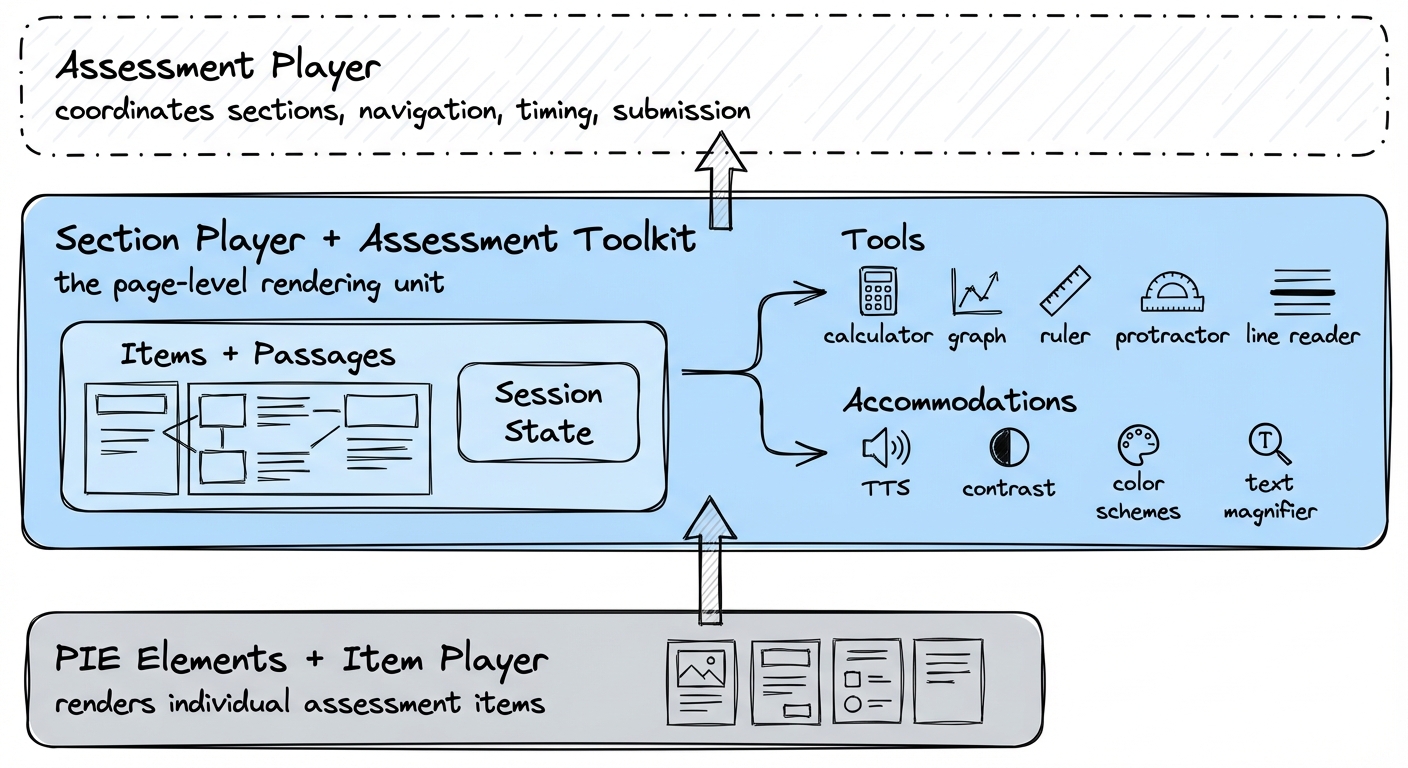
The rendering workhorse. A section maps to a page — grouping a passage with items, or a set of standalone items, into a single view with shared tools, session state, and navigation scope. Integrates with the ToolkitCoordinator for calculator, TTS, and annotation.
Assessment Player
An orchestration layer above the section player. Coordinates which section is active, manages assessment-level session continuity across sections, provides navigation controls, and handles the delivery lifecycle. Does not render content itself.
Item Player Loading Strategies
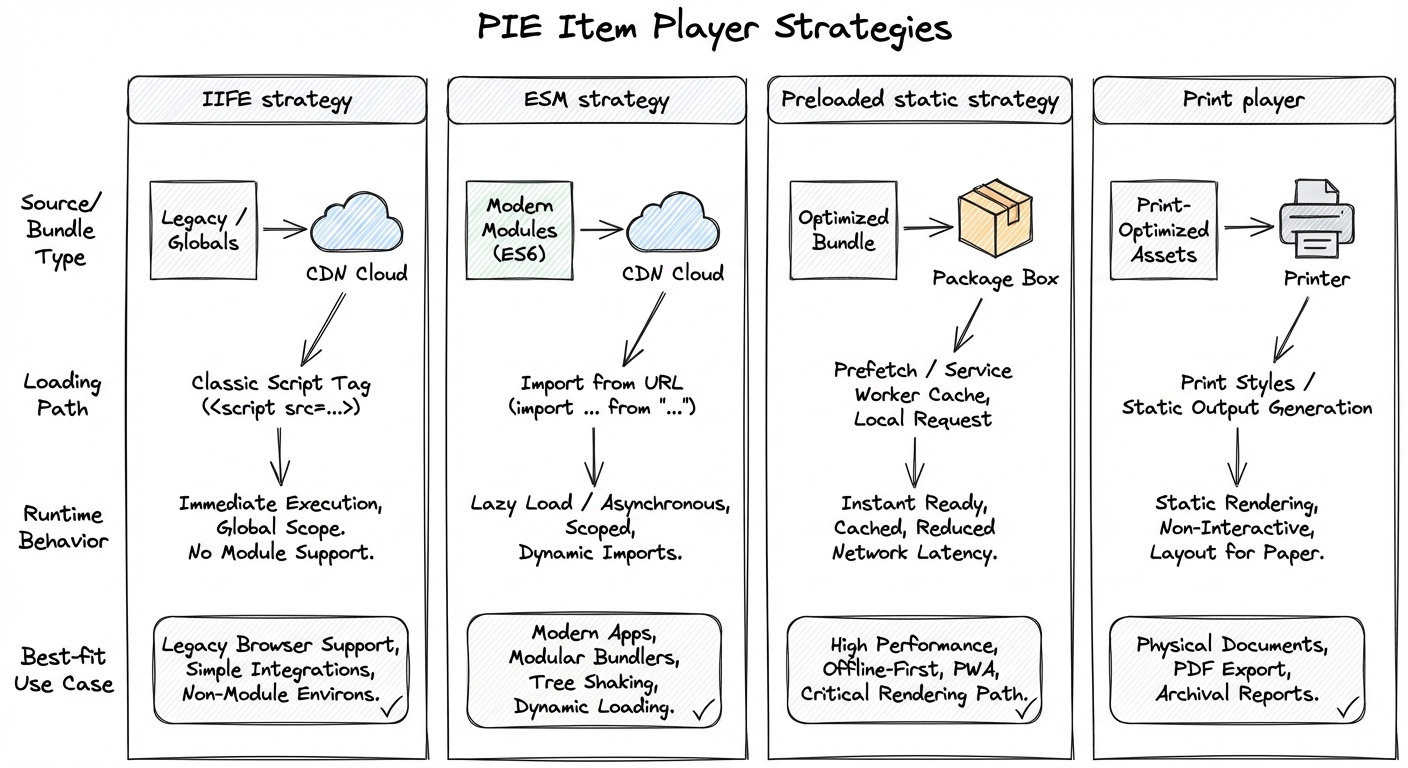
The item player (<pie-item-player>) uses a strategy attribute to control how PIE element bundles are fetched and registered. Three strategies are available, all producing identical rendering behavior.
IIFE Strategy
Loads pre-bundled element packages by injecting <script> tags from a bundle hosting service. The most widely deployed strategy and the safe default for production systems.
strategy="iife"ESM Strategy
Uses native browser import() from an ESM CDN. Modules are cached by the browser's native module cache, shared dependencies are deduplicated, and roughly 85% bundle size reduction vs IIFE.
strategy="esm"Preloaded Strategy
All required PIE custom elements are pre-bundled at build time — no network requests at runtime. Zero-latency rendering for offline environments, strict performance budgets, or controlled test harnesses.
strategy="preloaded"Usage
Section Player: Page-Level Composition
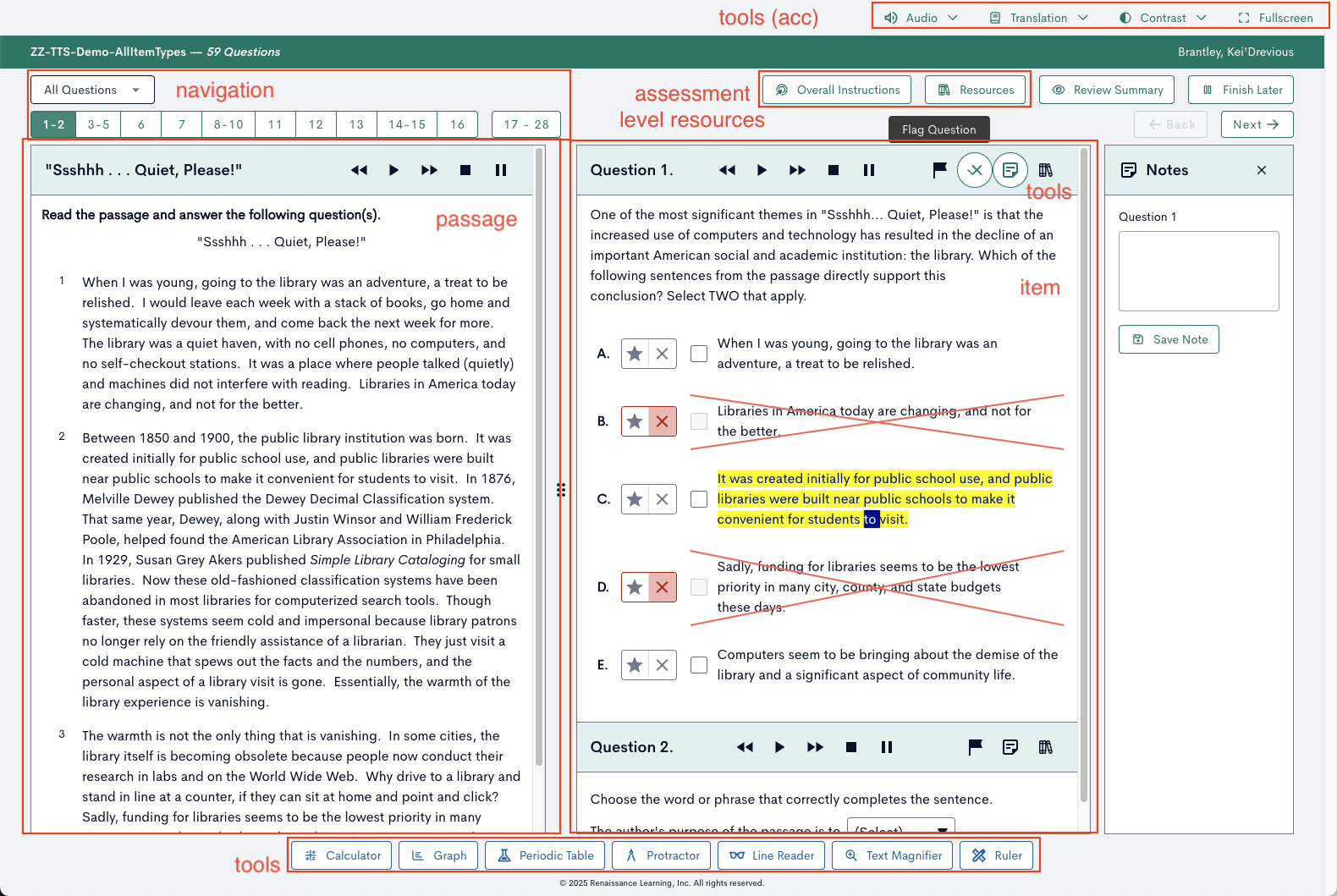
Step back and look at what a real assessment screen looks like in practice. There's a reading passage on the left paired with questions on the right. A toolbar at the bottom offers section-wide tools: calculator, graph, periodic table, protractor, line reader, ruler. Each item has its own controls — text-to-speech playback, annotation, answer elimination. Accommodation controls manage audio, contrast, and fullscreen mode. All of this needs coordination, shared state, and a coherent lifecycle.
Every team that builds beyond the item player level ends up rebuilding some version of this composition. The section player exists to provide that layer as a ready-made, well-tested foundation — so integration teams can focus on their product's unique concerns rather than re-solving passage-item layout, tool coordination, session persistence, and accessibility plumbing.
Three-Layer Architecture
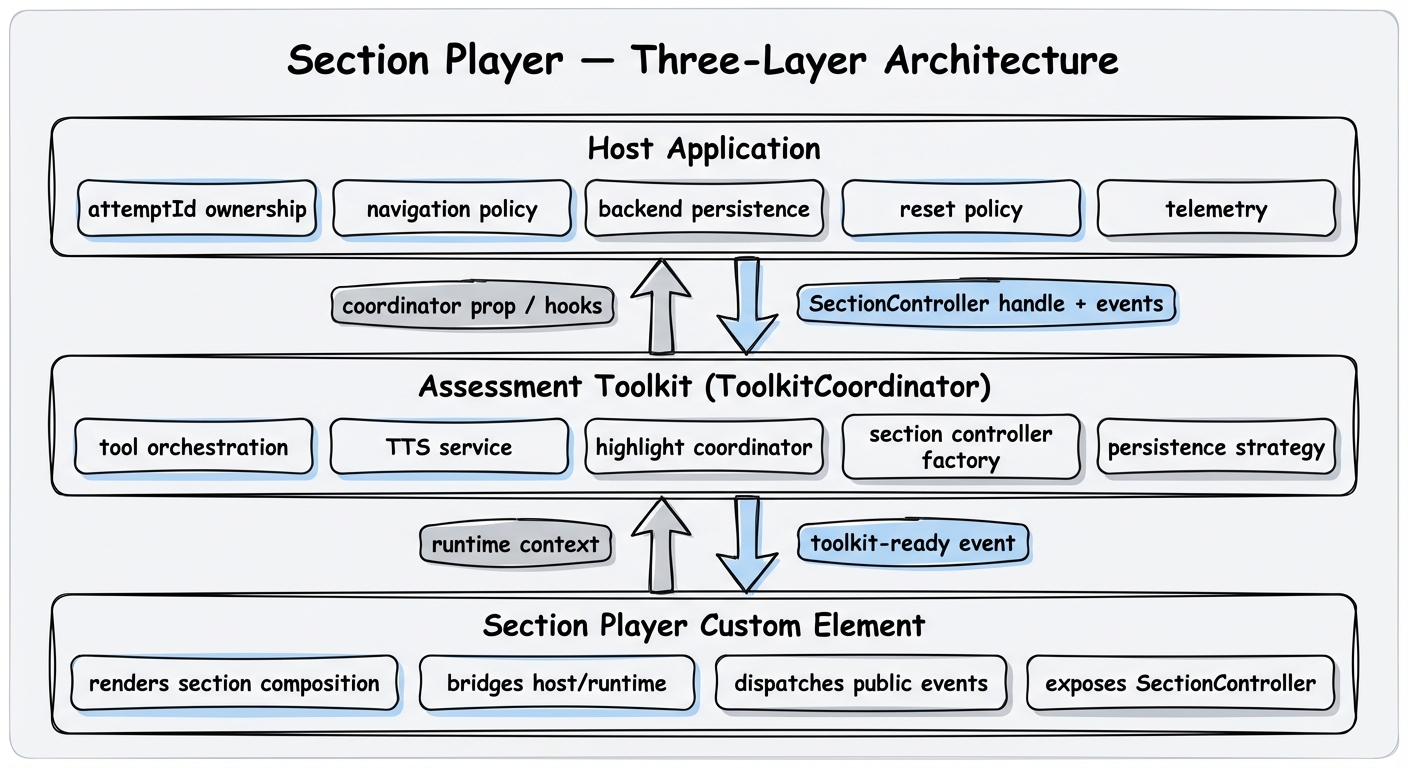
Section Player CE
Renders the section composition — items, passages, toolbars — and bridges between host runtime contracts and the internal rendering engine. Dispatches lifecycle events and exposes a controller handle.
Assessment Toolkit
Orchestrates toolkit services: tool availability, TTS, highlight coordination, accessibility catalogs, and section controller lifecycle. The single authoritative service hub for an assessment context.
Host Application
Owns everything with business meaning: attempt identity, navigation continuity across page loads, backend persistence, reset policy, and telemetry.
Splitpane Layout
<pie-section-player-splitpane> — passage on the left, items on the right. The most common layout for passage-based assessments.
Vertical Layout
<pie-section-player-vertical> — stacked layout for standalone items or narrow viewports.
Integration Modes
The section player supports two integration modes, both producing identical runtime behavior:
CE-First
Pass tool and section configuration as element attributes. The player creates the ToolkitCoordinator internally — simplest path for standard deployments.
JS API
Construct the ToolkitCoordinator yourself for full lifecycle control. Allows wiring standalone TTS panels, custom annotation toolbars, or advanced service configuration.
When connected to the section player, the toolkit automatically handles SSML extraction from passages and items, manages accessibility catalog lifecycle, renders TTS tools inline in passage/item headers, coordinates z-index layering for tools, and synchronizes text highlighting with TTS playback.
HTML Attributes
JS Properties
Assessment Player: Multi-Section Orchestration
Above the section layer, the assessment player (<pie-assessment-player-default>) coordinates navigation between sections, manages assessment-level session continuity, tracks progress, and handles submission workflow. It routes between pages; it doesn't render them — the section player remains the rendering workhorse.
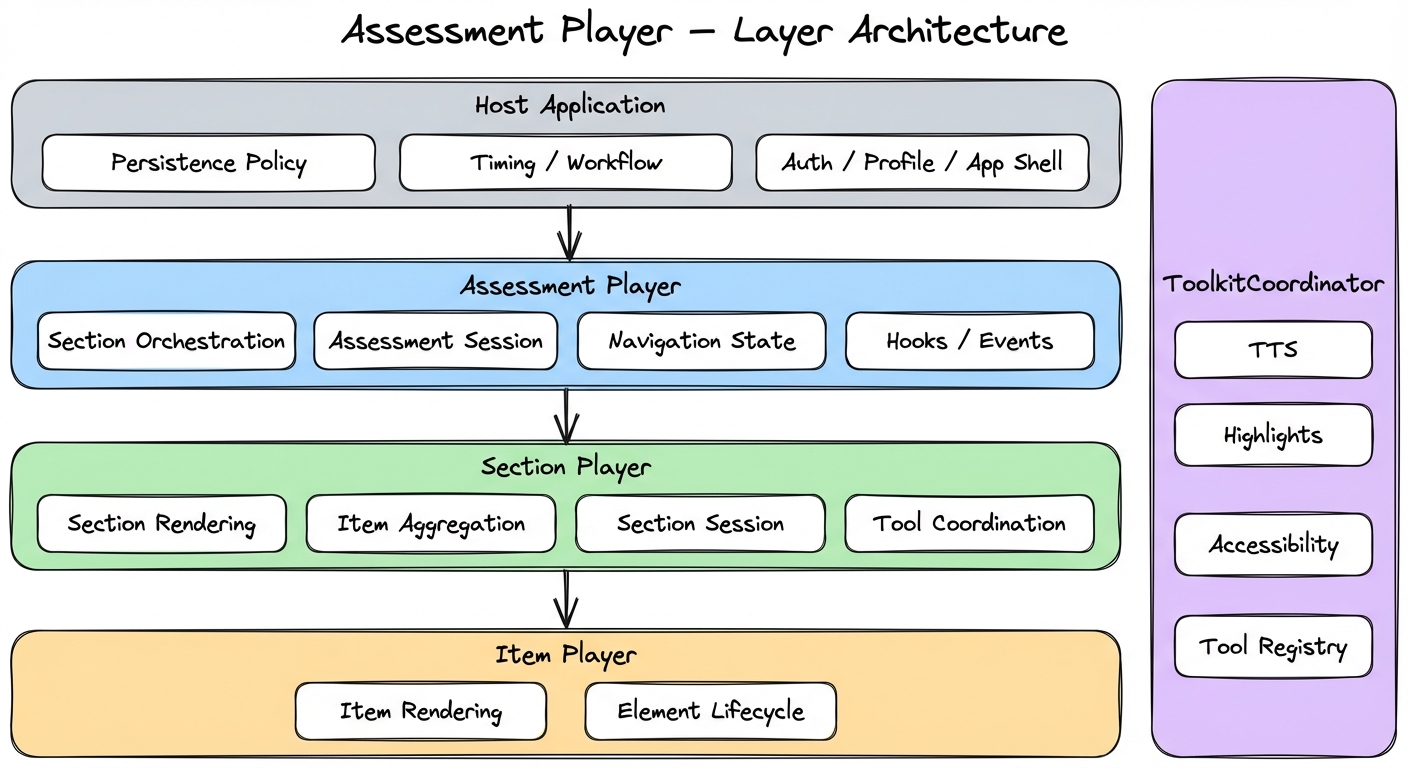
QTI-Inspired Content Model
An assessment definition contains sections (or nested test parts with sections). The assessment player flattens this structure into a linear delivery plan and navigates by index. Each section is passed to a section player when it becomes active.
Layered Session State
Session state is layered recursively: item sessions live inside section sessions, which live inside the assessment session aggregate. This structure enables granular persistence and replay at each level.
Assessment Player Usage
assessment-controller-ready event with an AssessmentControllerHandle that provides navigateNext(), navigatePrevious(), submit(), getSession(), and subscribe(). Cancelable assessment-navigation-requested events let the host implement custom gating policies.Web Component Standard & Controller API
All PIE players are implemented as HTML5 custom elements, integrating into any web page as standard HTML tags. Under the hood, players communicate through standard DOM APIs — properties, events, and methods.
For the element and item players, this DOM-level interface is the primary API. However, for most production integrations using the section player or assessment player, raw DOM events should be considered an implementation detail. Instead, the section controller provides a well-defined, typed events and methods interface as the primary integration surface.
Element & Item Player: DOM API
Standard DOM events and properties for fine-grained control of individual questions.
- Properties — configuration and state via JS properties or JSON attributes
- Events —
session-changed,load-complete,player-error
Section & Assessment Player: Controller API
A SectionControllerHandle with typed methods and a single subscribe() for discriminated events — a stable contract decoupled from internal DOM structure.
- Methods —
getSession(),hydrate(),persist(),applySession() - Events —
subscribe()with types likeitem-session-data-changed,section-loading-complete,section-error - Assessment controller —
navigateNext(),navigatePrevious(),submit()