Integrate PIE
Assessment integration
Connect sections to navigation, timing, storage and submission.
From the pie-players documentation · View source(opens in new tab)
A multi-section player runs an assessment's sections one at a time: it mounts a
section player for the current section, moves between sections and keeps the
attempt in one AssessmentSession. PIE supplies the parts: the section player
renders a section, and @pie-players/pie-assessment-toolkit supplies the
ToolkitCoordinator and three assessment-session helpers. The player that
assembles them is host-built, because PIE ships no backend, CMS or attempt
store and multi-section policy is product policy
(product scope).
This guide is for teams building that player. It builds one from the toolkit
helpers, then uses <pie-assessment-player-default> from
@pie-players/pie-assessment-player as the worked example. That element is a
reference assembly with no production users: it serves prototypes and demos,
and it changes without a compatibility period. Its
package README is the API
reference. The guide assumes custom elements, TypeScript and the
section player integration guide.
The multi-section layer
A section is the rendering unit: one section fills one view, with its items, passages, tools and accommodations composed together.
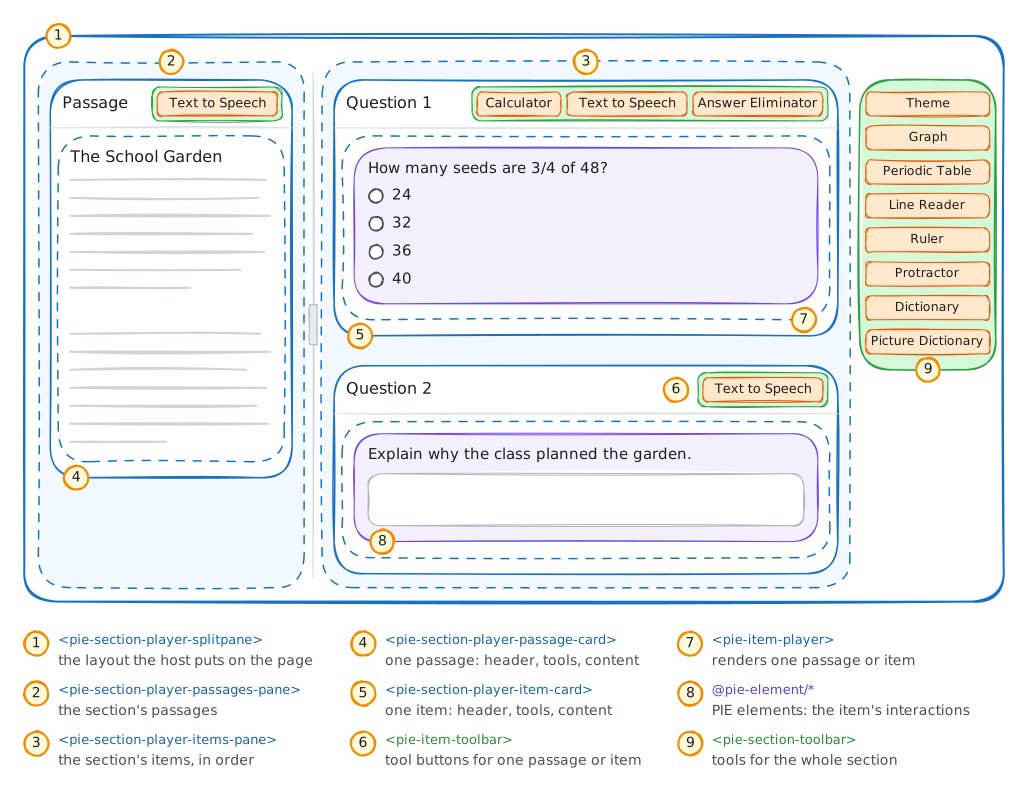
Delivery above one section needs routing between sections, an assessment-level
position and progress, a session that spans sections, submission, and the
host's policy over all of these. <pie-item-player> renders items and the
section player renders one section and runs its section controller; the
multi-section layer decides which section is mounted and aggregates the section
sessions. The toolkit's helpers do the aggregation. Routing, chrome and policy
are the host's.
Host-owned policy
PIE owns runtime mechanics; the host owns product policy and the application around the player: user profile and permissions, authentication, the app shell and its routes, and workflow and compliance rules.
The mechanics PIE supplies are the assessment-session helpers, the section controller, snapshots and selectors, hooks, and events around each transition. Policies that vary by product stay with the host: timing, navigation gating, review and revisit, stage progression, submission confirmation, URL synchronization, and how telemetry and errors are presented. A host builds its delivery workflow, time policy and navigation constraints on those mechanics.
Layer model
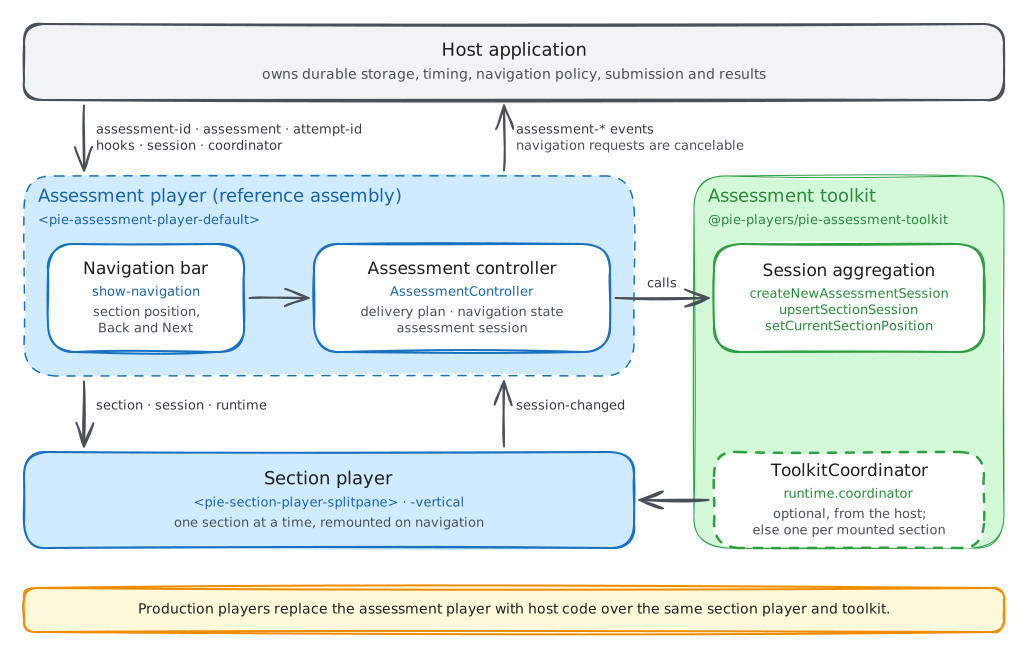
| Layer | Owns |
|---|---|
| Multi-section player | Which section is mounted and when it changes; the AssessmentSession over the section sessions; the position and visited sections; assessment-level events |
| Section player | Section rendering; navigation between items; the section session and its item sessions, kept by the section controller |
ToolkitCoordinator |
Tools, accessibility settings, text-to-speech (TTS) and highlighting; section controller provisioning; the section persistence hook |
| Host application | Durable persistence; timing, workflow and business policy; authentication, profile and app shell; routing, submission and results |
One coordinator spans the assessment when the host passes the same instance to every section player. A section player given none builds its own, without hooks, and disposes it with the section, so tool state, TTS and section persistence hooks do not carry across sections.
The player runs the mechanics and the host owns durable data and policy: persist
getSession(), never getRuntimeState(), and keep navigation decisions in host
policy.
The assessment session
An AssessmentSession nests the other sessions: item sessions live in section
snapshots, and section snapshots live in sectionSessions.
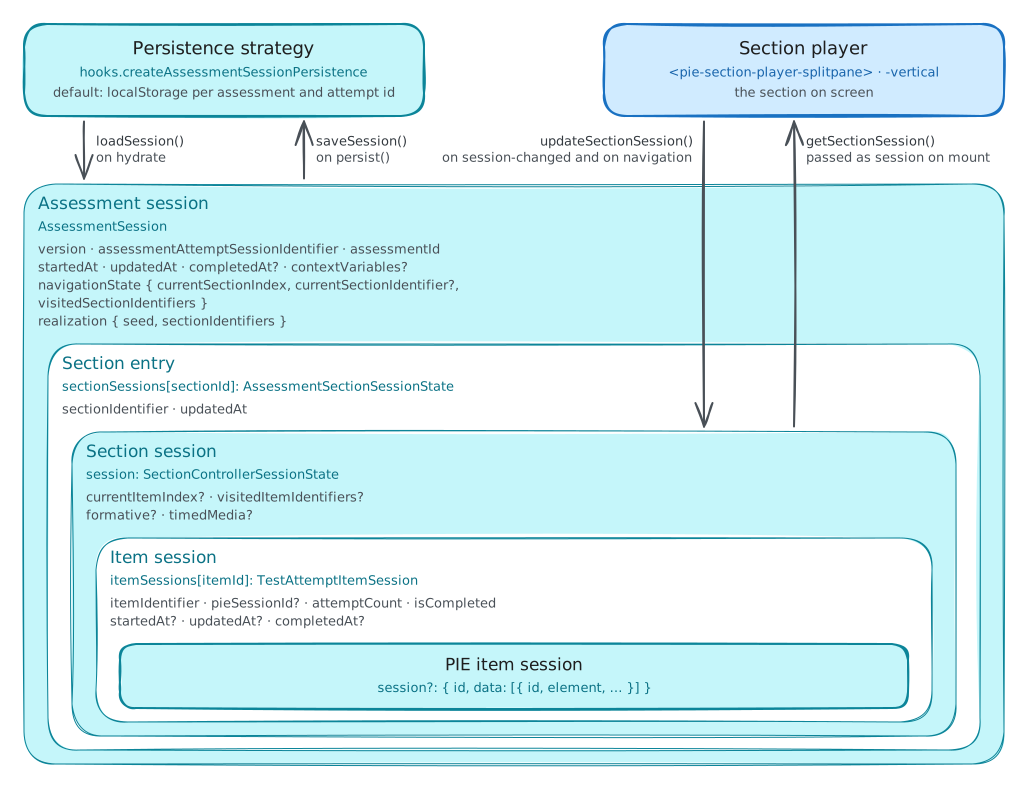
interface AssessmentSession {
  version: 1;
  assessmentAttemptSessionIdentifier: string;
  assessmentId: string;
  startedAt: string;
  updatedAt: string;
  completedAt?: string;
  navigationState: {
    currentSectionIndex: number;
    visitedSectionIdentifiers: string[];
    currentSectionIdentifier?: string;
  };
  realization: {
    seed: string;
    sectionIdentifiers: string[];
  };
  sectionSessions: Record<string, {
    sectionIdentifier: string;
    updatedAt: string;
    // currentItemIndex, visitedItemIdentifiers, itemSessions, and formative
    // and timedMedia when the section uses them
    session: SectionControllerSessionState | null;
  }>;
  contextVariables?: Record<string, unknown>;
}
The toolkit exports three helpers over it. Each returns a new session and leaves its argument unchanged.
| Helper | Effect |
|---|---|
createNewAssessmentSession({ assessmentAttemptSessionIdentifier, assessmentId, seed, sectionIdentifiers }) |
A fresh session at the first section, which it marks visited; realization records the seed and section order |
upsertSectionSession(session, { sectionIdentifier, sectionSession }) |
Writes one section's snapshot and stamps updatedAt on the entry and the session |
setCurrentSectionPosition(session, { currentSectionIndex, currentSectionIdentifier }) |
Moves the position and adds the section to the visited list; updatedAt is unchanged |
A player from the toolkit helpers
This player mounts a fresh section player per section, keeps the attempt in one
AssessmentSession and saves it after every move:
import "@pie-players/pie-section-player";
import {
  ToolkitCoordinator,
  createNewAssessmentSession,
  setCurrentSectionPosition,
  upsertSectionSession,
} from "@pie-players/pie-assessment-toolkit";
import type { AssessmentSession } from "@pie-players/pie-assessment-toolkit";
import type { SectionPlayerRuntimeHostContract } from "@pie-players/pie-section-player";

type SectionPlayerElement = HTMLElement & SectionPlayerRuntimeHostContract;

declare const sections: Array<{ identifier: string }>;
declare const container: HTMLElement;
declare function loadAttempt(attemptId: string): Promise<AssessmentSession | null>;
declare function saveAttempt(attemptId: string, session: AssessmentSession): Promise<void>;

const assessmentId = "algebra-unit-1";
const attemptId = "attempt-42";

// One coordinator for every section. Its section strategy stores nothing, so
// the assessment session is the one store.
const coordinator = new ToolkitCoordinator({
  assessmentId,
  hooks: {
    createSectionSessionPersistence: () => ({
      async loadSession() {
        return null;
      },
      async saveSession() {},
    }),
  },
});

let session: AssessmentSession;
let current: { element: SectionPlayerElement; sectionId: string; ready: boolean } | null = null;

function capture(): void {
  if (!current?.ready) return;
  const sectionSession = current.element.getSectionController()?.getSession?.() ?? null;
  session = upsertSectionSession(session, {
    sectionIdentifier: current.sectionId,
    sectionSession: structuredClone(sectionSession),
  });
}

function mount(index: number): void {
  const section = sections[index];
  session = setCurrentSectionPosition(session, {
    currentSectionIndex: index,
    currentSectionIdentifier: section.identifier,
  });
  const element = document.createElement("pie-section-player-splitpane") as SectionPlayerElement;
  const entry = { element, sectionId: section.identifier, ready: false };
  element.setAttribute("section-id", section.identifier);
  element.setAttribute("attempt-id", attemptId);
  element.section = section;
  const saved = session.sectionSessions[section.identifier]?.session;
  if (saved) element.session = structuredClone(saved);
  element.runtime = { assessmentId, coordinator, playerType: "iife" };
  element.addEventListener("pie-stage-change", (event) => {
    const { stage, status } = (event as CustomEvent).detail;
    if (event.target === element && stage === "engine-ready" && status !== "failed") {
      entry.ready = true;
    }
  });
  element.addEventListener("session-changed", () => {
    if (current === entry) capture();
  });
  current = entry;
  container.replaceChildren(element);
}

async function navigate(index: number): Promise<void> {
  // persist() commits responses an element has not yet reported.
  await current?.element.getSectionController()?.persist?.();
  capture();
  mount(index);
  await saveAttempt(attemptId, session);
}

async function start(): Promise<void> {
  session =
    (await loadAttempt(attemptId)) ??
    createNewAssessmentSession({
      assessmentAttemptSessionIdentifier: `${assessmentId}:${attemptId}`,
      assessmentId,
      seed: attemptId,
      sectionIdentifiers: sections.map((section) => section.identifier),
    });
  mount(session.navigationState.currentSectionIndex);
}
The steps follow these rules:
- A fresh section player per section. The outgoing player is replaced, and its controller is disposed with it.
- Restore through
session. The saved snapshot is set before the element connects, and only when the assessment session holds one; the section controller applies it beforeengine-ready(Session lifecycle). A section without a snapshot hydrates from the section strategy. - Capture only after
engine-ready. A section that failed to restore holds empty item sessions, and capturing them would overwrite the saved snapshot. - Capture on the toolkit's
session-changed. It follows every item session change the section controller records, and it bubbles from the section player. - Commit before leaving. A delivery element coalesces its own
session-changed, so the last response can still be pending when navigation starts. The section controller'spersist()commits it first (Commit at a section boundary). - Save at the host's cadence. This player saves after each move; a host that
must not lose answers saves on
session-changedas well.
The reference player
<pie-assessment-player-default> builds on the same helpers and adds an
AssessmentController with a delivery plan, hooks, a persistence strategy and a
save queue, a cancelable navigation request, Back and Next chrome with focus
handling and announcements, and error states with Retry. The
assessment demos run it.
Integration modes
The element constructs and owns its AssessmentController in both modes; they
differ in how the host drives it. In the custom-element-first mode the host sets
inputs and listens to DOM events:
<pie-assessment-player-default
  assessment-id="assessment-001"
  attempt-id="attempt-abc"
  section-player-layout="splitpane"
></pie-assessment-player-default>
const playerEl = document.querySelector("pie-assessment-player-default");
playerEl.assessment = assessmentDefinition;
playerEl.hooks = hooks;
playerEl.env = { mode: "gather", role: "student" };
playerEl.addEventListener("assessment-controller-ready", (event) => {
  const { controller } = (event as CustomEvent).detail;
});
Inputs assigned in the same turn are batched, before or after connecting.
Changing assessmentId, attemptId, assessment, hooks or session
rebuilds the controller; assign a new object, since mutating one in place
signals nothing. The locale, navigation visibility and runtime inputs reach the
mounted section without a rebuild. The README's
Inputs table covers each
one.
In the controller-first mode the host obtains the handle and drives navigation and persistence through it:
const controller = await playerEl.waitForAssessmentController(5000);
if (!controller) throw new Error("Assessment controller not ready");

if (controller.getRuntimeState().canNext) {
  controller.navigateNext();
}
The handle is available once initialization and hydration succeed, and only the
newest connected initialization publishes one
(Obtaining the handle).
Navigation through the handle skips the element's cancelable
assessment-navigation-requested and its save after the move, so a host on
this path calls persist() itself. The controller-first mode suits a host
whose workflow, timing or routing policy is tied to wider application state.
Coordinator and tools
Tools, TTS and accessibility settings are configured on a ToolkitCoordinator,
which the element passes to every section player it mounts:
import { ToolkitCoordinator } from "@pie-players/pie-assessment-toolkit";
import { createPackagedToolRegistry } from "@pie-players/pie-default-tool-loaders";

declare const playerEl: HTMLElement;

const toolRegistry = createPackagedToolRegistry();
const coordinator = new ToolkitCoordinator({
  assessmentId: "assessment-001",
  toolRegistry,
  tools: {
    placement: {
      section: ["theme", "graph", "periodicTable", "lineReader"],
      item: ["calculator", "textToSpeech", "annotationToolbar"],
      passage: ["textToSpeech", "annotationToolbar"],
    },
    providers: {
      textToSpeech: {
        backend: "server",
        serverProvider: "polly",
      },
      calculator: {
        provider: {
          runtime: {
            authFetcher: async () => {
              const response = await fetch("/api/tools/desmos/auth");
              return response.json();
            },
          },
        },
      },
    },
  },
});

playerEl.coordinator = coordinator;
The coordinator places the color-scheme tool (theme) with the other tools;
theme tokens come from <pie-theme> (theme package README).
Desmos is the default calculator, and a licensed deployment supplies its key
through authFetcher
(calculator with host auth).
Desmos's documented browser integration puts the key in the script URL, so
runtime delivery keeps it out of the static bundle without making it secret.
Use a key whose Trial or Commercial Tier covers the deployment; see the
Desmos API Terms.
The same coordinator serves every section. On a section change the element replaces the section player and stops TTS playback; the coordinator's configuration and services carry over. Tool placement and providers are covered in the section player guide's tool configuration, and element loading in its content loading.
Content and delivery plan
The assessment property takes an AssessmentDefinition whose sections sit in
sections or in testParts[].sections. The controller flattens them into a
linear delivery plan, which the createAssessmentDeliveryPlan hook replaces,
and navigates by index through it. The element maps player-type, the
coordinator, env and sectionPlayerRuntime into each section player's
runtime (Section runtime).
const assessment = {
  identifier: "colonial-history-se-asia",
  title: "Colonial History in Southeast Asia",
  sections: [
    { identifier: "section-1" /* items, rubricBlocks */ },
    { identifier: "section-2" },
    { identifier: "section-3" },
  ],
};

playerEl.assessment = assessment;
Observability
Item, section and assessment events reach one InstrumentationProvider, set on
sectionPlayerRuntime.player.loaderConfig.instrumentationProvider. Assign the
provider instance as a property:
import { ConsoleInstrumentationProvider } from "@pie-players/pie-players-shared";

declare const playerEl: HTMLElement;

const provider = new ConsoleInstrumentationProvider({ useColors: true });
await provider.initialize({ debug: true });

playerEl.sectionPlayerRuntime = {
  player: {
    loaderConfig: {
      trackPageActions: true,
      instrumentationProvider: provider,
      maxResourceRetries: 3,
      resourceRetryDelay: 500,
    },
  },
};
Each layer reports its own events: the element its assessment-* events, the
section player and toolkit theirs. The README's
Instrumentation
lists the forwarded names.
Hydration
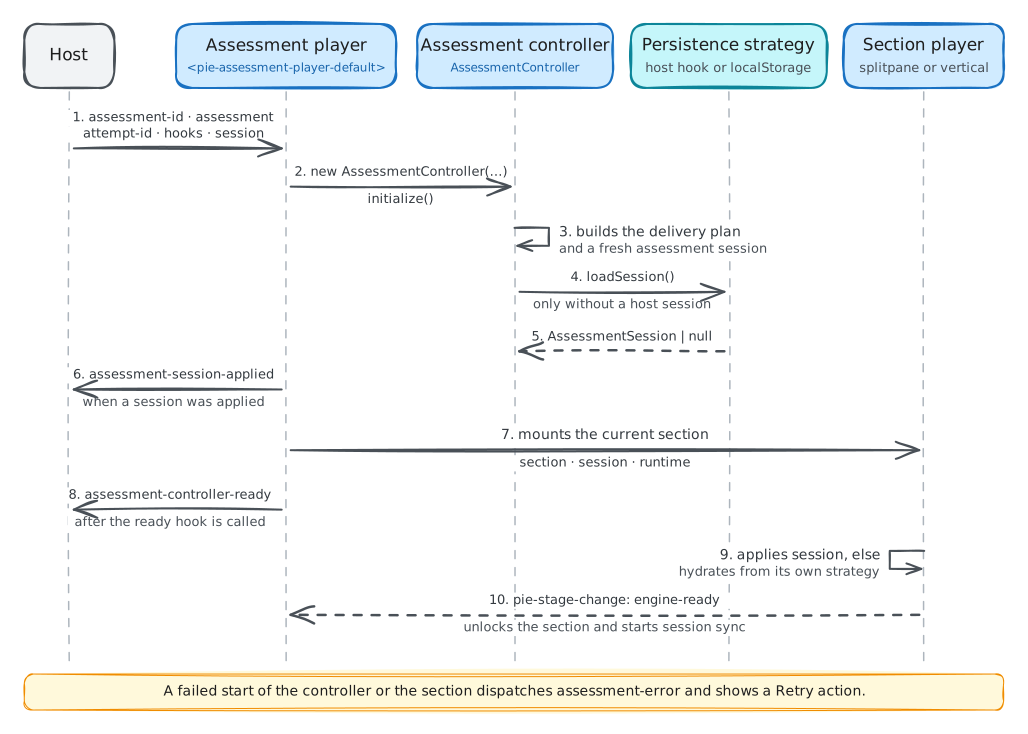
On page load:
- The host mounts the element and sets
assessment-id,attempt-id,assessment, andhooks,env,coordinatorandsessionas needed. - The element creates an
AssessmentControllerand subscribes to it. - The controller builds the delivery plan, through
createAssessmentDeliveryPlanor the default flattening, and a fresh session at the first section. hydrate()awaitsonBeforeAssessmentHydrate, then resolves the persistence strategy throughcreateAssessmentSessionPersistence.- An assigned
sessionreplaces the fresh one; without one the controller callsloadSession()and applies what it returns. - When a session was assigned or loaded, the controller emits
assessment-session-applied. A hydrate failure instead shows the error state with Retry and dispatchesassessment-error. - The element publishes the controller and mounts the current section player
with
section,runtimeand, when the assessment session holds the section's snapshot,session. - It calls
onAssessmentControllerReady, without awaiting it, and dispatchesassessment-controller-ready. - The section's controller applies the passed snapshot in place of hydrating; a section without one hydrates from the section strategy.
- Until the section reaches
engine-ready, for up to 5 seconds, the section is inert and its regionaria-busy. The element then unlocks it and copies the section session into the assessment session on eachsession-changed.
Navigation
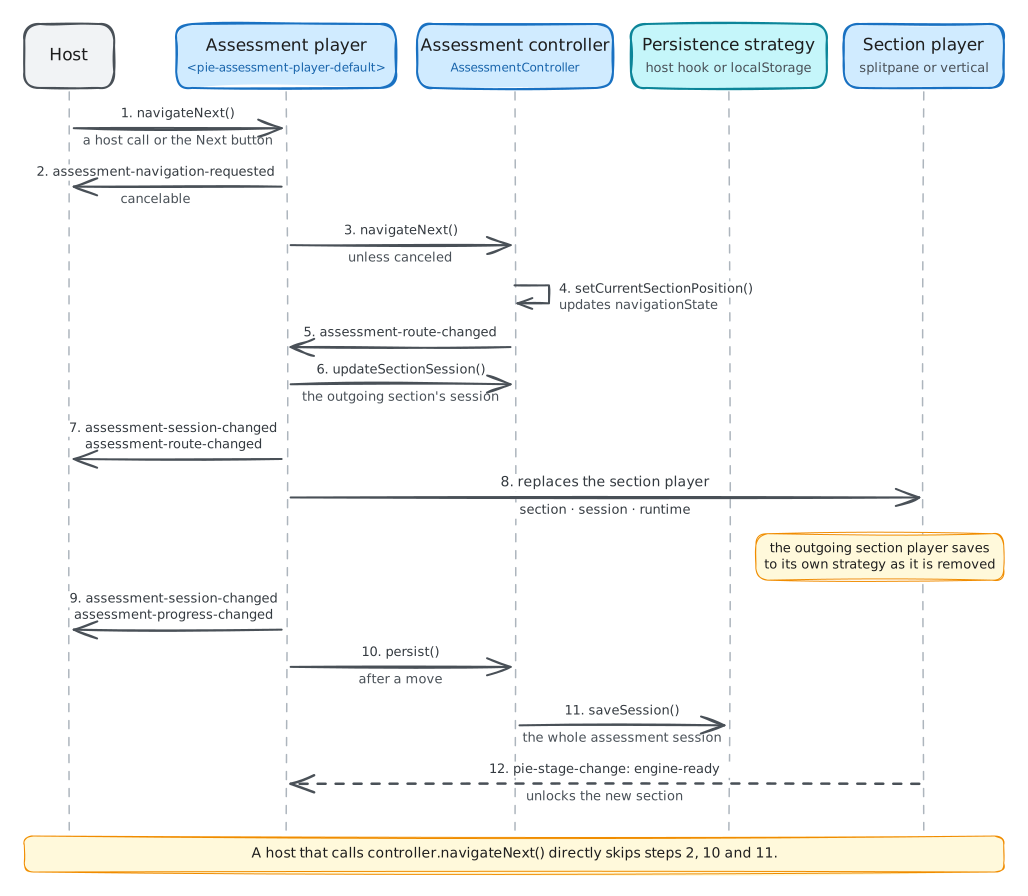
When the learner presses Next, or the host calls the element's
navigateNext():
- The element dispatches the cancelable
assessment-navigation-requested; a canceled request ends here. - It calls the controller's
navigateNext(), which appliessetCurrentSectionPosition. - The controller emits
assessment-route-changed. - On that event the element copies the outgoing section's session into the
assessment session through
updateSectionSession, which emitsassessment-session-changed. - It stops TTS playback and dispatches
assessment-route-changedto the host. - It replaces the section player. The coordinator saves the outgoing section through the section strategy as it disposes its controller.
- The controller emits
assessment-session-changedfor the position, thenassessment-progress-changed. - The element calls
persist(), and the strategy'ssaveSessionstores the session. - The new section reaches
engine-readyand unlocks, as in hydration.
A host therefore receives assessment-session-changed,
assessment-route-changed, assessment-session-changed, then
assessment-progress-changed. A call to the controller's own navigateNext()
runs steps 3 to 7 and 9, skipping the request and the save.
Session persistence
createAssessmentSessionPersistence returns the strategy. It is called once per
controller, at the first hydrate or save, and cached:
import type { AssessmentPlayerHooks } from "@pie-players/pie-assessment-player";

declare const api: any;

const hooks: AssessmentPlayerHooks = {
  createAssessmentSessionPersistence({ assessmentId, attemptId }) {
    return {
      async loadSession() {
        return (await api.assessmentSessions.load({ assessmentId, attemptId })) ?? null;
      },
      async saveSession(_context, session) {
        await api.assessmentSessions.save({ assessmentId, attemptId, snapshot: session });
      },
      async clearSession() {
        await api.assessmentSessions.delete({ assessmentId, attemptId });
      },
    };
  },
};
defaults.createDefaultPersistence() returns the localStorage strategy under
pie:assessment-controller:v1:{assessmentId}:{attemptId}, which neither reads
nor writes without an attempt id. Production players supply a strategy backed
by their own store. The element saves after its own moves; a host that saves on
every change subscribes and skips a session it has already saved:
let lastFingerprint: string | null = null;

controller.subscribe((event) => {
  if (event.type !== "assessment-session-changed") return;
  const fingerprint = JSON.stringify(controller.getSession());
  if (fingerprint === lastFingerprint) return;
  lastFingerprint = fingerprint;
  void controller.persist();
});
Saves run in call order. submit() saves, then marks the assessment submitted
in memory only
(Session persistence and submission).
A strategy can store the session as one document per attempt or normalize it.
The assessment demos' session-hydrate-db demo uses three SQLite tables:
attempt_sessions with the navigation state, section_sessions with one row
per section per attempt, and item_sessions with one row per item per attempt.
The strategy maps between those rows and the AssessmentSession aggregate.
Layout and composition
The element mounts the current section in a splitpane or vertical section
player and renders a position label ("Section 2 of 3") with Back and Next,
disabled at the first and last section. With show-navigation="false" the host
renders its own chrome and calls the element's navigation methods; it then also
announces the section change, which the element announces only when focus was
inside it (Navigation chrome).
A host that needs timers, progress bars or workflow buttons around the section
builds its player from the toolkit helpers, as above, and can lay it out in
<pie-assessment-player-shell>, a scaffold with a navigation slot and a body
slot that carries no controller
(Shell element).
Attempt reset
Most deployments manage attempts on the server: the host routes the learner to
a new attempt with a backend-issued attemptId, and the player mounts fresh.
Client-side reset serves demo and test apps, authoring previews, and proctoring
tools that end an attempt in progress without a page load. It coordinates the
controller with host state:
async function resetAssessmentAttempt(currentAttemptId: string) {
  // Save the final state, when the host keeps it.
  await playerEl.getAssessmentController()?.persist();

  // Clear the stored attempt.
  await api.assessmentSessions.delete({ assessmentId, attemptId: currentAttemptId });

  // A new attempt id rebuilds the controller with a fresh session.
  playerEl.attemptId = generateAttemptId();
}
A new attemptId is the clearest reset. Clear server-side storage too, since
clearing local state alone leaves the stored attempt behind, and implement
clearSession() on a custom strategy so reset flows can call it.
Relationship to the section player
The multi-section player decides which section is active, owns the assessment
session over the section sessions, raises assessment-level events and hooks, and
mounts and replaces section players. The section player composes and renders the
section, owns the section session (getSession(), applySession()), coordinates
tools through the ToolkitCoordinator, and loads item elements and tracks their
readiness.
When the active section emits session-changed, the reference element writes the
section controller's getSession() into the assessment session through
controller.updateSectionSession(). On a return to a visited section it reads the
snapshot with controller.getSectionSession() and sets it as the new section
player's session, which the section controller applies in replace mode as it is
created.
The section layer persists as well unless the host turns it off. A section
mounted without a snapshot hydrates from the coordinator's section strategy, by
default localStorage under
pie:section-controller:v1:{assessmentId}:{sectionId}:{attemptId} and only with
an attempt id, and the coordinator saves the section there before disposing its
controller. To make the assessment controller the one persistence owner, pass a
coordinator whose hooks.createSectionSessionPersistence returns a strategy that
loads and saves nothing; a hook that returns no strategy gets the default.
The section player integration guide covers the section side.
Guardrails
These hold for the reference player and for a custom player alike.
One coordinator per assessment. Pass one ToolkitCoordinator to every
section player. A section player given none builds its own per section, so tool
state, TTS and section persistence hooks reset at each section change.
Gate on controller readiness. Await waitForAssessmentController() rather
than polling, and never assume a controller right after mounting the element.
Persist getSession(), never getRuntimeState(). The runtime state holds
derived fields with no stability guarantee; the assessment session is the
persistence payload.
Fingerprint before saving. Skip a save whose session content matches the last one, as in Session persistence.
Gate navigation on the request event. assessment-navigation-requested is the
only cancelable event, and it fires for the element's navigation methods and
buttons only. assessment-route-changed fires after the move, and navigation
through the controller handle sends no request.
Scope subscriptions. Call the function subscribe() returns when the host
route tears down.
One persistence owner. By default both layers persist under the attempt id:
the assessment controller under
pie:assessment-controller:v1:{assessmentId}:{attemptId}, and each section
controller in its own localStorage entry, which it hydrates from whenever the
assessment session holds no snapshot for that section. Two layers writing
independently race, and such a section comes back with whatever the section
strategy stored. The assessment session already aggregates the section sessions,
so give the coordinator a section strategy that stores nothing.
The host owns attemptId. A standalone deployment reflects it in the URL, so
a refresh or back navigation restores the same attempt. In an embedded
integration the outer layer that owns routing owns the attempt id and passes it
to the player.
Dispose deliberately. On route unmount, remove controller subscriptions and save a final time when the host needs one.