Integrate PIE: Integrate PIE
Integrate PIE
Players, tools and authoring
Embed an item or a section of questions, add learner tools, or include visual editors in your CMS.
Integration options
| You need | Start with | Your application handles |
|---|---|---|
| One question or an editor | Item player | Page layout, content and persistence |
| One item with learner tools | Item player + toolkit | Page layout and workflow |
| Passages and several questions | Section player | Assessment navigation and backend |
| A complete assessment flow | Your shell + sections + toolkit | Timing, identity, storage and submission policy |
Integration guides
Embed an item
Display a question and collect the response.
Deliver a section
Display passages and questions with layouts and learner tools.
Assessment toolkit
Add learner tools and apply accommodation policies.
Assessment integration
Connect sections to navigation, timing, storage and submission.
Embed authoring
Add visual item editors and preview to a CMS.
Practice and feedback
Let learners check answers, see feedback and retry.
Video with questions
Show questions during a video and pause for answers.
Print and answer keys
Create worksheets and answer keys for elements with print views.
Item-bank summaries
Show lightweight item previews in lists and search results.
Extend tools and providers
Add a tool, toolbar action or service provider.
Application responsibilities
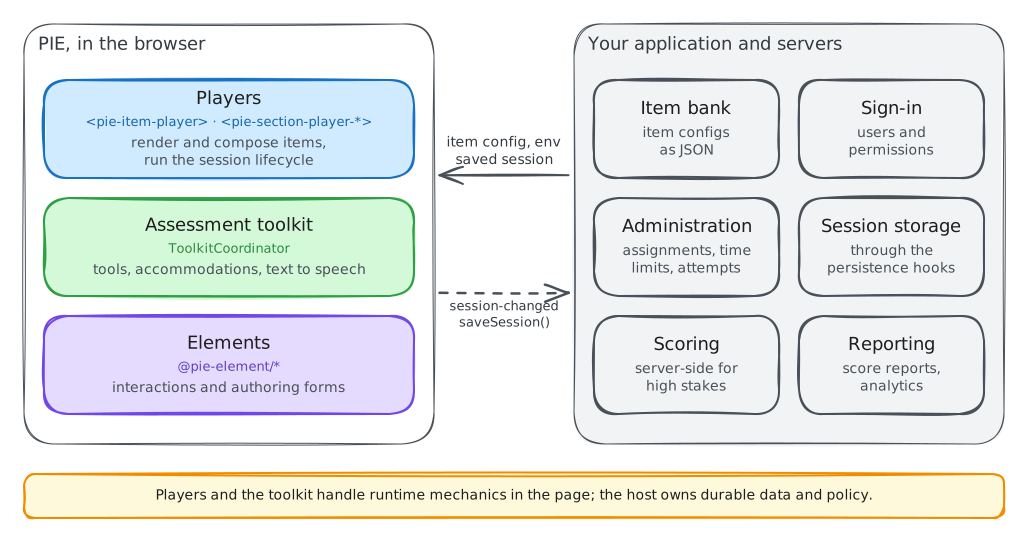
PIE handles rendering and learner tools. Your application manages content, learner accounts, storage and assessment policy. The reference assessment player shows how to connect sections into an assessment.
Plan graded delivery · Save and resume · Choose exact package versions