Guide and reference
Save and resume
Save responses and restore an attempt.
Try it
Try a passage and questions with layouts and learner tools.
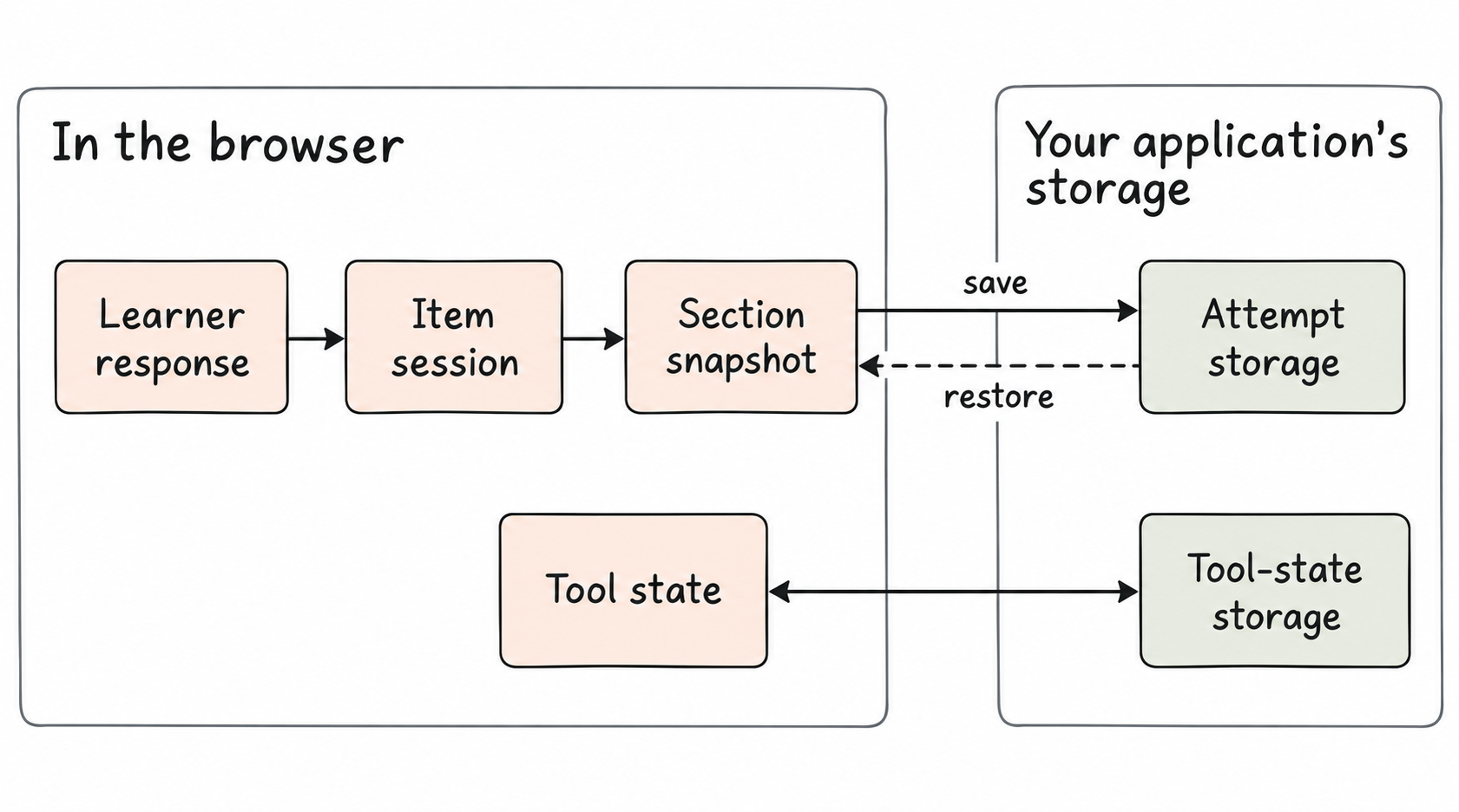
PIE reports response changes and provides snapshots you can restore. Your application stores them against the correct learner and attempt. Use a backend to support recovery across devices.
State has several owners
| State | Runtime owner | Host integration |
|---|---|---|
| Item response | Item player; one session row per element | Save session-changed and restore player.session. |
| Section | Section controller; item sessions, visited items and position | Set the layout's session property, or supply a persistence strategy. |
| Assessment | Your shell; section sessions and current position | Use the toolkit's assessment-session helpers and your backend. |
| Tool state | Toolkit tool-state store | Persist through tool-state hooks separately from scored responses. |
Save a complete item session
The item player's session-changed event carries the whole item session when response data changes. A metadata-only event carries session: null and should not overwrite a stored response.
player.addEventListener('session-changed', ({ detail }) => {
  if (detail.session) saveSession(detail.session);
});
// On a later visit:
player.session = savedSession;
An optional delivery backend adds explicit save and opt-in autosave. Its custom client must preserve the documented save ordering and page-lifecycle request options. See backend integration.
Restore a section before it starts
Set runtime, then the saved section session, then section on the layout. The controller restores the session before it first displays the section.
Read a fresh snapshot from getSectionController().getSession(). The snapshot contains currentItemIndex, visitedItemIdentifiers and itemSessions, with formative and timedMedia slices when used.
player.runtime = runtime;
player.session = savedSectionSession;
player.section = section;
player.addEventListener('session-changed', () => {
  const snapshot = player.getSectionController()?.getSession();
  if (snapshot) saveSectionSession(snapshot);
});
A later applySession can replace or merge section state. Use getSession(), not introspection state, as the persistence format.
Commit before moving away
Elements may batch response updates. The section controller commits pending responses before item navigation, section changes and persist(). Item players also commit when focus leaves, during teardown and when the page is hidden.
If your host removes a standalone item player, call commitPendingElementSessions() before detaching it. Listen before starting a transition: an event emitted after detachment cannot reach a document listener.
Commit events can name the item being left. Persist their response, but do not move the host's navigation back to that item.
Browser storage and recovery
Default section persistence writes to localStorage when persistence runs, and requires an attempt ID. Save from response events or on a schedule; a reload may skip teardown.
Item session snapshots are opt-in device recovery. A snapshot-available event reports a candidate; the host decides whether it belongs to the current attempt and should be restored.
The example above saves in this browser. In production, save to authenticated attempt storage.