Guide and reference
Read-aloud
Configure speech, recordings and synchronized text highlights.
From the pie-players documentation · View source(opens in new tab)
This document explains how text-to-speech (TTS) works across PIE Players at runtime. It is for host integrators and contributors who need the whole flow, from the button a student presses through provider selection, authored spoken content, generated Math speech, playback, and highlighting.
For the packages, their dependencies and the provider comparison, see TTS Architecture. For authoring patterns, see TTS Authoring Guide.
Mental Model
TTS has four jobs, owned by different layers:
- A UI tool decides what visible region the student wants read.
TTSServicedecides what should be spoken for that region.- The active provider decides how to turn speech text or SSML into audio.
- Word boundaries or speech marks are mapped back to the visible DOM for highlighting.
The UI does not synthesize speech itself. The inline tool finds a reading target
and calls the shared TTSService, which chooses between authored spoken
catalogs, generated Math speech and plain visible text.
Packages And Ownership
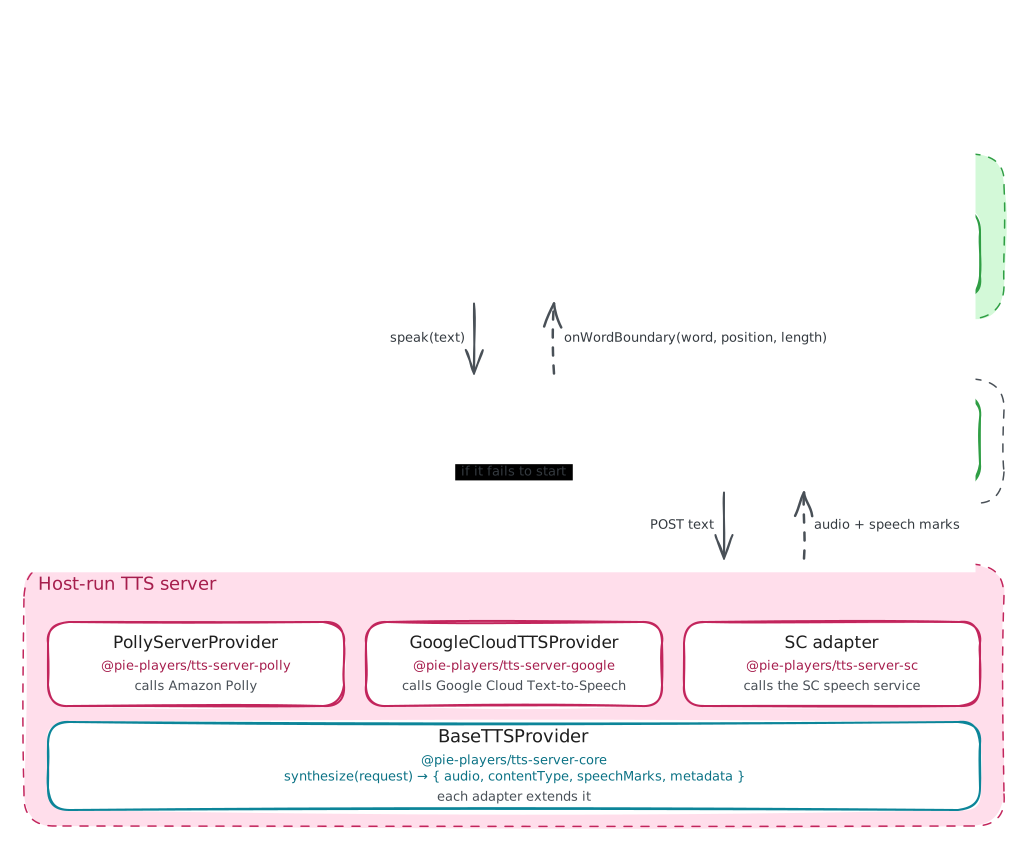
@pie-players/pie-tts is the contract package.
It defines the provider factory and playback interfaces, configuration types,
feature flags, capabilities, and speech segment shape. It has no UI ownership.
@pie-players/pie-assessment-toolkit
owns the runtime orchestration. The main classes are:
ToolkitCoordinator, which creates shared services and registers tool providers.ToolProviderRegistry, which stores providers by tool id.TTSToolProvider, which chooses the browser or server backend; the server backend's vendor (polly,googleorcustom) is itsserverProvider.TTSService, which resolves speech content, owns playback state, calls the provider, and coordinates highlighting.AccessibilityCatalogResolver, which stores scoped spoken alternatives from assessment, passage, item, and model catalogs.HighlightCoordinator, which receives TTS highlight updates.
@pie-players/pie-tool-tts-inline
is the runtime UI. It renders the
play/pause controls in item and passage toolbars, finds the readable content
region, and passes it to ttsService.speak(...). The annotation toolbar's
read-aloud passes the selection's range to the same entry.
@pie-players/tts-client-server
provides ServerTTSProvider, the browser-side bridge to a host TTS API. It plays
the returned audio in an HTMLAudioElement and turns speech marks into boundary
callbacks.
The tts-server-* packages are server-side helpers for host applications:
tts-server-core,
tts-server-polly,
tts-server-google, and
tts-server-sc, the SC adapter. They
do not run in the browser. A host API route wires them to the browser-side
ServerTTSProvider.
Provider Setup
The toolkit configures TTS through the tool provider path rather than requiring each UI component to construct its own provider.
At coordinator startup, ToolkitCoordinator creates shared services:
ToolCoordinatorHighlightCoordinatorAccessibilityCatalogResolverToolProviderRegistryTTSService
Tool registration then contributes a TTS provider descriptor. When TTS is needed,
the registry creates a TTSToolProvider, and that provider creates one concrete
TTS provider:
BrowserTTSProviderforbackend: "browser"ServerTTSProviderforbackend: "server", withserverProvidernaming the service:"polly","google"or"custom"
The server path loads @pie-players/tts-client-server through a dynamic import
in the TTS registration of @pie-players/pie-default-tool-loaders, which passes
it to TTSToolProvider as its loadServerProvider option. Browser-only
deployments never load that package, and the toolkit never names it.
If server-backed initialization fails, the toolkit coordinator falls back to
browser TTS and reports pie-tool-init-fallback.
TTS architecture owns
the selection and fallback rules; the toolkit README's
Minimal Server-Backed TTS Config
lists the keys and defaults.
Simple Happy Path
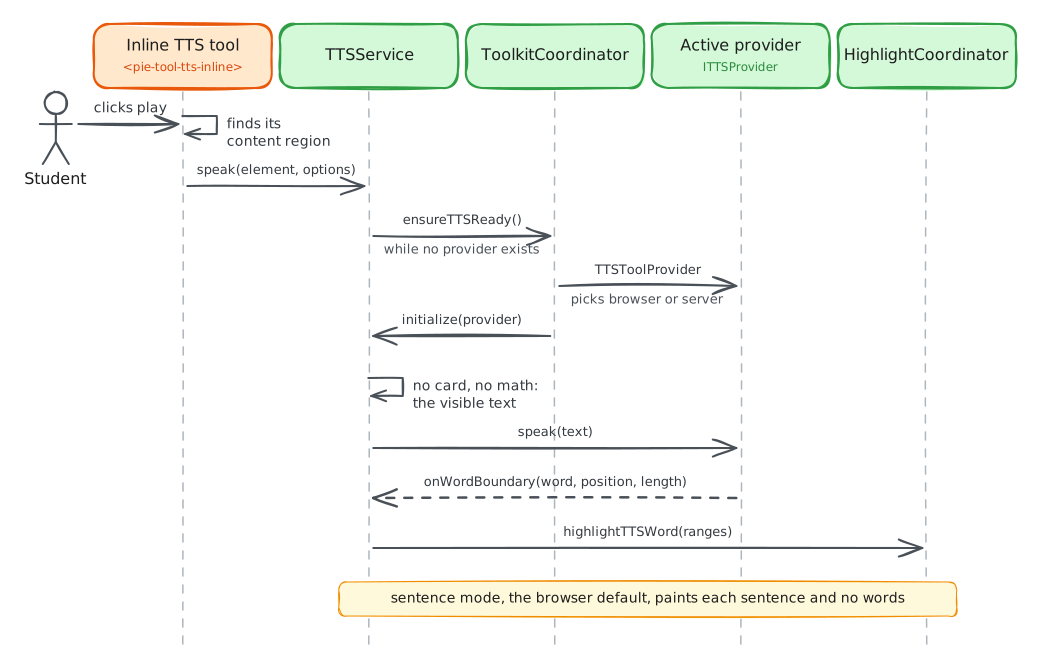
This is the simplest useful path: no authored spoken catalogs and no special Math generation. The system reads visible text with the active provider.
Simple Path Walkthrough
The section or item UI renders a toolbar. The TTS tool registration lazy-loads
pie-tool-tts-inline.The student clicks the inline play button.
pie-tool-tts-inlineresolves the reading target. It prefers the nearest[data-region='content']inside the current shell scope and falls back to the shell element itself.The tool calls the shared
TTSService, whoseHighlightCoordinatorToolkitCoordinatorattached at construction:ttsService.speak(readingTarget, { catalogId, catalogContext, language, });speakresolves the read's language fromlanguageand the content's markup as TTS language sets out.A speak that finds no provider waits on the service's readiness gate, which calls
ToolkitCoordinator.ensureTTSReady(). The registry initializesTTSToolProvider, which chooses browser or server-backed TTS from host config. When TTS starts eagerly or the policy grantstextToSpeech, coordinator readiness already waits for it; a profile resolvingscreenReaderenabled withholds that grant as a support conflict, so no read-aloud starts at all (ADR 0004).TTSService.speak()collects the target's visible text, math included, normalizes it and callsresolveSpeechContent(...).If no authored spoken catalog applies and no generated speech is needed,
TTSServicespeaks normalized visible text.BrowserTTSProviderusesSpeechSynthesisUtterance.ServerTTSProviderposts to the host API, receives audio and speech marks, then plays audio with anHTMLAudioElement.Boundary events flow back to
TTSService, which maps each word through the position map to the ranges covering it, one per tree the word spans, andHighlightCoordinator.highlightTTSWordpaints them. Every word target, from boundaries, catalog spans or math tokens, takes that one call. The browser provider defaults to sentence highlighting, so a browser read highlights sentence by sentence unless word mode is configured (see Browser Provider).
Browser Provider
The browser provider is direct:
TTSService -> BrowserTTSProvider -> Web Speech API -> boundary events
It highlights sentence by sentence by default: its capabilities report word
boundaries with defaultHighlightMode: "sentence", because boundary events
depend on the voice and several network voices send none, and a sentence-mode
read takes no word boundaries. providerOptions.highlightMode: "word" turns word
highlighting on, which follows the engine's onboundary events and is only as
accurate as the platform voice reports them.
It does not support SSML. When generated Math speech is used with the browser
provider, the toolkit sends plain speech text rather than <speak>...</speak>.
An authored <speak> document that reaches it is voiced as its spoken text, with
word boundaries still reported as offsets into the document.
Server Provider
The server-backed provider uses a host API:
TTSService -> ServerTTSProvider -> /api/tts/synthesize -> server provider
That is the pie transport, which posts to ${apiEndpoint}/synthesize and
gets audio plus speech marks back inline. The custom transport posts to the
apiEndpoint root and fetches the URL-based audio and word-mark assets the
response names, with origin and SSRF protections; the SC adapter,
@pie-players/tts-server-sc, is the reference server for it. endpointMode
overrides either default.
Server reads highlight words, and a response that carries no speech marks
highlights the sentence it voices instead. The choice is per response, so an
explicit providerOptions.highlightMode: "word" keeps word highlighting where
marks arrive and falls back to sentences where they do not.
Pause, Stop And Media
A pause or stop holds from the moment a read starts loading. pause() while the
read resolves its content or waits for audio holds it: the audio starts paused
when it arrives, and a resume() before then returns the read to loading. stop()
ends a read in any state and releases its run owner, which closes an open
<pie-tool-tts-inline> panel; a read that ends on its own keeps its owner and
the panel. Each provider holds a pause that lands before its audio
starts, which ITTSProviderImplementation.pause requires.
Read-aloud and media audio never play at once, and the learner's latest action
wins. A media surface uses two helpers from
@pie-players/pie-assessment-toolkit/tools/registration:
bindTtsAudioHandoff({ ttsService, silence }) calls silence whenever the
service starts loading or playing and returns its teardown, and
pauseTtsForMediaAudio(ttsService) pauses a read that is loading or playing
when the learner starts media. Both count a loading read as speaking, through
one predicate, and neither resumes what it silenced.
Highlight Target Remapping
A host whose rendered content differs from the text it speaks remaps highlight
targets with a TTSHighlightTargetResolver, set as the
ttsHighlightTargetResolver property on <pie-item-scope> or
<pie-passage-shell>. While the inline tool reads that scope, it hands the
resolver to TTSService with a TTSHighlightContext: the scope element, the
item ids, the content kind and the region policy. Both methods are optional:
resolveWordRange(range, context)returns theRangeto paint for a word.resolveSentenceRanges(ranges, context)returns theRangeorHTMLElementtargets for a sentence.
PIE keeps painting and cleanup. The seam fails open: a null result, a target
outside the scope element or a throw keeps the native targets, and one bad
sentence entry keeps all the native sentence ranges. The types are exported from
@pie-players/pie-assessment-toolkit; the
TTS highlight target resolver PRD
holds the contract.
Debug Logging
Read-aloud's debug lines, from the service, the providers, TTSToolProvider,
math speech and the settings panel's preview, log only while PIE_TTS_DEBUG=1
is set in the environment or globalThis.__PIE_TTS_DEBUG__ = true in the page.
The flag is read on each line, so a page turns tracing on after load. Warnings
and errors always log.
How TTS Chooses What To Speak
TTSService.speak(target, options) reads a DOM range or element. Content marked
not-to-be-spoken (data-tts-suppress) is never read, from a named card
included; a target inside such content, or holding nothing else, speaks nothing
and leaves playback already running alone. For the rest, the
TTSService.resolveSpeechContent(...) priority is:
- If an explicit
catalogIdresolves to a spoken catalog, use that catalog. A range reads it only when it holds the whole content root. - If the target contains
data-catalog-idrefregions, compose speech chunks from those catalogs plus visible interstitial text. A range composes only the regions it holds whole, and its interstitial text is the selected text. - If the target contains Math or Math-like markup, generate speech from the DOM with Speech Rule Engine. A range reads an equation as math only when it holds the whole equation; part of one reads as the selected text.
- A range with no such region and no whole equation speaks its selected text.
- Otherwise, speak its normalized visible text.
Authored Content-Provided TTS
Content-provided TTS means the content itself supplies the spoken alternative. The runtime shape is the accessibility catalog, adapted from the catalogs of 1EdTech's QTI (Question and Test Interoperability) 3.0, which took them over from APIP (Accessible Portable Item Protocol); the catalogs integration guide owns the data model:
interface AccessibilityCatalog {
  identifier: string;
  cards: CatalogCard[];
}

interface CatalogCard {
  catalog: string; // "spoken" for TTS
  language?: string;
  content?: string; // the string form — SSML for `spoken`
  payload?: CatalogCardPayload; // the structured form, for types a string cannot express
}
A card carries either content or payload, decided by catalog. A named
catalogId reads only the string form: a resolved card with no content (a
sign-language card, for instance) is treated as no catalog at all, and
resolution continues with the next step of the priority above rather than
speaking an empty string. A data-catalog-idref region also plays a spoken
card's payload recording, with the region's script card as its fallback.
Visible markup points to catalog entries with data-catalog-idref:
<span data-catalog-idref="equation-1">
  <math>...</math>
</span>
Where Catalogs Can Live
Catalogs can be registered from:
- assessment-level accessibility config
- passage
accessibilityCatalogs - item
accessibilityCatalogs - model-level
accessibilityCatalogs config.extractedCatalogs, if a preprocessing step has populated it
The runtime scopes catalogs by owner context. Passage catalogs are registered with a passage context. Item and model catalogs are registered with item/model context. This lets different content owners reuse catalog identifiers without turning every catalog id into a global key. The catalog registration diagram in the integration guide shows the filing and lookup flow.
Authored Catalog Walkthrough
- The assessment, passage, item, or model data includes
accessibilityCatalogs. For TTS, the important cards usecatalog: "spoken"and usually contain SSML. - Visible markup includes elements whose
data-catalog-idrefmatches catalog identifiers. - When an item scope or passage shell mounts and finds its toolkit, it
dispatches
pie-registerwith its registration details. <pie-assessment-toolkit>callsAccessibilityCatalogResolver.registerOwner(...)once for the mounted entity, its Catalog Owner.- The resolver walks entity-root,
config.extractedCatalogs, and model catalogs and stores them under that owner as one transaction. Content surfaces read the owner's cards throughforOwner(...), a Catalog Owner View that supplies immutable Catalog Owner Snapshots. - The student clicks play in
pie-tool-tts-inline. - The inline tool passes its reading target and
catalogContexttoTTSService.speak(...). TTSServicefirst tries an explicitcatalogId, if one was provided.- If that does not resolve,
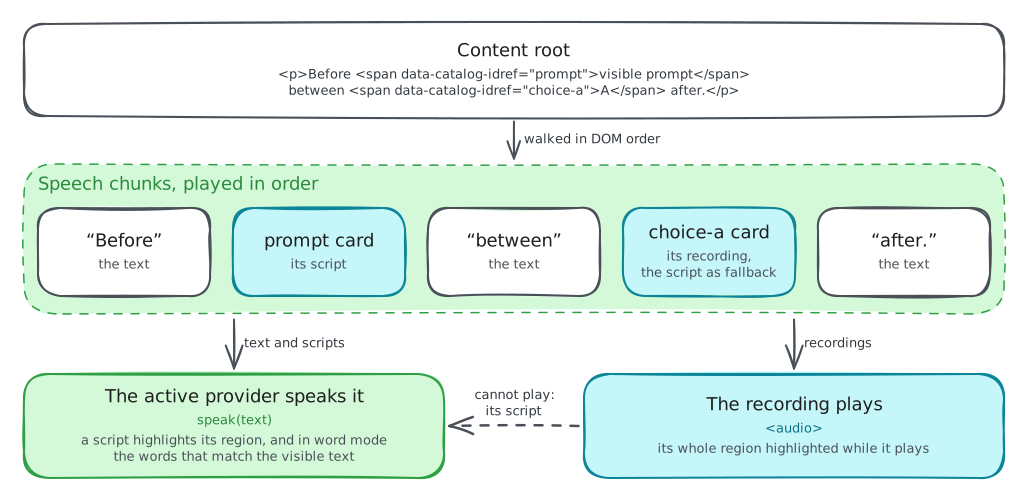
TTSServicewalks the target and looks fordata-catalog-idref. - Each matching element becomes a speech chunk from its authored card: a
recording when a
spokencard carries one, its script otherwise. Text between catalog-marked regions becomes plain speech chunks. - Playback runs chunk by chunk. Scripts and text go through the active
provider; a recording plays in an
<audio>element, and a recording that cannot play falls back to its script. - A recording highlights its region as a block for its duration, since it
reports no word boundaries. A script highlights its region, and its words
only in word mode and when its SSML aligns with the visible DOM; SSML that
cannot be mapped reliably, such as
<audio>or complex<phoneme>behavior, keeps the region highlight.
Explicit catalogId and DOM Composition
The inline tool may pass a catalogId such as an item or passage id. That id
does not necessarily match each fine-grained spoken catalog id inside the
content. For multi-region content, the important path is often DOM composition:
TTSService walks the reading target and resolves each data-catalog-idref
region.
Embedded <speak>
SSMLExtractor converts embedded <speak> markup into cleaned content plus
extractedCatalogs. No player or shell calls it: extraction is a preprocessing
step the host runs, and registration files config.extractedCatalogs when they
are present.
On-The-Fly Generated Math TTS
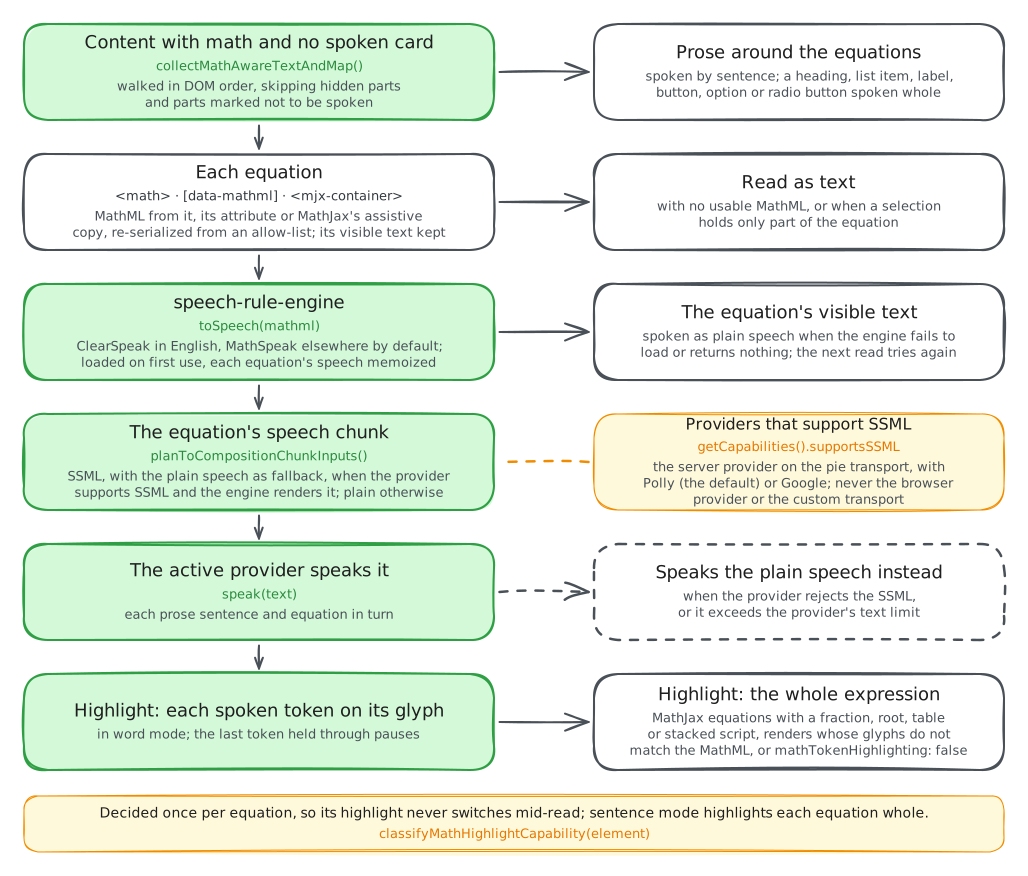
Generated Math TTS is the fallback for content that has Math in the DOM but no matching authored spoken catalog. It turns rendered Math into speech at runtime. Every speak reads a live DOM target, so this path applies to every caller.
Generated Math Walkthrough
- The student clicks play in
pie-tool-tts-inline. - The inline tool passes its reading target to
TTSService.speak(...). - No explicit spoken catalog resolves.
- No
data-catalog-idrefcomposition applies, or the uncovered content still needs generated speech. TTSService.resolveGeneratedSpeechContent(...)callsbuildGeneratedSpeechFromRoot(...).- The DOM adapter calls
collectMathAwareTextAndMap(...)to walk visible text and Math. - Math can be detected from native
<math>, adata-mathmlattribute, MathJax containers, or MathJax assistive MathML. - MathML is canonicalized and sanitized before speech generation.
assembleGeneratedSpeech(...)calls the memoized Math speech resolver.math-speech.tslazily imports Speech Rule Engine and converts each Math chunk into plain speech. If the active provider can handle SSML, it can also request SRE SSML.TTSServicechecks provider capabilities:- browser TTS always gets plain speech
- the server provider gets SSML on the
pietransport withpolly(the default) orgoogle - the
customtransport always gets plain speech, since the client never reports SSML support for it
- Generated Math chunks carry a plain fallback. If an SSML-capable provider rejects a generated SSML chunk, playback retries that chunk with plain speech.
- Boundary callbacks feed the highlight pipeline, which decides each
equation's highlight mode once, for the whole read:
- Token mode paints the token each boundary maps to on the MathJax or native Math glyphs. Before the first token resolves the surrounding region is highlighted, and a boundary that maps to no token, such as a pause, holds the last token. A token-mode equation never paints the whole expression.
- Expression mode highlights the equation as one block. It applies to
MathJax equations whose rendering breaks one-to-one correspondence with
the source MathML tokens, such as fractions, roots, tables and under or
over scripts, and to every equation when the TTS config sets
mathTokenHighlighting: false.
What SRE Receives
The generated path does not rely on aria-label or image alt text. It is based
on visible text plus MathML sources:
- native
<math> data-mathml- MathJax assistive MathML
Visible fallback text is still collected. If SRE fails or returns nothing, the system can speak the visible/fallback Math text rather than stopping playback. A read's equations share one SRE load. A failed load is logged once as a warning, and the next read loads SRE again; an equation that fell back to its visible text is not cached, so the next read resolves it again.
Plain Versus SSML Generated Math
The browser Web Speech API speaks SSML tags literally, so generated Math is plain text for the browser provider.
Server providers that support SSML can receive generated <speak>...</speak>
chunks. That lets SRE preserve useful speech markup, such as character-level
pronunciation. The aggregate speech plan remains plain for seeking and structural
pause logic; SSML is applied per playback chunk.
Math In Control Names
Browsers leave MathML out of a name computed from content, so a choice labeled
with 4/12 is named "4 12". The toolkit labels each mjx-container inside a
control (a label, button, summary or link, or an element with a control
role such as radio or option) with SRE's speech, and the browser puts that
aria-label in the control's name. PieAssessmentToolkit observes each
registered item and passage shell, so a container MathJax replaces, as a menu
rerender does, is labeled again. The label replaces the elements' own English
one and stays when SRE cannot speak the math. Math outside controls stays
unlabeled, so screen readers keep navigating its MathML.
Names read ClearSpeak in English and MathSpeak elsewhere, in the language of
the nearest lang attribute, English without one. ClearSpeak reads fractions
"over", so a name keeps the numerals as written: "4 over 4", where read-aloud
says "four fourths". An expression holding a fraction with longer parts reads
every fraction by numerator and denominator, which "over" would leave
ambiguous. Of the host's mathSpeech, names take only engineOptions, which
sets where SRE's locale tables load. The standalone item and print players have
no toolkit and keep the elements' labels.
Comparison Of The Three Scenarios
| Scenario | Trigger | Spoken Source | Provider Payload | Highlighting |
|---|---|---|---|---|
| Simple happy path | No matching catalog and no generated Math needed | normalized visible text | plain text | word boundaries against visible text; sentences on the browser provider unless highlightMode is "word" |
| Authored content-provided TTS | explicit catalog or data-catalog-idref regions |
spoken card: its script, or its recording in a region |
SSML or plain script; a recording plays in <audio> |
the region; a script's words in word mode when its SSML aligns |
| On-the-fly Math TTS | the target contains Math and no authored speech wins | SRE generated Math speech plus visible prose | plain or SSML per provider capability | per equation, token by token or the whole expression |
File Map
- Provider contracts:
packages/tts/src/provider-interface.ts - Toolkit startup:
packages/assessment-toolkit/src/services/ToolkitCoordinator.ts - TTS provider factory:
packages/assessment-toolkit/src/services/tool-providers/TTSToolProvider.ts - Speech resolution and playback:
packages/assessment-toolkit/src/services/TTSService.ts - Inline TTS UI package:
@pie-players/pie-tool-tts-inline(registration entrypoint consumed through package exports); source:packages/tool-tts-inline/tool-tts-inline.svelte - Catalog owner identity and traversal:
packages/assessment-toolkit/src/services/catalog-owner.ts - Catalog registration and resolution:
packages/assessment-toolkit/src/services/AccessibilityCatalogResolver.ts - Math-aware DOM extraction:
packages/assessment-toolkit/src/services/tts/math-aware-text-processing.ts - Generated speech planner:
packages/assessment-toolkit/src/services/tts/generated-speech/ - SRE integration:
packages/assessment-toolkit/src/services/tts/math-speech.ts - Math control names:
packages/assessment-toolkit/src/services/tts/math-control-names.ts - Server TTS client:
packages/tts-client-server/src/ServerTTSProvider.ts