Guide and reference
Install and load PIE
Load elements from a bundle host, as browser ESM, or from your own build.
From the pie-players documentation · View source(opens in new tab)
How <pie-item-player> gets PIE elements onto the page: the three loading
strategies, the loaderOptions that configure them, and how a host registers
elements it installs from npm. For hosts that choose or configure a strategy.
Getting started renders a first item, and
Math rendering covers what each strategy means for
MathJax.
The strategy attribute selects the strategy. Every strategy goes through the
ElementLoader primitive (@pie-players/pie-players-shared/loaders), which
hands the load to an adapter; preloaded uses none and asserts that the
elements are already registered.
| Strategy | Adapter | Source | Best for |
|---|---|---|---|
iife |
IIFE adapter | IIFE bundles from the bundle host, injected as <script> tags |
Production deployments that use the bundle host |
esm |
ESM adapter | Browser ESM builds from an npm CDN, by URL or import map | Element packages that publish browser ESM builds |
preloaded |
none (uses assertRegistered) |
Elements the host registers | Section-level preloading, static builds, offline use |
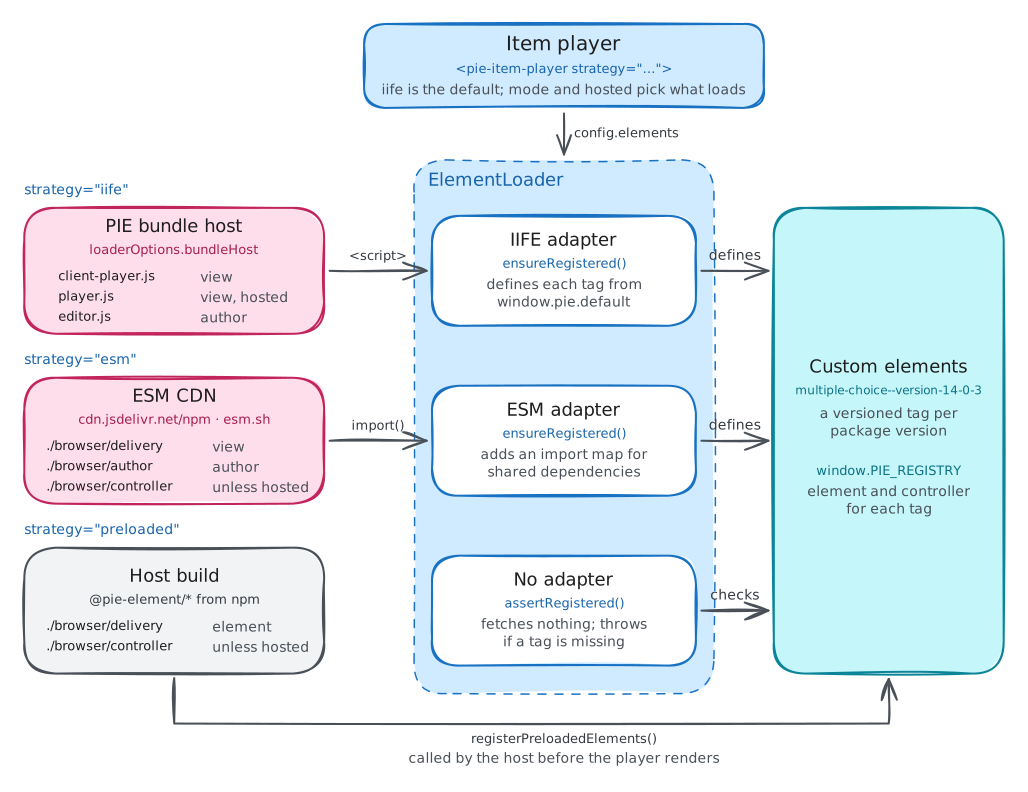
The bundle host is the server that builds IIFE bundles of the element packages
an item names, and serves them. Element packages publish under the
@pie-element/* scope from two repositories:
pie-elements, the legacy one,
whose packages load only as IIFE bundles, and
pie-elements-ng, whose
packages serve all three strategies. Its
PIE element contract
defines what an element package publishes; this page covers how the player
consumes it.
loaderOptions
loaderOptions is a JavaScript property with no attribute form:
const player = document.querySelector("pie-item-player");
player.loaderOptions = {
  bundleHost: "https://proxy.pie-api.com/bundles/",
  esmCdnUrl: "https://cdn.jsdelivr.net/npm",
  esmCdnProvider: "jsdelivr",
  moduleResolution: "url",
  view: "delivery",
  loadControllers: true,
  runtimeSupportCheck: "off",
};
| Option | Used by | Default | Description |
|---|---|---|---|
bundleHost |
iife |
https://proxy.pie-api.com/bundles/ |
Base URL of the bundle host |
esmCdnUrl |
esm; all, for page assets |
https://cdn.jsdelivr.net/npm |
Base URL of the npm CDN the ESM adapter loads from. Under every strategy it also serves the Font Awesome Free stylesheet toolbars add and, under iife, the speech rules of the player's math renderer (ESM CDN providers) |
esmCdnProvider |
esm |
"esm.sh" when esmCdnUrl contains esm.sh, otherwise "jsdelivr" |
URL layout of that CDN: "jsdelivr", "esm.sh", another name for a CDN with jsDelivr's layout, or a provider object (ESM CDN providers) |
moduleResolution |
esm |
"url" |
"url" imports fully qualified CDN URLs; "import-map" imports bare specifiers through an import map |
view |
esm |
"author" when mode="author", otherwise "delivery" |
ESM view: "delivery", "author", or "print" |
loadControllers |
esm |
true; false for a hosted player outside author mode |
Whether to load PIE controllers alongside elements. A player is hosted when hosted is set or backend.delivery is enabled, and a hosted player resolves no controller. The section pre-warm resolves the default the same way |
runtimeSupportCheck |
esm |
"off" |
"on" reads each package's optional ./runtime-support module before loading; a failed load's error then names the packages that declare the view unsupported |
elementPackagePolicy |
all | unset | { allowedPackages, requireExactVersions? }. Limits the config.elements packages that may load to exact names or name@version specs, and with requireExactVersions (default true) rejects ranges, tags and build metadata. For config.elements that is not fully trusted host input; see Escape hatches |
Strategy details
strategy="iife"
The IIFE adapter loads bundles from the bundle host by injecting <script>
tags. The bundle host builds each bundle from the npm releases of the packages
the item names, through their /controller, /configure, /author and
/print exports
(IIFE
in the contract). The player's mode and hosted pick the bundle:
| Player | Bundle | Contents |
|---|---|---|
mode="view", not hosted |
client-player.js |
Elements and controllers |
mode="view", hosted |
player.js |
Elements only; the host's server runs the controllers |
mode="author" |
editor.js |
Configure (authoring) elements and controllers |
client-player.js carries the controllers, so the answer key and the scoring
logic run in the learner's browser. That is the default: hosted is false
unless the host sets it or enables backend.delivery.
Delivery integrity covers what a
proctored delivery does instead, and the security page gives the CSP each
strategy needs.
After loading, elements are registered in window.PIE_REGISTRY and defined as
custom elements with versioned tag names (e.g. multiple-choice--version-14-0-3).
IIFE bundles resolve @pie-lib/math-rendering to
window["@pie-lib/math-rendering"], so the player installs its MathJax renderer
there before the first bundle loads. A renderer already on window stays.
- A host that wants the MathJax module fetched sooner calls
ensureItemPlayerMathRenderingReady()from@pie-players/pie-item-playerat startup. - A host that loads IIFE element bundles itself, outside the player, awaits
ensureItemPlayerMathRenderingReady()before the first bundle evaluates, because the bundle reads the renderer as it evaluates.@pie-players/pie-item-player/preloadedexports it without defining the player.
player.strategy = "iife";
player.loaderOptions = {
  bundleHost: "https://proxy.pie-api.com/bundles/",
};
strategy="esm"
The ESM adapter imports each element's browser ESM build from an npm CDN, as the
contract's
Browser ESM Packaging
defines it. For an element such as @pie-element/multiple-choice@13.2.2 it
loads these files of the package:
dist/browser/delivery/index.jsin thedeliveryviewdist/browser/author/index.jsin theauthorview, defined under the base tag plus-configdist/browser/print/index.jsin theprintview, under the base tag plus-printdist/browser/controller/index.jswhenloadControllersis on
The author and print views fall back to the delivery module when theirs
fails to load. The player imports the files as published, without jsDelivr's
+esm transform. A package version without browser ESM builds, such as a
legacy pie-elements release, fails to load under esm.
By default the adapter imports each module by its full CDN URL
(moduleResolution: "url"). moduleResolution: "import-map" imports bare
specifiers through an import map instead, which names each package once per
page, so a later load that requests another version of a mapped package fails.
player.strategy = "esm";
player.loaderOptions = {
  esmCdnUrl: "https://cdn.jsdelivr.net/npm",
  esmCdnProvider: "jsdelivr",
  moduleResolution: "url",
  view: "delivery",
  loadControllers: true,
};
ESM element builds bring their own MathJax, so under esm the player installs
no math renderer and never fetches its MathJax 3 module
(Math rendering).
Shared dependencies
React and React DOM are page singletons. An element package that uses either
declares the exact version it was built against in its package.json, under
pie.browserSharedDependencies; a missing or inexact declaration fails the
load. Dependency and peer-dependency ranges are install metadata, and the
player does not read them as a runtime fallback. The adapter maps one version of
each in an import map it adds to the page, in both resolution modes.
When elements declare different versions within one major, the adapter selects
the highest and reports the conflict: a [pie-esm] console warning and, with
loaderConfig.trackPageActions on and an instrumentation provider set, a
pie-esm-shared-dependency-conflict event. Different majors fail the load.
Once the map is on the page its versions are fixed, so a later load that
declares a higher version fails too. A failure logs a [pie-esm] console error
and reports an EsmSharedDependencyError to instrumentation.
Import maps are required: in a browser without them, a load that has a dependency to map fails.
Browsers that reject late import maps
Firefox applies one import map per page, and only before the page's first module
load, so it rejects the player's map on a page that loaded a module first, and
any map after the first. The adapter detects a rejected map by importing one of
its specifiers. From then on it loads that page's elements through
es-module-shims, an import-map polyfill that @pie-players/pie-players-shared
bundles and loads only on such a page. The adapter runs it in shim mode, in
which es-module-shims resolves imports itself from the maps handed to it, so a
map the browser rejected still applies. Browsers that apply the map load
natively.
A page that runs its own es-module-shims keeps that instance, which must run in shim mode: es-module-shims takes maps from a script only in shim mode, so an instance in polyfill mode, its default, fails the load with an error that says so. The CSP base policy covers both paths.
Shared editor runtime
The rich-text editors in element packages run on Tiptap and ProseMirror. A
package that declares pie.browserEditorRuntime also publishes, for each view
its views names, a variant that imports them from a shared runtime package
instead of bundling them, so every editor on the page runs one engine. Under
moduleResolution: "url" the player loads that variant,
dist/browser/<views[view]>/index.js, and adds the runtime's
pie.browserModules to the import map, each at dist/browser/<module>/index.js
of the runtime package on the same CDN. A view views does not name loads its
./browser/* module, and so does every package under
moduleResolution: "import-map" or without the declaration.
The runtime is a page singleton. The first load that needs it maps the highest
version among the packages it loads and records it as data-pie-editor-runtime
on the import map script; later loads on the page, from any player, use that
version. It serves a package that declares the same runtime at a version in its
caret range at or below its own: the same major, and below 1.0.0 the same
minor. Serving a package that declared a lower version is reported as a resolved
shared-dependency conflict, as for React.
The player loads a package's ./browser/* modules instead, and reports it the
same way, when:
- the runtime cannot serve the package
- the runtime's
package.json, its modules or the variant fail to load - the page already maps one of the runtime's specifiers
- the browser has no import maps
The ./browser/* modules are self-contained, so none of these fails the load.
ESM CDN providers
esmCdnProvider names the URL layout of the CDN at esmCdnUrl. jsDelivr's is
the default: package files at <esmCdnUrl>/<package>@<version>/<path>, and
shared dependencies at <esmCdnUrl>/<dependency>@<version>/+esm. Every provider
name other than "esm.sh" selects that layout, so a mirror that serves it
passes its own name and URL.
jsDelivr builds a +esm module with its own dependencies imported by root path,
/npm/<dependency>@<version>/+esm. When esmCdnUrl has that layout and is not
its origin's /npm, the player adds an import-map scope that sends those
imports to esmCdnUrl, so a mirror such as https://mirror.example/esm serves
every module and the page holds one copy of each dependency.
The same base serves the page assets the players add: the Font Awesome Free
stylesheet of the item toolbar and the inline TTS tool, which read the item
player's loaderOptions, and under iife the speech rules of the player's
MathJax 3 renderer, unless the page sets SRE's json path or a MathJax asset
root (MathJax assets). <pie-print> takes
the same esmCdnUrl and esmCdnProvider in a loaderOptions of its own.
For esm.sh, pass both the provider name and base URL:
player.loaderOptions = {
  esmCdnProvider: "esm.sh",
  esmCdnUrl: "https://esm.sh",
};
With this provider, PIE package artifacts are fetched from raw.esm.sh while
shared browser dependencies are fetched from esm.sh.
A CDN with another layout takes a provider object: a name and the URL builders
packageJsonUrl(pkg), browserViewUrl(pkg, view), browserControllerUrl(pkg)
and sharedDependencyUrl(dep, version, subpath?), plus an optional
runtimeSupportUrl(pkg). Under esm the item player's own MathJax takes the
provider's npm root as its asset root when the page sets none
(MathJax assets).
strategy="preloaded"
The player assumes all required PIE custom elements are already defined in the
browser and loads nothing. The host installs the pie-elements-ng packages it
needs as npm dependencies, its own build bundles their ESM builds, and it
registers them with registerPreloadedElements
(below) before the player renders. Preloaded
is ESM only, because the elements are resolved at the host's build time; IIFE
bundles are the runtime-loaded iife strategy. Preloaded needs no package
format of its own: element modules export classes without registering tags, so
one build serves every strategy
(Preloaded
in the contract).
<pie-item-player
  strategy="preloaded"
  config="..."
></pie-item-player>
Registration records each package's version in window.PIE_PRELOADED_ELEMENTS.
Before rendering, the player:
- Replaces every authored spec of a recorded package with that version, on its runtime copy of the config.
- Defines each resulting versioned tag the page lacks from the element
registered for the same package spec, with that registration's controller
and bundle type (
defineAuthoredPreloadedTags). Content can author a package under another base tag than the one it is registered under, and this step renders it. - Calls
assertRegisteredfrom theElementLoaderprimitive for the versioned tags. A tag whose package spec the page did not register stays undefined and throwsElementAssertionError, naming each missing tag and the tags its package is registered as; there is no fall-back to bundle fetching.
The player installs no math renderer under preloaded, as under esm: the
elements start MathJax 4 themselves, on window.MathJax or as a copy of their
own (One MathJax version per page).
A bundled copy has no npm root of its own, so the host passes the
MathJax asset root when it registers the
elements.
Registering elements from npm
A host that installs element packages registers them with
registerPreloadedElements from @pie-players/pie-item-player/preloaded,
before the player renders. That entry defines no element and installs no
stylesheet. It ships in @pie-players/pie-item-player, so the host declares that
package and the element packages alone:
import { registerPreloadedElements } from "@pie-players/pie-item-player/preloaded";
import * as delivery from "@pie-element/multiple-choice/browser/delivery";
import * as controller from "@pie-element/multiple-choice/browser/controller";

registerPreloadedElements([{ element: delivery, controller }], {
  math: { assetRoot: "https://assets.example.com/npm" },
});
await import("@pie-players/pie-item-player");
packageandversiondefault to thepiePackagethe modules export, the{ name, version }of the package they were built from. Apackageorversionthe entry also gives must match it, so a registration an upgrade left behind throws.tagis the base tag to register, by default the package name without its@, with-for/:pie-element-multiple-choice. The element registers under its versioned form, which encodes the version: 13.4.0-next.15 registers aspie-element-multiple-choice--version-13-4-0-next-15. Content that authors the package under another base tag, such asmultiple-choice, renders through the versioned tag the player defines from this registration.Releases whose modules export no
piePackageneedpackageandversionin the entry, the version exact; a range throws. Reading it from the host's own exact pin keeps it equal to the installed package:import manifest from "../package.json"; // pins "@pie-element/multiple-choice" exactly registerPreloadedElements([ { package: "@pie-element/multiple-choice", version: manifest.dependencies["@pie-element/multiple-choice"], element: delivery, controller, }, ]);npm saves a caret range unless the install passes
--save-exact, and because both repositories publish under@pie-element/*, a fresh install can resolve one to another release line:^13.4.0-next.15resolves to the legacy13.4.4, which has no./browser/*modules.Install every pie-elements-ng package from one release, in one
npm install --save-exactfrom the same dist-tag, and upgrade them together. Elements whose./browser/*builds typeset onwindow.MathJaxshare the MathJax the first of them loads, in the build and configuration of that element's release. Releases change both, so in a mixed set an element can typeset with a MathJax it was not built for:@pie-element/multiple-choice13.4.0-next.15 loads a build without MathML input, 13.4.0-next.16 one with it. Elements that bundle their own MathJax (One MathJax version per page) share none.A package registers at one version per page, because the players align every authored version of a package to the registered one. Registering a second version throws.
elementis the package's./browser/deliverymodule:./browser/*is the npm entry because it resolves React from the element package, so a host does not switch to./delivery. Only@pie-element/*builds from pie-elements-ng publish./browser/deliveryand./browser/controller.controlleris the package's./browser/controllermodule. A player that is not hosted runs itsmodel()in the browser and warns once per tag registered without one. A hosted player renders server-processed models and needs none.mathsets where the elements' MathJax loads its fonts and speech data from, and whether math is in the tab order (MathJax assets). Elements on adapter 0.1.3 or later render without web fonts and speech when neither it nor the page gives a root or the files' URLs.The call is synchronous and validates every entry, and
math, before registering any. A tag that is already defined keeps its definition.Under TypeScript, a
package.jsonimport needsresolveJsonModule, and a package version that ships no declarations for./browser/*needs adeclare moduleshim for those subpaths.
Preloaded player builds
Generated @pie-players/pie-preloaded-player builds bundle a fixed set of
pie-elements-ng elements with the item player and the MathJax files they load,
and register the elements at import, without controllers, so a hosted
<pie-item-player strategy="preloaded"> renders them without fetching. They
are transitional: a new integration registers ESM builds itself, as above.
Preloaded player covers installing and
upgrading them.
Load completion
load-complete goes out once the item's and passage's elements have rendered
and the first markup math pass is done,
so a host that reveals the item on it shows it drawn. The wait is bounded at two
seconds in total: a render or typeset that outlasts the bound holds the event no
further. In author mode the player waits for neither.
An element has rendered once it holds content, and so has every custom element
it painted, as an ebsr paints its parts. No element event marks a render in
both pie-elements and pie-elements-ng builds, so the player reads the DOM: an
element still empty once the player's subtree has had no mutation for 200ms
counts as rendering nothing, as a rubric does for a student, and a tag no bundle
has defined is not waited for.
MathJax assets
Where the elements' MathJax loads its fonts and speech data from, and how a host sets it, is in Math rendering.
One MathJax version per page
Which MathJax builds can share a page, and how a mixed page fails, is in Math rendering.
Section player integration
The section player renders each item via <pie-item-player>. Hosts select the
strategy through runtime.playerType on the section-player element, which maps
directly onto the item player's strategy and defaults to iife:
runtime.playerType |
Item player strategy |
|---|---|
iife |
iife |
esm |
esm |
preloaded |
preloaded |
const player = document.querySelector("pie-section-player-splitpane");
player.runtime = { playerType: "preloaded" };
The layout elements <pie-section-player-splitpane>,
<pie-section-player-vertical> and <pie-section-player-tabbed> have no
player-type attribute: they hand the resolved value through
<pie-assessment-toolkit> to each item player. <pie-assessment-player-default>
accepts a player-type attribute and maps it onto the section player's
runtime.playerType.
The demo apps switch strategy with a query parameter: ?player=iife,
?player=esm or ?player=preloaded.
Invalid strategy fallback
The player normalizes an unrecognized strategy value to "iife"
(normalizeItemPlayerStrategy()).