Guide and reference
Toolkit API
Coordinator, services, item scopes and tool state.
From the pie-players documentation · View source(opens in new tab)
The assessment toolkit coordinates the services around PIE item players: tool
policy and placement, tool providers, accommodations, text-to-speech (TTS),
highlighting and per-element tool state. It ships the ToolkitCoordinator, the
services it owns and the <pie-assessment-toolkit> custom element. This README
is for host integrators wiring the toolkit into a section player, an item player
or their own shell, and for contributors working on toolkit core. The
tools and accommodations architecture
sets out the design, and Configuring Tools
is the configuration guide.
Contents
- Install
- Capabilities
- Architecture overview
- Configuration: attributes and a constructed coordinator
- Quick Start
- Tool Configuration Model
- Test Attempt Session
- ToolkitCoordinator API
- ElementToolStateStore API
- Service APIs
- Integration with Section Player
- Instrumentation and Observability
- Section Runtime Engine (advanced)
- Writing a capability package
- State separation
- Examples
- TypeScript Support
- Content trust boundary
- Related Documentation
Install
npm install @pie-players/pie-assessment-toolkit @pie-players/pie-default-tool-loaders
The examples build their tool registry with createPackagedToolRegistry() from
@pie-players/pie-default-tool-loaders, so a host that imports it declares it
in its own dependencies. The section player depends on it too, but strict
installers such as pnpm expose only the packages a host declares.
Server-backed TTS (backend: "server") loads
@pie-players/tts-client-server, a dependency of
@pie-players/pie-default-tool-loaders whose TTS registration imports it on
first use. If it fails to load, TTS initialization reports a provider-init
framework error and falls back to browser speech.
Capabilities
- Centralized service management: one coordinator owns the toolkit services and hands them to the players
- Tool coordination: z-index management, visibility state and per-element tool state
- Accommodation support: tool policy driven by the student's personal needs profile (PNP), including tools an IEP (Individualized Education Program) or Section 504 plan requires
- TTS and annotation coordination: TTS reading highlights and student annotations share one highlight layer without conflict
- Event communication: typed events between players, toolkit and tools
- Accessibility theming: high-contrast color schemes through the
color-scheme tool (
theme) - State separation: tool state kept apart from PIE session data
Architecture overview
The Assessment toolkit section of the architecture overview places the toolkit among the players.
Core Principles
- Centralized Coordination: ToolkitCoordinator owns the services, and players reach them through it
- Composable Services: Import only what you need (or use coordinator for convenience)
- No Framework Lock-in: Works with any JavaScript framework
- Product Control: Products control navigation, layout and backend. Session persistence defaults to
localStorageat the section and assessment layers, stored per attempt id and inactive without one, and a product replaces either through its persistence hook (hooks.createSectionSessionPersistenceon the coordinator,createAssessmentSessionPersistenceon the assessment player) - Standard Contracts: Well-defined event types for component communication
- Element-Level Granularity: Tool state is tracked per PIE element
- State Separation: Tool state is stored apart from PIE session data and never scored
Configuration: attributes and a constructed coordinator
This package and @pie-players/pie-section-player give each input one entry
point (see One tier per input). A host that needs more
than the element inputs builds the coordinator itself.
Element inputs and a constructed coordinator
Element attributes / properties. Use these for the common cases that are static for the lifetime of the player or that hosts want to set declaratively in HTML / templating frameworks. Example:
<pie-assessment-toolkit
  assessment-id="my-assessment"
  section-id="s-1"
  tool-config-strictness="warn"
></pie-assessment-toolkit>
A constructed
ToolkitCoordinator(or aruntimeobject on the player custom elements). Use this for advanced cases: composed configuration, dynamic overrides, runtime mutation, fields without an attribute, or anything that benefits from being a single typed object passed by reference. Example:import { ToolkitCoordinator } from "@pie-players/pie-assessment-toolkit"; import { createPackagedToolRegistry } from "@pie-players/pie-default-tool-loaders"; const toolRegistry = createPackagedToolRegistry(); const coordinator = new ToolkitCoordinator({ assessmentId: "my-assessment", toolRegistry, toolConfigStrictness: "warn", tools: { providers: { calculator: { enabled: true } }, placement: { item: ["calculator", "textToSpeech"] }, }, }); el.runtime = { ...(el.runtime ?? {}), coordinator };
Naming rule
Top-level attributes use kebab-case (assessment-id,
tool-config-strictness). Section-player runtime configuration is grouped
under the runtime object instead of duplicated as top-level props.
One tier per input
Each input has one entry point. On the section-player layout elements,
runtime carries assessmentId, the player, tool, accessibility,
coordinator, env and isolation fields, runtime factories and the on*
callbacks; attributes carry section identity, layout controls, nds-icons,
locale and tool-config-strictness. Unset inputs take their documented
defaults.
<pie-assessment-toolkit> takes the same fields as its own properties. Its
string and boolean attributes are assessment-id, section-id, attempt-id,
nds-icons, locale, content-language, lazy-init,
tool-config-strictness, enabled-tools, player-type and isolation;
section, env, tools and player also accept JSON attributes. It reads
pnpEnforcement from tools.pnpEnforcement.
Canonical attribute set
- Identity:
assessment-idon the toolkit,section-id,attempt-id - Runtime config on section-player custom elements:
runtime - Toolkit-only object properties:
tools,toolRegistry,coordinator,accessibility - Interface:
nds-icons,locale. The toolkit stampslanganddirfrom the interface locale on its own host element, never on the document, and it answersinterfaceLocaleContext(@pie-players/pie-context) from the same locale for the PIE elements inside it, as{ locale, direction } - Diagnostics:
tool-config-strictness, anddebugon the section-player layouts. Framework-error delivery is via theonFrameworkErrorcallback (a toolkit property,runtime.onFrameworkErroron a section player) and theframework-errorDOM event dispatched on the layout element.
Inputs outside the runtime config:
- Identity (
section-id,attempt-id,section): per-attempt host state, not configuration. - Layout-only shell knobs on the section-player layout elements
(
show-toolbar,toolbar-position,narrow-layout-breakpoint,split-pane-collapse-strategy): rendering concerns of the layout element. - Per-region toolbar tool placement: hosts populate
tools.placement.item/tools.placement.passage(object form) orruntime.tools.placement.{item,passage}directly. - Runtime-only keys on the section-player layout elements
(
createSectionController,isolation): accepted only viaruntime.<key>. Section-player layouts forward both to the wrapped toolkit as properties.<pie-assessment-toolkit>keepscreateSectionControllerJS-only and takesisolationas an attribute or a property. Acoordinatorpassed to it wins over an outer toolkit's.
Adding an attribute (contributors)
A new input becomes an attribute only if all of the following hold:
- It is a common case that hosts set without composing a
ToolkitCoordinator/runtimeobject. - Its value is a primitive or small typed object that round-trips through HTML attributes (string, boolean-like, number; structured data passes via property assignment).
- It exists on every custom element that owns the same knob, or has a deliberate documented exclusion.
Otherwise expose it through the configuration object only.
Quick Start
Three defaults decide whether tools show up at all:
- Placement is empty by default. A tool appears only at the levels
tools.placementnames, and a profile grant does not place a tool. - The section player renders its section toolbar only when
show-toolbaristrue; the attribute defaults tofalse. - The default calculator, Desmos, needs an API key (Calculator providers).
Option 1: Use ToolkitCoordinator (Recommended)
import { ToolkitCoordinator } from '@pie-players/pie-assessment-toolkit';
import { createPackagedToolRegistry } from '@pie-players/pie-default-tool-loaders';

// Create coordinator with configuration
const toolRegistry = createPackagedToolRegistry();
const coordinator = new ToolkitCoordinator({
  assessmentId: 'demo-assessment',
  toolRegistry,
  tools: {
    providers: {
      textToSpeech: { enabled: true, backend: 'browser' },
      // Desmos needs an API key; see "Calculator providers" below.
      calculator: { enabled: true }
    },
    placement: {
      section: ['graph', 'periodicTable', 'protractor', 'lineReader', 'ruler'],
      item: ['calculator', 'textToSpeech', 'answerEliminator'],
      passage: ['textToSpeech']
    }
  },
  accessibility: {
    catalogs: assessment.accessibilityCatalogs || [],
    language: 'en-US'
  }
});

// Pass to section player
const player = document.getElementById('player');
player.runtime = { ...(player.runtime ?? {}), coordinator };

// Access services directly if needed
const ttsService = coordinator.ttsService;
const toolState = coordinator.elementToolStateStore.getAllState();
Controller Event Subscriptions (Helper First)
For host-side session and progress logic, the helper subscriptions below are simpler than the generic filter API. A cohort is the (sectionId, attemptId) pair a section controller serves. Subscriptions follow the toolkit's active cohort, so a single subscribe* call survives navigation between sections without re-wiring:
const unsubscribeItem = coordinator.subscribeItemEvents({
  itemIds: ['item-1', 'item-2'],
  listener: (event) => {
    // item-selected, item-session-data-changed, item-complete-changed, ...
  }
});

const unsubscribeSection = coordinator.subscribeSectionLifecycleEvents({
  listener: (event) => {
    // section-loading-complete, section-items-complete-changed, section-error, ...
  }
});

// cleanup
unsubscribeItem?.();
unsubscribeSection?.();
Subscription behavior:
- Subscribe after the first
getOrCreateSectionController(...)resolves; calling subscribe before any cohort exists throws. - On every cohort transition (navigation, fresh
getOrCreateSectionControllerfor a new section), the listener is automatically migrated to the new controller and receives a snapshot replay (content-loaded× N thensection-loading-complete) in the same order a fresh subscriber would have seen. - A section's subscriptions receive
content-loadedonly for that section's renderables, live or replayed; the previous section's loads stay with it. A renderable in both sections, such as a passage that stays mounted across the switch, counts as loaded in each. - Subscribing the same listener function twice replaces the first subscription (filter args from the second call win).
- A listener that throws is caught and
console.warn-logged; the throw does not interrupt fan-out to other listeners.
Use subscribeSectionEvents(...) when you need advanced/custom filtering mixes. Section-scoped events do not carry item IDs, so pairing them with itemIds filters will not match.
To persist or snapshot an inactive section, use coordinator.getSectionController({ sectionId, attemptId }) — that lookup is by id and is unaffected by the active-cohort behavior described above.
Option 2: Create Services Manually (Advanced)
import {
  TTSService,
  BrowserTTSProvider,
  HighlightCoordinator,
  AccessibilityCatalogResolver,
  ElementToolStateStore
} from '@pie-players/pie-assessment-toolkit';

// Initialize each service independently
const ttsService = new TTSService();
const highlightCoordinator = new HighlightCoordinator();
const elementToolStateStore = new ElementToolStateStore();
const catalogResolver = new AccessibilityCatalogResolver([], 'en-US');

await ttsService.initialize(new BrowserTTSProvider());
ttsService.setCatalogResolver(catalogResolver);

// Use them from host-built UI
No player element takes services one by one. The section and assessment
players reach services only through a coordinator, runtime.coordinator on a
section player and coordinator on an assessment player; manually created
services serve host code that drives them directly. The tool coordinator is
not among them: it is created and disposed by its ToolkitCoordinator.
Without a Section Player
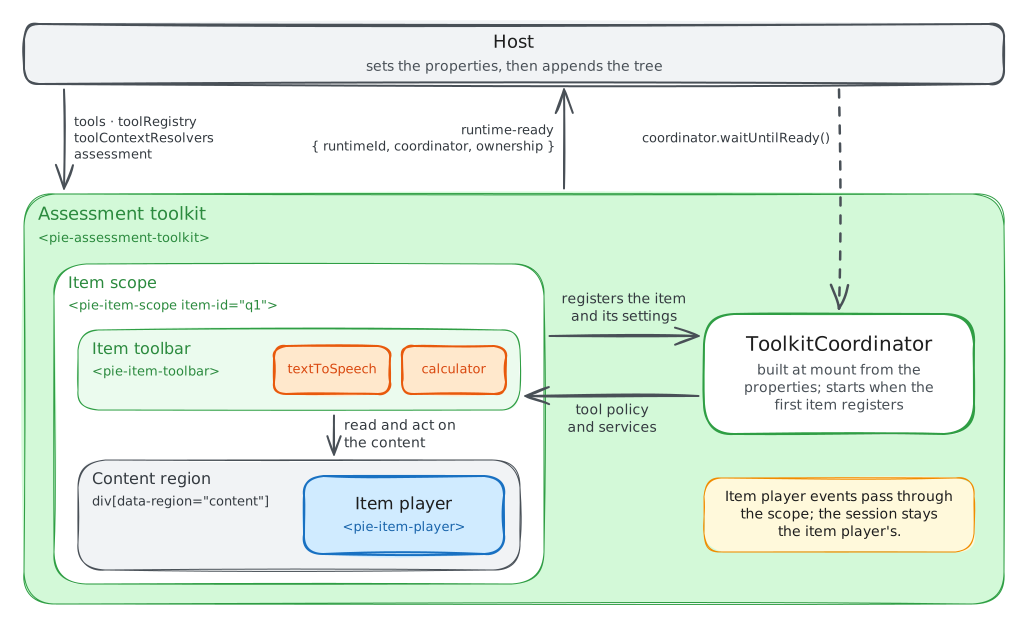
<pie-assessment-toolkit> needs no section. Bind none and it serves the item
toolbars inside it and the tools they open, around a plain item player that
takes nothing from the toolkit. <pie-item-scope> holds the item for its tools,
as it does in a section player's card. The tree this builds:
<pie-assessment-toolkit>
  <pie-item-scope item-id="q1">
    <pie-item-toolbar></pie-item-toolbar>
    <div data-region="content">
      <pie-item-player></pie-item-player>
    </div>
  </pie-item-scope>
</pie-assessment-toolkit>
The host sets the toolkit's properties before the tree enters the document. A scope registers as soon as it mounts, and that first registration starts the coordinator from the toolkit's inputs at that moment; see the binding rules below.
import '@pie-players/pie-assessment-toolkit/components/pie-assessment-toolkit-element';
import '@pie-players/pie-assessment-toolkit/components/item-scope-element';
import '@pie-players/pie-assessment-toolkit/components/item-toolbar-element';
import '@pie-players/pie-item-player';
import { createPackagedToolRegistry } from '@pie-players/pie-default-tool-loaders';

// With no section player, the registry's loaders are what define the tool elements.
const toolRegistry = createPackagedToolRegistry();

const toolkit = document.createElement('pie-assessment-toolkit');
toolkit.tools = {
  pnpEnforcement: 'on',
  placement: { item: ['textToSpeech', 'calculator'] },
};
toolkit.toolRegistry = toolRegistry;
toolkit.toolContextResolvers = toolContextResolvers;
toolkit.assessment = { id: 'a1', personalNeedsProfile: { supports: ['calculator'] } };

const scope = document.createElement('pie-item-scope');
scope.setAttribute('item-id', 'q1');
scope.item = item;
scope.innerHTML = `
  <pie-item-toolbar></pie-item-toolbar>
  <div data-region="content"><pie-item-player></pie-item-player></div>
`;

toolkit.append(scope);
container.append(toolkit);
Inside a scope:
- The toolbars and tools take the item and its id from the scope, and act on
the scope or on the element its
scopeElementproperty names.textToSpeechreads the scope's[data-region="content"]first. - A toolbar's own
item,item-idandscopeElementoverride the scope, and itstoolRegistryoverrides the toolkit's. - The scope registers the item with the toolkit once it finds one above it, so it may mount first. The toolkit files the item's accessibility catalogs, which read-aloud speaks in place of the markup they name.
- Item player events pass through the scope unchanged, and the session stays the item player's.
- A registry whose
toolModuleLoadersleave a tool out renders a button for it whose element never loads unless the host defines it.
Profile changes. A profile change is a new assessment value; the toolbars
re-derive on the policy change it emits. A host that holds the coordinator from
runtime-ready, or passes its own as coordinator, changes the profile with
coordinator.updateAssessment(...); the toolkit applies its assessment
property only to a coordinator it owns. The
calculator-pnp section demo
composes the owned-coordinator form.
Readiness. The toolkit announces runtime-ready, with
{ runtimeId, coordinator, ownership }, once per coordinator, with or without a
section. Without one, the coordinator starts at the first item that registers,
and a host reads its readiness from coordinator.waitUntilReady() or
isReady(). toolkit-ready and section-ready wait for a bound section, and
both fire again for every section the toolkit initializes, toolkit-ready
first, so a handler that needs the coordinator once guards itself. The toolkit
emits no stage events: pie-stage-change is the section player's.
Coordinator binding. The toolkit builds its own coordinator at mount from
tools, enabled-tools, assessment-id, accessibility, lazy-init,
tool-config-strictness and toolRegistry.
- Its first content binds it: the section, or without one the first item scope that registers.
- Content that arrives after one of those inputs changed binds a coordinator rebuilt from the current values, and the toolbars move to it.
- Once bound, a change to those inputs is reported once in the console and does
not reach the coordinator. The exception is a
toolRegistrygiven to a toolkit that had none, which the coordinator adopts in place. tools.pnpEnforcement,assessmentandtoolContextResolversapply at any time.- The coordinator reports feature policy asked with no assessment bound only
while
tools.pnpEnforcementison: a toolkit given noassessmentand no enforcement has asked for no accommodation.
Nested toolkits. A toolkit nested in another inherits the outer one's
coordinator when the outer one has a coordinator by the time the inner one
connects, which holds for both mounted together. Otherwise the inner one builds
its own and keeps it, and reports an outer coordinator arriving later once in
the console. isolation "force" keeps a nested toolkit on its own coordinator
by design.
Unmount. At unmount the toolkit disposes the controller of every section it bound. A coordinator it owns it then disposes too; one the host passes, or an outer toolkit lends, stays with its owner, and a later toolkit on it restores those sections from their sessions.
TTS and provider startup. Text-to-speech starts at the toolkit's first
content, once the section composes or the first item scope registers, and
coordinator.waitUntilReady() waits for it. With lazy-init it starts at the
first read-aloud instead, unless policy grants it. A tool provider or
text-to-speech that fails to start is a recoverable framework error: the tool
reports itself unavailable and the assessment goes on. When policy grants the
tool, through an item or district requirement, a profile support or a
test-administration override set to true, the failure is fatal, including one
that a later policy change grants. For a toolbar tool, only grants from
decisions that PNP enforcement applies to make the failure fatal.
Tool Configuration Model
The toolkit uses one canonical tools model with four keys:
policy: which tools may appear at all. A non-emptyallowedlist is an allow-list;blockedremoves a tool absolutely, whatever else grants it.placement: where tools appear (section,item,passage). Each tool declares the levels it supports;calculatoris item-only, and a tool placed at a level it does not support fails validation, which throws under the defaulttoolConfigStrictness: "error".providers: provider and runtime options per tool (calculator, textToSpeech and so on).providers.<toolId>.enabled: falsevetoes the tool.pnpEnforcement:"on"or"off"forces personal needs profile gating; omitted, the toolkit turns it on when the assessment carries profile or district material (PNP enforcement).
A profile, district policy or item setting names a tool by its toolId, and an
id no registered tool carries raises tool-policy.unknownSupportId.
Support ids lists the AfA PNP 3.0 terms the
packaged ids serve, and createPersonalNeedsProfileFromAfa in
@pie-players/pie-default-tool-loaders converts an AfA record
(AfA PNP 3.0 records).
Example:
tools: {
  policy: {
    // Only these tools may appear...
    allowed: ['calculator', 'textToSpeech', 'answerEliminator', 'graph', 'periodicTable'],
    // ...and graph never does.
    blocked: ['graph']
  },
  placement: {
    section: ['graph', 'periodicTable', 'protractor', 'lineReader', 'ruler'],
    item: ['calculator', 'textToSpeech', 'answerEliminator'],
    passage: ['textToSpeech']
  },
  providers: {
    calculator: {
      provider: {
        runtime: { authFetcher: async () => ({ apiKey: '...' }) }
      }
    },
    textToSpeech: { enabled: true, backend: 'browser' }
  }
}
With this configuration the section toolbar shows only periodicTable:
graph is blocked, and protractor, lineReader and ruler are outside the
allow-list. The item and passage placements show every tool they list.
Scope and Lifecycle
Tool instances use structured ids that make their scope explicit:
<toolId>:<scopeLevel>:<scopeId>
scopeLevel is one of assessment, section, item, passage or rubric,
and createScopedToolId throws on any other. The toolbars the players render
scope their ids at section, item or passage, and a rubric block's toolbar
scopes at passage. Examples from a section player:
lineReader:section:reading-1theme:section:reading-1calculator:item:q1textToSpeech:passage:passage-1
The section player keeps every item card of a section mounted while the student
moves between its items. The ElementToolStateStore keeps answer eliminations,
annotation highlights and the color-scheme choice, and the coordinator's
saveToolState/loadToolState hooks carry them across reloads
(Persistence Integration). Which tools are open is
not restored, and graph points start over.
Item-Level Tools (tools.placement.item)
Tools that operate within the context of one item:
tools: {
  placement: {
    item: ['calculator', 'textToSpeech', 'answerEliminator']
  }
}
Characteristics:
- Scope: bound to one item's DOM context
- Lifetime: an item's tools live as long as its card, which stays mounted until the section changes
- State: isolated per item (eliminations on Q5 don't affect Q6)
- UI pattern: buttons in the item toolbar; tools such as the calculator and the dictionaries open in a floating panel
- Persistence: answer eliminations and annotation highlights are kept per PIE element in the ElementToolStateStore
Available item-level tools:
- Text-to-speech (
textToSpeech): reads the item or passage text - Answer eliminator (
answerEliminator, item only): strikes through answer choices - Calculator (
calculator, item only): basic, scientific or graphing calculator - Annotation toolbar (
annotationToolbar): highlights and annotates selected text; it opens from a text selection, outside the toolbars - Line reader (
lineReader), magnifier (magnification), ruler (ruler), protractor (protractor), graph (graph) and periodic table (periodicTable) - Dictionaries (
dictionary,pictureDictionary,dictionarySpanish,pictureDictionarySpanish)
Default Tools lists every packaged tool with the content it applies to.
Example Use Case: A student uses answer eliminator on Question 3 to cross out choices B and D. When they navigate to Question 4, they see fresh, uneliminated choices. When they return to Question 3, their eliminations are restored.
Section-Level Tools (tools.placement.section)
Tools that float above the section and stay open across its items:
tools: {
  placement: {
    section: ['graph', 'periodicTable', 'protractor', 'lineReader', 'ruler', 'theme']
  }
}
Characteristics:
- Scope: section-wide, shared across the section's items
- Lifetime: one instance per section; at a section change the tool re-scopes to the new section and its state starts over
- State: an open tool stays open and in place while the student moves between the section's items
- UI pattern: draggable floating panels with z-index management
Available section-level tools:
- Graph (
graph): coordinate plane - Periodic table (
periodicTable): interactive periodic table reference - Protractor (
protractor): angle measurement - Ruler (
ruler): linear measurement (metric and imperial) - Line reader (
lineReader): reading guide and masking overlay - Magnifier (
magnification): movable magnifying lens - Dictionaries (
dictionary,pictureDictionary,dictionarySpanish,pictureDictionarySpanish) - The color-scheme tool (
theme): high-contrast color schemes; it also supports assessment level
Every section-level tool except the color-scheme tool also supports item placement.
Example Use Case: A student opens the periodic table on Question 2 and moves it beside the passage. When they navigate to Question 7 of the same section, it is still open where they left it.
When to Use Each
Use item-level tools when:
- Tool needs to read/interact with specific question content
- State should be isolated per-question
- Tool appears inline with the question (space-efficient)
- Tool behavior is contextual to the current item
Use section-level tools when:
- Tool is a general-purpose utility used across multiple questions
- State should persist while the student moves between a section's items
- Tool needs independent positioning and sizing
- Tool provides reference information or computation capability
Configuration example
A coordinator shows a tool only where tools.placement lists it, and its
default placement is empty. This configuration places the commonly used tools
at both kinds of level:
import { ToolkitCoordinator } from '@pie-players/pie-assessment-toolkit';
import { createPackagedToolRegistry } from '@pie-players/pie-default-tool-loaders';

const toolRegistry = createPackagedToolRegistry();
const coordinator = new ToolkitCoordinator({
  assessmentId: 'math-exam',
  toolRegistry,
  tools: {
    placement: {
      // Contextual placement
      item: ['calculator', 'textToSpeech', 'answerEliminator'],
      passage: ['textToSpeech'],
      // Section-level utilities
      section: ['graph', 'periodicTable', 'protractor', 'lineReader', 'ruler', 'theme']
    },
    providers: {
      calculator: {
        enabled: true,
        provider: {
          runtime: {
            authFetcher: async () => {
              const response = await fetch('/api/tools/desmos/auth');
              return response.json();
            }
          }
        }
      },
      textToSpeech: { enabled: true, backend: 'browser' }
    }
  },
  accessibility: {
    catalogs: [],
    language: 'en-US'
  }
});
Calculator providers
With no calculator provider configured, the calculator is Desmos. Desmos's CDN
rejects a calculator.js request without an apiKey (HTTP 403), so the Desmos
calculator opens only when the host supplies a key through
provider.runtime.authFetcher, a provider.init.proxyEndpoint that returns
{ apiKey }, or provider.init.apiKey, or has already loaded window.Desmos.
Without one the adapter throws "An apiKey or proxyEndpoint is required to load
Desmos." Runtime key delivery keeps the key out of the bundle, and the
browser's Desmos script request still carries it. The bundled open-source
implementation below needs no key.
Select the separate GeoGebra implementation explicitly without changing the calculator capability, placement, or item policy:
providers: {
  calculator: {
    provider: { id: 'calculator-geogebra' },
    settings: { showResetIcon: true }
  }
}
The bundled open-source implementation uses no API key or runtime network
request and supports basic, scientific, and focused graphing modes. It is
outside the packaged set, so the host first adds it with
createCalculatorToolRegistration
(Adding a backend) and then
selects it in the same way:
providers: {
  calculator: {
    provider: { id: 'calculator-cortex' },
    settings: { angleMode: 'degree', evaluationTimeLimitMs: 1000 }
  }
}
Minimal Server-Backed TTS Config
For Polly/Google server-backed TTS, the provider config supports a minimal form. Common options are defaulted so you can start with:
tools: {
  providers: {
    textToSpeech: {
      enabled: true,
      backend: 'server',
      serverProvider: 'polly'
    }
  }
}
By default, server-backed TTS resolves:
apiEndpoint: '/api/tts'transportMode: 'custom'forserverProvider: 'custom', else'pie'endpointValidationMode: 'voices', so the provider reads the voices route before it reports ready;'none'skips the probe
You can still set apiEndpoint explicitly when your host route is not /api/tts.
Inline TTS Speed Options
Inline TTS speed buttons are configurable via speedOptions on the provider config.
tools: {
  providers: {
    textToSpeech: {
      enabled: true,
      backend: "browser",
      speedOptions: [2, 1.25, 1.5] // host options keep this order; Normal is added if omitted
    }
  }
}
Hosts that need semantic UI copy can use object-form options. The rate still
drives playback and provider mapping; label / ariaLabel only change visible
and accessible button text.
tools: {
  providers: {
    textToSpeech: {
      enabled: true,
      backend: "server",
      serverProvider: "custom",
      speedOptions: [
        { rate: 0.8, label: "Slow", ariaLabel: "Slow speed" },
        { rate: 1, label: "Normal", ariaLabel: "Normal speed", default: true },
        { rate: 1.5, label: "Fast", ariaLabel: "Fast speed" }
      ]
    }
  }
}
speedOptions semantics:
- Omitted or non-array: default speed choices are shown (
Slow,Normal,Fast), withNormalselected. - Explicit empty array (
[]): hide all speed choices and reset playback speed to1.0. - Invalid-only arrays (for example
["fast", -1]): fall back to defaults. - Valid numeric values are deduplicated and keep first-seen order.
- Object-form entries use the same numeric validation/deduping by
rate. - Missing labels fall back to numeric text like
1.5x; missingariaLabelfalls back to a matching accessible name likeFast speed. - Visible labels render lowercase regardless of the configured casing (so
Slow/Normal/Fastdisplay asslow/normal/fast). This is a presentation transform only — the accessible name still usesariaLabel(e.g.Slow speed), so screen readers announce the canonical text. 1is a visibleNormalchoice. If a non-empty config omits1, PIE addsNormalat the natural point in the speed scale while preserving the relative order of host-provided options.- Speed choices are exposed as a
Playback speedradio group: one option is always selected, and choosing the already-selected speed is a no-op. - If only one speed option remains, the speed group is hidden by default. Set
showSingleSpeedOption: trueon the provider config to surface that one-option state.
Browser Fallback
The coordinator owns fallback to browser speech. When a server-backed provider
fails to initialize, the coordinator re-initializes TTS on the browser backend
and reports pie-tool-init-fallback. TTSService.initialize itself rejects
when its provider fails to start, and a playback failure after initialization
rejects that read without switching provider.
provider.runtime.authFetcher is optional. Add it only when your host environment
requires runtime auth material for TTS requests:
tools: {
  providers: {
    textToSpeech: {
      enabled: true,
      backend: 'server',
      serverProvider: 'polly',
      apiEndpoint: '/api/tts',
      provider: {
        runtime: {
          authFetcher: async () => {
            const response = await fetch('/api/tts/auth');
            return response.json();
          }
        }
      }
    }
  }
}
The fetch completes before the first TTS request, and its result merges over the
provider config: a returned authToken is sent as Authorization: Bearer <token>
and returned headers with every synthesis request, and under
includeAuthOnAssetFetch the Authorization header also reaches the custom
transport's speech-mark and audio fetches. A failed fetch falls back to browser
speech and reports pie-tool-init-fallback.
For a server that authenticates by cookie on another origin, set credentials: "include" on the textToSpeech provider config, beside
includeAuthOnAssetFetch. The cookie reaches speech-mark and audio fetches only
for origins in assetOrigins; unset, every TTS fetch keeps the browser default.
Custom Transport via Server Proxy (SC-style)
For custom backends that return URL assets (for example { audioContent, word }),
prefer a host-owned proxy endpoint so secrets never ship to the browser.
tools: {
  providers: {
    textToSpeech: {
      enabled: true,
      backend: "server",
      serverProvider: "custom",
      transportMode: "custom",
      endpointMode: "rootPost",
      endpointValidationMode: "none",
      apiEndpoint: "/api/tts/sc",
      speedRate: "medium",
      lang_id: "en-US",
      cache: true
    }
  }
}
Recommended host boundary:
- Browser calls local proxy (
/api/tts/sc) only. - Proxy route reads required server env vars (no defaults) and signs/attaches auth upstream.
- Browser never receives shared secret, API key, or signing material.
The section demos' /api/tts/sc route, backed by the SC adapter
(@pie-players/tts-server-sc), is the worked example of custom transport. TTS
stays on browser speech unless the host configures a server backend.
Test Attempt Session
The toolkit exposes a canonical TestAttemptSession runtime. The host maps its
backend's attempt payload into it and back out.
import {
  createNewTestAttemptSession,
  toItemSessionsRecord,
  upsertItemSessionFromPieSessionChange,
} from "@pie-players/pie-assessment-toolkit";

let testAttemptSession = createNewTestAttemptSession({
  testAttemptSessionIdentifier: attempt.id,
  assessmentId: assessment.id,
  seed: attempt.id,
  itemIdentifiers: assessment.itemIdentifiers,
});

// Record a PIE session change against its item
testAttemptSession = upsertItemSessionFromPieSessionChange(testAttemptSession, {
  itemIdentifier: "q1",
  pieSessionId: change.session.id,
  session: change.session,
});

// Use in section-player handoff (same item session shape as item players expect)
const itemSessions = toItemSessionsRecord(testAttemptSession);
Integration Boundary
@pie-players/pie-section-playerstays backend-agnostic and emits session/state changes.- Host applications own backend I/O.
- Hosts decide persistence policy (immediate, debounced, checkpoint, submit).
Section session API (controller + persistence)
For section-level session flows, the toolkit supports two complementary APIs:
- Persistence hook:
createSectionSessionPersistence(context, defaults)for load/save/clear orchestration - Direct controller API:
getSession(),applySession(session, { mode }),updateItemSession(itemId, detail)
The persistence strategy works with the same SectionControllerSessionState shape exposed by the controller, so hosts can choose bulk restore (applySession) and fine-grained updates (updateItemSession) without internal runtime coupling.
ToolkitCoordinator API
Configuration
export interface ToolkitCoordinatorConfig {
  assessmentId: string;  // Required: unique assessment identifier
  tools?: {
    policy?: {
      allowed?: string[];
      blocked?: string[];
    };
    placement?: {
      section?: string[];
      item?: string[];
      passage?: string[];
    };
    pnpEnforcement?: 'on' | 'off';  // omitted: auto-detected from the assessment
    providers?: {
      // Abridged; TextToSpeechToolProviderConfig carries every option.
      textToSpeech?: {
        enabled?: boolean;
        backend?: 'browser' | 'server';
        serverProvider?: 'polly' | 'google' | 'custom';
        apiEndpoint?: string;
        defaultVoice?: string;
        rate?: number;
        speedOptions?: TTSSpeedOption[];
        layoutMode?: 'reserved-row' | 'expanding-row' | 'floating-overlay' | 'left-aligned';
      };
      calculator?: {
        enabled?: boolean;
        provider?: {
          id?: string;  // 'calculator-desmos' (default), 'calculator-geogebra', or a composed-in backend
          init?: Record<string, unknown>;
          runtime?: {
            authFetcher?: () => Promise<Record<string, unknown>>;
          };
        };
        settings?: Record<string, unknown>;
        restrictedMode?: boolean;
      };
    };
  };
  toolConfigStrictness?: 'off' | 'warn' | 'error';  // default 'error'
  toolRegistry?: ToolRegistry | null;
  toolContextResolvers?: ToolContextResolverMap;
  accessibility?: {
    catalogs?: any[];
    language?: string;
  };
  hooks?: ToolkitCoordinatorHooks;
  lazyInit?: boolean;   // default false
  eagerInit?: boolean;  // default !lazyInit
}
A ToolkitCoordinator registers tool providers only from its toolRegistry.
Built without one, it adopts the registry of the toolkit it is bound to, such as
the section player's, which then validates its config and registers its
providers. A registry passed at construction is never replaced. Bound to a
toolkit that has none, it registers no providers, skips tool-id and placement
validation, and warns once (tools.registryUnavailable).
Methods
// Tool configuration
coordinator.getToolConfig('textToSpeech');
coordinator.updateToolConfig('textToSpeech', { rate: 1.5 });  // replaces the tool's provider, which starts again on next use
coordinator.updateToolsPlacement({ item: ['calculator', 'textToSpeech'] });

// Tool policy
coordinator.decideToolPolicy({ level: 'item', scope: { level: 'item', scopeId: 'item-42' } });
coordinator.decideFeaturePolicy('transcript', { level: 'item', scopeId: 'item-42' });
const unregisterItem = coordinator.registerItemSettings('item-42', itemSettings);
const offPolicy = coordinator.onPolicyChange(listener);
const offDiagnostics = coordinator.onPolicyDiagnostic(listener);
coordinator.updateAssessment(assessment);  // new profile or settings; null unbinds
coordinator.setPnpEnforcement('on');       // 'on' | 'off'; null returns to auto-detection
coordinator.getPolicyInputs();             // read-only inputs behind current decisions
const unregisterSource = coordinator.registerPolicySource(source);

// Tool requests: ask the toolbar hosting a tool to open it
const unregisterTarget = coordinator.registerToolRequestTarget(target);
coordinator.canRequestTool('calculator');      // false for a tool the deployment lacks
coordinator.requestTool({ toolId: 'calculator' });  // whether a toolbar claimed it; throws on an unknown id
const offTargets = coordinator.onToolRequestTargetsChange(listener);

// Providers and events
const provider = await coordinator.ensureProviderReady('textToSpeech');
const offErrors = coordinator.subscribeFrameworkErrors(listener);
const offCatalogs = coordinator.onCatalogsChange(listener);

// Readiness and teardown
await coordinator.waitUntilReady();
coordinator.isReady();
coordinator.getToolRegistry();
await coordinator.dispose();  // final teardown by the owner that constructed the coordinator
Each register*, on* and subscribe* call returns a function that undoes it.
The section-controller methods are under
Controller Event Subscriptions.
Direct Service Access
All services are public properties for direct access:
coordinator.ttsService              // TTSService instance
coordinator.toolCoordinator         // ToolCoordinatorApi, owned by the coordinator
coordinator.highlightCoordinator    // HighlightCoordinator instance
coordinator.elementToolStateStore   // ElementToolStateStore instance
coordinator.catalogResolver         // AccessibilityCatalogResolver instance
coordinator.toolProviderRegistry    // ToolProviderRegistry, the providers registered from toolRegistry
ElementToolStateStore API
The ElementToolStateStore holds tool state per PIE element under globally unique composite keys. It is kept apart from PIE session data and leaves the browser only through the coordinator's saveToolState hook (Persistence Integration).
Key Concepts
- Global Element ID: Composite key format:
${assessmentId}:${sectionId}:${attemptId}:${itemId}:${elementId}, withattemptId""when the host names no attempt - Element-Level Granularity: State tracked per PIE element; a tool keyed by item or section leaves
elementId, and for a sectionitemId, as"" - Per-Attempt State: two attempts at one section never share a key
- Separate from session data: tool state never enters the PIE session and is never scored
- Cross-Section Persistence: State persists when navigating between sections
ID Utilities
// Generate global element ID
const globalElementId = store.getGlobalElementId({
  assessmentId: 'demo-assessment',
  sectionId: 'section-1',
  attemptId: 'attempt-1',
  itemId: 'question-1',
  elementId: 'mc1'
});
// Returns: "demo-assessment:section-1:attempt-1:question-1:mc1"

// Parse global element ID
const components = store.parseGlobalElementId(globalElementId);
// Returns: { assessmentId, sectionId, attemptId, itemId, elementId }
CRUD Operations
// Set state for a tool on an element
store.setState(globalElementId, 'answerEliminator', {
  eliminatedChoices: ['choice-a', 'choice-c']
});

// Get state for a specific tool
const state = store.getState(globalElementId, 'answerEliminator');

// Get all tool states for an element
const elementState = store.getElementState(globalElementId);

// Get all states across all elements
const allState = store.getAllState();
Cleanup Operations
// Clear state for a specific element
store.clearElement(globalElementId);

// Clear state for a specific tool across all elements
store.clearTool('answerEliminator');

// Clear all elements in a specific section, across its attempts
store.clearSection('demo-assessment', 'section-1');

// Clear all state
store.clearAll();
Persistence Integration
A coordinator's store reports changes to the coordinator, which forwards them
to hooks.saveToolState; loadToolState is read once while the coordinator
gets ready. Persist tool state through those hooks. store.setOnStateChange
holds a single callback, so calling it on a coordinator's store disconnects
saveToolState.
const coordinator = new ToolkitCoordinator({
  assessmentId: 'demo-assessment',
  toolRegistry,
  hooks: {
    loadToolState: () => JSON.parse(localStorage.getItem('tool-state') ?? 'null'),
    saveToolState: (state) => localStorage.setItem('tool-state', JSON.stringify(state)),
  },
});
Reactivity
// Subscribe to state changes
const unsubscribe = store.subscribe((state) => {
  console.log('State changed:', state);
});

// Unsubscribe when done
unsubscribe();
Service APIs
TTSService
import { BrowserTTSProvider, TTSService } from '@pie-players/pie-assessment-toolkit';

const ttsService = new TTSService();

// Initialize with provider
await ttsService.initialize(new BrowserTTSProvider());

// Set catalog resolver for SSML support
ttsService.setCatalogResolver(catalogResolver);

// Playback: reads an element or a range, or the named card in its place
await ttsService.speak(promptElement, {
  catalogId: 'prompt-001',
  language: 'en-US'
});

// Controls
ttsService.pause();
ttsService.resume();
ttsService.stop();

// Settings
await ttsService.updateSettings({
  rate: 1.5,
  voice: 'Matthew'
});
ToolCoordinator
The toolkit owns the coordinator. A tool element registers with the one in its runtime context and hands it the element once it renders:
import {
  createToolCoordinatorRegistration,
  ZIndexLayer,
} from '@pie-players/pie-assessment-toolkit/tools/registration';

const registration = createToolCoordinatorRegistration('Calculator', ZIndexLayer.TOOL);

// Re-registers when a republished context brings a new coordinator.
$effect(() => registration.sync(coordinator, toolId));
$effect(() => {
  if (coordinator && containerEl && toolId) {
    coordinator.updateToolElement(toolId, containerEl);
  }
});
onDestroy(() => registration.release());
Visibility and stacking then go through the coordinator by scoped tool id:
showTool, hideTool, toggleTool, isToolVisible, bringToFront(element),
and getVisibleTools({ baseId }) / hideAllTools({ baseId }) for one tool
across scopes. Disposing the toolkit coordinator releases every entry. Its
debug lines print only under window.PIE_DEBUG = true.
HighlightCoordinator
import { HighlightColor, HighlightCoordinator } from '@pie-players/pie-assessment-toolkit';

const highlightCoordinator = new HighlightCoordinator();

// TTS highlights (temporary)
highlightCoordinator.highlightTTSWord([wordRange]); // one range per tree the word spans
highlightCoordinator.highlightTTSSentence([range1, range2]);
highlightCoordinator.clearTTS();

// Annotation highlights (persistent)
const id = highlightCoordinator.addAnnotation(range, HighlightColor.YELLOW);
highlightCoordinator.removeAnnotation(id);
Reading highlights resolve through five component-public tokens registered in
packages/theme/src/token-registry.json:
| Custom property | Default | Description |
|---|---|---|
--pie-tts-word-highlight |
--pie-missing at 68% |
Fill behind the current word |
--pie-tts-sentence-highlight |
--pie-missing at 38% |
Fill behind the current sentence |
--pie-tts-line-highlight |
--pie-tts-sentence-highlight |
Fill behind the current line |
--pie-tts-word-underline |
--pie-text at 70% |
Underline marking the current word |
--pie-tts-word-shadow |
--pie-text at 35% |
Shadow carrying the word over its fill |
The coordinator derives all five from the active theme's --pie-missing,
--pie-text and --pie-background. --pie-missing is the theme's
missing-response feedback color, which reading highlights reuse as their accent.
Opacities are clamped to a legible band, and the underline color is picked by
background luminance so the cue survives a dark scheme. The coordinator writes
the five inline on the document element. Inline styles outrank any author
selector, so a host override takes !important and owns the contrast the
derivation was maintaining, across every scheme it ships.
AccessibilityCatalogResolver
import { AccessibilityCatalogResolver } from '@pie-players/pie-assessment-toolkit';

const resolver = new AccessibilityCatalogResolver(
  assessment.accessibilityCatalogs,
  'en-US'
);

// Add item-level catalogs
resolver.addItemCatalogs(item.accessibilityCatalogs);

// Get alternative representation
const alternative = resolver.getAlternative('prompt-001', {
  type: 'spoken',
  language: 'en-US'
});

// Clear item catalogs when navigating away
resolver.clearItemCatalogs();
A resolved card carries either a string content (SSML for spoken, text for
braille) or a structured payload, decided by its catalog type — never both.
Consumers select by type and then validate the form they expect; a card with no
string form is not text content, and treating it as such would speak or render an
empty string.
Catalogs carried by a rendered item or passage are registered as one owner-level
transaction. The resolver owns the walk over entity-root,
config.extractedCatalogs, and model catalogs, along with their registration
precedence and change notification:
import {
  catalogOwnerContextFor,
} from '@pie-players/pie-assessment-toolkit';

const owner = {
  kind: 'item',
  itemId: item.id,
  canonicalItemId,
  assessmentId,
  sectionId,
} as const;

const unregister = resolver.registerOwner({ owner, entity: item });
const ownerView = resolver.forOwner(catalogOwnerContextFor(owner));

const stopObserving = ownerView.onChange(() => {
  const snapshot = ownerView.snapshot();
  // Interpret only the card types your capability owns.
});

stopObserving();
unregister();
CatalogOwnerSnapshot is immutable and deterministic. A content capability
receives it as ToolContentDependencyContext.catalogs; it does not receive the
raw entity, resolver, or separately assembled lookup context. Direct consumers
such as TTS may still call getAlternative(...) with a context built by
catalogOwnerContextFor.
SSMLExtractor
import { SSMLExtractor } from '@pie-players/pie-assessment-toolkit';

const extractor = new SSMLExtractor();

// Extract from item config
const result = extractor.extractFromItemConfig(item.config);

// Update item with cleaned config
item.config = result.cleanedConfig;
item.config.extractedCatalogs = result.catalogs;

// Register with catalog resolver
catalogResolver.addItemCatalogs(result.catalogs);
Cards without an extractor
A signed alternate is authored or written by an importer; no extractor lifts it from markup.
This package resolves and registers those cards through
AccessibilityCatalogResolver and the generic media helpers it re-exports
from @pie-players/pie-players-shared/media. Which card types mean what belongs to the capability that
needs them — signing's card validators and its resolution rules live in
@pie-players/pie-tool-sign-language, behind that capability's
requiresAuthoredContent.
Feature policy without a placement
ToolPolicyEngine.decideFeature(featureId, scope?) (and
ToolkitCoordinator.decideFeaturePolicy(featureId, scope?)) resolve one feature id
through PnpPolicySource's PNP precedence, independent of any toolbar
placement. Use it for capabilities that are not toolbar surfaces, such as
signing: an item-level decideToolPolicy(...) also reports a tool absent when it
was never placed, so it cannot tell a denial from a missing placement. An item
scope applies that item's registered settings, the item restriction and
requirement rungs; a decision without one applies no item's.
This package ships no profile.
Universal and empty profiles
covers the profiles @pie-players/pie-default-tool-loaders builds.
Registry membership makes a tool policy-addressable; it grants nothing.
Live registry changes
ToolRegistry.onRegistryChange(listener) observes successful register,
override, unregister, clear, component-override, and module-loader
changes synchronously. Invalid and no-op mutations do not emit, listener
failures do not interrupt other listeners, and unsubscribe is idempotent.
Section-player subscribes internally, so a capability registered after mount
appears without a host-forced rerender; unregister and clear destroy their
mounted surface elements immediately.
Integration with Section Player
The section player provides automatic ToolkitCoordinator integration:
<pie-section-player-splitpane id="player" section-id="section-1"></pie-section-player-splitpane>

<script type="module">
  import { ToolkitCoordinator } from '@pie-players/pie-assessment-toolkit';
  import { createPackagedToolRegistry } from '@pie-players/pie-default-tool-loaders';

  // Create coordinator
  const toolRegistry = createPackagedToolRegistry();
  const coordinator = new ToolkitCoordinator({
    assessmentId: 'my-assessment',
    toolRegistry,
    tools: {
      providers: { textToSpeech: { enabled: true, backend: 'browser' } },
      placement: {
        section: ['graph', 'periodicTable', 'protractor', 'lineReader', 'ruler'],
        item: ['calculator', 'textToSpeech', 'answerEliminator'],
        passage: ['textToSpeech']
      }
    }
  });

  // Pass to player
  const player = document.getElementById('player');
  player.runtime = { ...(player.runtime ?? {}), coordinator };
  player.section = mySection;

  // Player automatically:
  // - Extracts services from coordinator
  // - Scopes its runtime engine to `section-id`
  // - Provides runtime context to child components
  // - Registers item catalogs, including SSML catalogs a host extracted
  //   into `config.extractedCatalogs` with `SSMLExtractor`
  // - Handles catalog lifecycle
</script>
Runtime Context Contract
Section-player and toolkit components share one runtime context. An element inside the toolkit's tree connects to it:
import {
  connectToolRuntimeContext,
  type AssessmentToolkitRuntimeContext
} from "@pie-players/pie-assessment-toolkit";

let runtime: AssessmentToolkitRuntimeContext | undefined;
const disconnect = connectToolRuntimeContext(hostElement, (value) => {
  runtime = value;
});
AssessmentToolkitRuntimeContext carries ambient orchestration dependencies
that should not be prop-drilled through intermediate components:
toolkitCoordinatortoolCoordinatorttsServicehighlightCoordinatorcatalogResolverelementToolStateStoreassessmentIdsectionId
These runtime fields are expected to be present once the section-player provider is established (host-supplied coordinator or lazily created by section-player). Use explicit props/events for direct content contracts, and use runtime context for cross-cutting orchestration scope.
Standalone Sections (No Coordinator Provided)
If no coordinator is provided, the section player creates a default one:
// No coordinator provided - section player creates default
player.section = mySection;

// Internally creates:
// new ToolkitCoordinator({
//   assessmentId: runtime.assessmentId ?? section.identifier ?? 'assessment-<random>',
//   toolRegistry,                        // the player's toolRegistry, else the packaged registry
//   tools: player.runtime?.tools         // no tools are placed when this is unset
// })
Safe Custom Tool Configuration
Invalid tool or runtime initialization is handled inside pie-assessment-toolkit; the host needs no try/catch. The error model, its events and hooks, and the fallback panel are in Framework-owned error handling; host-side config patterns are in Safe custom tool configuration.
Use createToolsConfig() when you want to pre-validate and inspect diagnostics before mounting:
import {
  createToolsConfig,
  ToolkitCoordinator
} from "@pie-players/pie-assessment-toolkit";
import { createPackagedToolRegistry } from "@pie-players/pie-default-tool-loaders";

const toolRegistry = createPackagedToolRegistry();
const { config, diagnostics } = createToolsConfig({
  source: "host.bootstrap",
  strictness: "error",
  toolRegistry,
  tools: {
    providers: {
      textToSpeech: { enabled: true, backend: "browser" },
      calculator: { enabled: true }
    },
    placement: {
      item: ["calculator", "textToSpeech"]
    }
  }
});

// Fail-fast default: invalid config throws at the boundary.
const coordinator = new ToolkitCoordinator({
  assessmentId: "demo-assessment",
  toolRegistry,
  tools: config,
  toolConfigStrictness: "error"
});
Notes:
providers.textToSpeechis the canonical TTS provider key.providers.ttsis rejected by the validation contract.- A tool registration can declare
sanitizeConfigandvalidateConfighooks for itsproviders.<toolId>entry.
Instrumentation and Observability
Toolkit instrumentation is provider-agnostic. It uses the shared
InstrumentationProvider contract from @pie-players/pie-players-shared.
Injection Path
When the toolkit is hosted by a section or assessment player, the provider comes from the item-player loader config:
runtime.player.loaderConfig.instrumentationProvider
Semantics
- How an unset,
nullor invalid provider resolves is set out in Instrumentation providers. - Debug overlays can consume the same stream by composing providers with
CompositeInstrumentationProvider(for example New Relic + debug panel). - Toolkit telemetry forwarding uses the same provider path, so tool/backend instrumentation is sent to production providers and is visible in debug panel overlays.
Toolkit-Owned Canonical Event Stream
pie-toolkit-runtime-ownedpie-toolkit-runtime-inheritedpie-toolkit-runtime-readypie-toolkit-readypie-toolkit-section-readypie-toolkit-framework-error
Toolkit operational events are listed in Instrumentation providers.
The toolkit emits toolkit lifecycle events only; section and assessment events
stay in their own layers, so no event has two emitters. The event bridge's
optional dedupeWindowMs drops repeats within a window and is off by default.
Section Runtime Engine (advanced)
The section runtime engine is the section player's stage chain: a pure FSM that
turns the cohort a layout shows (its (sectionId, attemptId) pair), the
controller resolving and the readiness signals the layout derives into
pie-stage-change and pie-loading-complete.
The section player's layout kernel owns one per layout element, and it is the
only stage emitter. <pie-assessment-toolkit> emits no stages: its
SectionControllerBinding resolves the section's controller, which the toolkit
announces with toolkit-ready, and the toolkit publishes framework errors.
Entry point
@pie-players/pie-assessment-toolkit/runtime/engine is the stable entry for a
host that drives a section's stage chain. It carries SectionRuntimeEngine and
the vocabulary of its surface: the SectionEngineInputs dispatchInput takes,
the SectionEngineOutputs subscribe delivers, the SectionEngineState and
SectionEnginePhase getState returns, the cohort helpers (makeCohort,
cohortsEqual), the runtime config types with
resolveSectionEngineRuntimeState, and the readiness signals. The engine core, its adapter and its DOM bridge have no
entry: a host reaches them through the facade.
Stage chain
A cohort moves through composed, engine-ready and interactive, and ends at
disposed on a cohort change or unmount. engine-ready follows the
section-controller-resolved input, interactive the readiness signals that
satisfy the readiness mode. A readiness update that reports runtimeError
before interactive ends the chain: the first stage the cohort did not reach is
failed and the rest up to interactive are skipped. The section player sets
runtimeError from a non-recoverable framework-error, so a host waiting on
engine-ready or interactive always hears an answer. pie-loading-complete
fires once per cohort, on the condition that opens interactive: the section
controller is ready and the element pre-warm for the current items has
resolved. The items load after it; the controller's section-loading-complete
marks them loaded.
Common-host wiring example
Most hosts never construct the engine: the section-player layout elements do,
and a host-built section layout takes its engine from
pie-section-player-kernel-host (custom section layouts).
Use the facade for a section renderer outside the section player. The shape
mirrors the section-player kernel:
import {
  SectionRuntimeEngine,
  makeCohort,
} from "@pie-players/pie-assessment-toolkit/runtime/engine";

const engine = new SectionRuntimeEngine();

// 1. Attach to the layout host. `sourceCe` is stamped onto every event.
engine.attachHost({ host: layoutHostElement, sourceCe: "my-custom-layout" });

// 2. (Optional) Subscribe to the output batches the DOM bridge dispatches.
engine.subscribe((outputs) => {
  // `stage-change` and `loading-complete` outputs
});

// 3. Drive the engine with `SectionEngineInput`s.
const cohort = makeCohort({ sectionId, attemptId });
engine.dispatchInput({
  kind: "initialize",
  cohort,
  effectiveRuntime,
  effectiveToolsConfig,
  itemCount,
});

// When the toolkit's `section-ready` delivers the cohort's section controller:
engine.dispatchInput({ kind: "section-controller-resolved" });

// On readiness signal updates:
engine.dispatchInput({
  kind: "update-readiness-signals",
  signals: {
    sectionReady,
    interactionReady,
    allLoadingComplete,
    runtimeError,
  },
  itemCount,
  mode: "progressive",
});

// On unmount; emits `disposed` for the active cohort.
engine.dispose();
The adapter dispatches pie-stage-change and pie-loading-complete on host,
bubbling and composed, as the toolkit dispatches its own events. Framework
errors are not an engine output. The toolkit that owns the coordinator publishes
each one once: one bubbling, composed framework-error event, which reaches the
layout host and document, and one onFrameworkError call. A coordinator the
host passes in reports through the same surfaces.
packages/section-player/tests/section-player-event-delivery.spec.ts pins these
counts.
Writing a capability package
@pie-players/pie-assessment-toolkit/tools/registration is the stable entry a
capability package imports: the ToolRegistration contract, the
ToolProviderApi its provider descriptor creates, the surface and content
dependency types, the context predicates, createToolElement, resolveToolTag
and the toolbar registration helpers. A renderer that puts registrations on
screen uses the same entry for createToolSurfaceHost and
resolveContentCapabilities.
Import it rather than the package root: the root pulls in ToolkitCoordinator,
TTSService and the components, none of which a registration needs, and a
capability bundle that inlines them ends up with a second ToolRegistry class
that fails every instanceof across the host boundary. Mark the toolkit external
in the package's build with a pattern that covers subpaths, not a bare specifier.
@pie-players/pie-tool-sign-language is the worked example end to end: a
registration, a content resolver, its own custom element, and no edit to any
generic package. The default-tool-loaders README
covers how a deployment then composes it in, and the
Tool Registry Reference the registration and
host-surface contracts.
State separation
The toolkit keeps tool state and PIE session data in separate stores.
Tool state (ElementToolStateStore)
Never scored; it leaves the browser only through the coordinator's
saveToolState hook (Persistence Integration):
{
  "demo-assessment:section-1:attempt-1:question-1:mc1": {
    "answerEliminator": {
      "eliminatedChoices": ["choice-b", "choice-d"]
    },
    "annotationToolbar": {
      "annotations": [...]
    }
  }
}
Use for:
- Answer eliminations
- Highlighting/annotations
- Tool preferences
- UI state
PIE session data
The host persists it, and its backend scores it:
{
  "question-1": {
    "id": "session-123",
    "data": [
      { "id": "mc1", "element": "multiple-choice", "value": ["choice-a"] }
    ]
  }
}
Use for:
- Student responses
- Scoring data
- Assessment outcomes
Examples
See section-demos for complete examples, among them "Demo 3: Three Questions, One Passage", "Demo 4: TTS with SSML Extraction" and "Two Passages with One Question".
TypeScript Support
Full TypeScript definitions included:
import type {
  ToolkitCoordinatorApi,
  ElementToolStateStoreApi,
  ToolkitCoordinatorConfig
} from '@pie-players/pie-assessment-toolkit';
Content trust boundary
The toolkit embeds item content via the underlying pie-item-player
custom element and renders tool icons / SSML fragments that originate
from tool configuration. Two sanitization layers apply:
- Item / passage markup - sanitized by default in
pie-item-player. See pie-item-player README for thetrust-markupopt-out and thesanitizeMarkupoverride. The player also wraps overwide images and tables in scrollable regions (reflow wrappers). - Tool icons and SSML - tool-registered icon markup is parsed and
DOMPurified inside the toolbar at render time; SSML payloads are
restricted to an allow-listed subset of SSML tags/attributes before
being forwarded to TTS providers. Do not ship tools that rely on raw
<script>or event-handler attributes in their icon strings.
Security sets out the full trust boundary and the host's obligations.
Related Documentation
- Tool Registry Reference - Registry-based tool management and AfA PNP 3.0 profile support
- PNP Configuration Guide - How to configure student profiles, district policies, and governance rules
- Configuring Tools - Placement, policy and provider configuration
- Toolkit Tool Host Contract - Runtime guarantees between hosts and toolkit-managed tools
- Tools and Accommodations Architecture - Tool design, scopes and activation
- Assessment toolkit in the architecture overview - Where the toolkit sits among the players
- Section Player README - Section player integration
- Section Player Architecture - Layered runtime engine, kernel/toolkit wiring, lifecycle emit invariant
- Framework-Owned Error Handling - Canonical framework error model/events and fallback behavior
- Safe Custom Tool Configuration - Host-side config patterns and validation guidance
- Architecture Overview - Complete system architecture
License
MIT