Integrate PIE
Embed an item
Display a question and collect the response.
From the pie-players documentation · View source(opens in new tab)
Try it
Answer a question, switch modes and inspect the response data.
PIE players render assessment content in a web page. The content is PIE items: HTML markup plus a model for each interaction, where each interaction is a PIE element such as multiple choice or an extended text response. The elements come from pie-elements-ng; the players, the assessment toolkit and the tools come from this repository. Every player is a custom element and bundles its own runtime, so the host page needs no framework.
This page renders one item, saves the learner's response and scores it. Architecture shows how the pieces fit together.
Install
npm install @pie-players/pie-item-player
import "@pie-players/pie-item-player";
The import registers <pie-item-player>. A page without a build step loads the same entry from a CDN as a module script:
<script
  type="module"
  src="https://cdn.jsdelivr.net/npm/@pie-players/pie-item-player@x.y.z/dist/pie-item-player.js"
></script>
The @pie-players/* packages release together under one version number, written x.y.z in these docs. Pin it exactly: any release can break, and a range or @latest URL changes the page without a deploy (versioning). Packages and entry points lists the other packages.
Render an item
<pie-item-player id="player"></pie-item-player>

<script type="module">
  const player = document.getElementById("player");

  player.config = {
    elements: { "multiple-choice": "@pie-element/multiple-choice@14.0.3" },
    models: [
      {
        id: "q1",
        element: "multiple-choice",
        prompt: "Which city is the capital of France?",
        choiceMode: "radio",
        choices: [
          { label: "Paris", value: "paris", correct: true },
          { label: "London", value: "london" },
          { label: "Madrid", value: "madrid" },
        ],
      },
    ],
    markup: '<multiple-choice id="q1"></multiple-choice>',
  };
  player.env = { mode: "gather", role: "student" };
  player.session = { id: "session-1", data: [] };
</script>
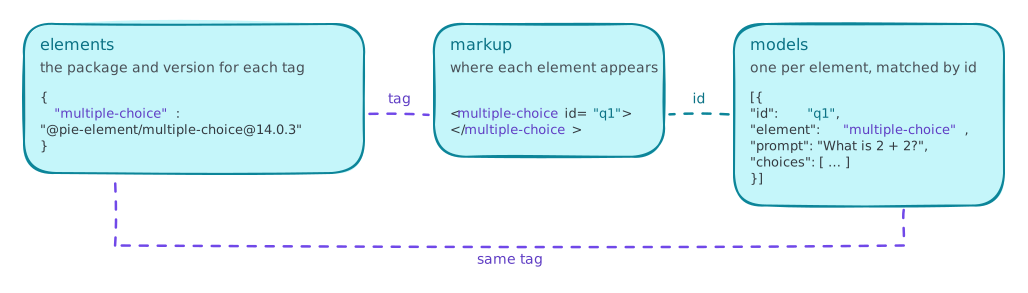
The item config has three parts that refer to each other:
elementsmaps each tag in the markup to an exact element package version. The player loads that version and registers it under a versioned tag, so two versions of one element can share a page.modelsholds one model per interaction. A model'selementnames its tag, and itsidmatches theidof its tag in the markup.markupis the item's HTML, with one element tag per model.
env.mode sets what the learner sees: gather takes responses, view shows them read-only, and evaluate marks them. env.role is student or instructor. The default is { mode: "gather", role: "student" }. Neither setting is a security boundary; see answer keys.
config, env and session are properties. Set as attributes, they take JSON.
Save the response
player.addEventListener("session-changed", (event) => {
  const { session } = event.detail;
  if (session) saveSession(session);
});
event.detail.session is the whole item session: { id, data }, with one data entry per element. Store it as it is, and assign it back to player.session to resume the attempt. The detail also names the element that changed (component) and whether it counts as answered (complete). A change to metadata alone carries session: null.
Score
const results = await player.provideScore();
provideScore() runs each element's scoring controller in the browser and returns one result per scored model, or false when the item has no models. Scoring and rubrics covers partial credit, rubrics and server-side scoring.
Answer keys
By default the full model reaches the browser, answer key included, and scoring runs there. That suits practice and formative use. Graded delivery needs three things together: hosted mode, models stripped of answer keys on the server, and outcomes computed by the host's backend. Security sets out the model.
Loading strategies
The strategy attribute sets where the player gets element code. The default, iife, loads pre-built bundles of any published element version from the PIE bundle host; esm loads the browser builds pie-elements-ng publishes from a CDN; preloaded uses elements the host bundled itself. Loading strategies compares the three.
Next steps
- A passage and its items in one layout, with tools and a saved section session: a section with tools, then the section player integration guide.
- Calculators, text-to-speech, the line reader and other tools: the assessment toolkit, and tools and accommodations for which tools each learner receives.
- Colors, fonts and dark mode: theming.
- Authoring:
mode="author"on the same player renders each element's configuration UI and emitsmodel-updatedas the author edits; see authoring configuration. - Moving from
@pie-framework/pie-player-components: the migration guide.