Guide and reference
Accessible content alternatives
Add spoken alternatives, transcripts and signed video to content.
From the pie-players documentation · View source(opens in new tab)
This guide defines the accessibility catalog data model and how the PIE runtime consumes it. An accessibility catalog attaches alternative representations to one piece of content: a spoken script or recording, a signed video, a transcript, braille and others. The guide covers the catalog types, card forms, references from markup, recordings, read-aloud suppression and scope, then SSML extraction and the toolkit, section player and print player wiring. It is for host integrators wiring catalogs into delivery, and for authors and importers producing catalog content.
Table of Contents
- Standards Basis
- Catalog Model
- Registration and Lookup
- SSML Extraction from PIE Content
- TTSService Integration
- PNP Integration
- Section Player Integration
- Print Player Integration
- Authoring Conventions
- References
Standards Basis
The catalog model adapts the accessibility catalogs of QTI (Question and Test Interoperability) 3.0, which took them over from APIP (Accessible Portable Item Protocol). Both specifications are maintained by 1EdTech, formerly IMS Global. Learner eligibility follows AfA PNP 3.0 (Access for All Personal Needs and Preferences), the project's standards baseline.
PIE departs from QTI in five places:
- Catalogs are JSON on the assessment, passage, item or model entity, and on
config.extractedCatalogs, in place of QTI XML. CatalogTypeis open: QTI'sext:vendor types pass, and any other unknown token is stored and logged (Supported Catalog Types).- A card may carry
payload, a structured form for types a string cannot express, such as a signed video. - Read-aloud suppression is
data-tts-suppress; importers map QTI'sdata-qti-suppress-tts(Suppressing Read-Aloud). - A support id is the camelCased AfA PNP 3.0 term where AfA names the
capability, such as
textToSpeechorsignLanguage.
Catalog Model
Supported Catalog Types
| Type | Description | Use Case | Rendered by PIE |
|---|---|---|---|
spoken |
A TTS script (SSML), or a recording of one as a media payload | Read-aloud | Yes: TTSService |
sign-language |
Signed video, as a structured media payload | Deaf/hard-of-hearing | Yes, once a host registers @pie-players/pie-tool-sign-language |
transcript |
Text transcript of an audio stimulus | Deaf/hard-of-hearing | Yes: the packaged transcript capability |
braille |
Braille-ready transcriptions | Blind users with refreshable displays | No: resolvable, host-consumed |
tactile |
Descriptions for tactile graphics | Tactile diagram readers | No: resolvable, host-consumed |
simplified-language |
Plain language alternatives | Cognitive accessibility, ELL | No: resolvable, host-consumed |
audio-description |
Extended audio descriptions | Visual content for blind users | No: resolvable, host-consumed |
extended-description |
Detailed text descriptions | Complex diagrams/images | No: resolvable, host-consumed |
sign-languagerenders in the section player's media region, gated on thesignLanguagePNP support (@pie-players/pie-tool-sign-language).transcriptrenders above the item or passage in the section and print players, gated on thetranscriptPNP support unless the card setsvisibility: "always".- A host renders the other types itself, reading them through the resolver
(
getAlternative,getCatalogsByType).
CatalogType stays open because QTI's support vocabulary is extensible: a token
PIE does not name is still stored and still resolvable by a host that asks for
it. A vendor extension takes QTI's ext: prefix (ext:custom-pronunciation)
and passes without comment. Any other unknown token, "spokn" included, is
registered and logged once per distinct token, on the card side ("stored but no
reader asks for that type") and on the lookup side ("cannot match any card"). A
host that checks before registering imports isKnownCatalogType from
@pie-players/pie-assessment-toolkit/services/AccessibilityCatalogResolver.
Card Content: String Or Payload
A card carries either content or payload, never both, and catalog
is the only thing that says which to read. catalog is QTI's
qti-card@support, and QTI gives qti-card one content slot:
interface CatalogCard {
  catalog: string;    // 'spoken', 'sign-language', 'braille', …
  language?: string;  // the card entry's xml:lang
  visibility?: string; // presentation policy for the capability that reads it
  content?: string;   // the string form: SSML for `spoken`, text for `braille`
  payload?: CatalogCardPayload;  // the structured form, read according to `catalog`
}
content is optional because some types have no string form at all. A signing
card needs a second source, a MIME type, a poster and a time range, so it carries
payload and no content. Nothing is mirrored between the two, so there is
never a second copy of the same URL to fall out of sync, and the payload carries
no type tag of its own that could disagree with catalog.
Consumers select by catalog type, then validate the form they expect:
- A
catalogIdpassed toTTSService.speakreads only a card's string form. A named card with nocontentcounts as no catalog, and resolution moves on to the content'sdata-catalog-idrefregions and then to generated speech. - A
data-catalog-idrefregion reads either form of aspokencard: a recording when one resolves, its script otherwise (Recorded Audio as a Spoken Alternate). - A
sign-languagecard carrying a bare URL incontentis reported and ignored.
Catalog References in Content
PIE elements provide the interaction (multiple choice, drag-and-drop,
constructed response); they live in
pie-elements-ng. Authored
content lives in item config model fields and in passage and rubric HTML, and
references a catalog with data-catalog-idref on the element whose content the
catalog replaces. An element renders its model content and preserves those
markers. Keep the PIE element id aligned with config.models[].id.
const item = {
  accessibilityCatalogs: [
    {
      identifier: 'prompt-001',
      cards: [{ catalog: 'spoken', language: 'en-US', content: '<speak>What is the main idea?</speak>' }]
    },
    {
      identifier: 'choice-001-A',
      cards: [{ catalog: 'spoken', language: 'en-US', content: '<speak>Choice A. Plants need sunlight.</speak>' }]
    }
  ],
  config: {
    markup: '<multiple-choice id="q1"></multiple-choice>',
    elements: {
      'multiple-choice': '@pie-element/multiple-choice@x.y.z'
    },
    models: [
      {
        id: 'q1',
        element: 'multiple-choice',
        prompt: '<div data-catalog-idref="prompt-001">What is the main idea?</div>',
        choices: [
          { value: 'a', label: '<span data-catalog-idref="choice-001-A">Plants need sunlight to grow.</span>' },
          { value: 'b', label: '<span data-catalog-idref="choice-001-B">Water is essential for life.</span>' }
        ]
      }
    ]
  }
};
<!-- Passage or rubric HTML can also reference a shared catalog. -->
<div data-catalog-idref="passage-photosynthesis">
  <p>Photosynthesis is the process by which...</p>
</div>
Two Cards of One Type: Script and Recording
A spoken node may carry both a reading script and a recording of it, in the same
language. This is APIP's pattern, kept by QTI 3's migration guidance: the script
is what the recording was generated from and its fallback when the clip cannot
play.
{
  identifier: 'prompt-1',
  cards: [
    { catalog: 'spoken', language: 'en-US', content: '<speak>A plant absorbs…</speak>' },
    { catalog: 'spoken', language: 'en-US', payload: { media: { /* audio */ } } },
  ],
}
A card carries exactly one of content or payload, so the slot is already the
discriminator and no extra field is needed. A lookup picks one with form:
resolver.getAlternative('prompt-1', { type: 'spoken', language: 'en-US', form: 'payload' });
form is a preference, not a filter: an absent preferred form still returns
the other card, so callers check what they got. It applies within a language
rung and never across one — a recording in the requested language beats a script
in that language, but a script in the requested language beats a recording in
another. Omit form for first-match resolution.
getAllAlternatives keys on type, language and form, so both cards are
reported.
Recorded Audio as a Spoken Alternate
A spoken card may carry a recording instead of a script. QTI 3 treats a script
and its recording as one support, so a recording needs no PNP entitlement of its
own.
{
  catalog: 'spoken',
  language: 'en-US',
  payload: {
    media: {
      version: 1,
      id: 'prompt-audio',
      kind: 'audio',
      sources: [{ src: '/audio/prompt.mp3', type: 'audio/mpeg' }],
    },
    fragment: { startSeconds: 4, endSeconds: 9 },  // optional slice of a longer file
  },
}
- Highlighting is the node as a block, not word by word: a recording emits no word-boundary events. Word-level highlighting stays on the synthesized path.
media.kindmust beaudio. A video filed underspokenis refused, so signing and speech cards cannot swap roles.- The first source is used. An
<audio>element with alternative<source>children signals failure through a path that is awkward to observe, and a dependable fallback matters more than encoding negotiation. fragmentbecomes a Media Fragments URI, with the end bound enforced by the player because browser support for it is inconsistent.- The rate setting applies via
playbackRate; voice selection does not. - Failure degrades to the script: playback retries the node with its
contentcard. With no script authored, the failure is reported rather than silently skipped. - Suppression still wins, below.
The read-aloud-accommodations section demo exercises all of this, including a
clip that fails to load.
Suppressing Read-Aloud
Some content must be shown and never spoken: items where reading is the
construct, such as decoding and spelling. data-tts-suppress marks an element and
its subtree not-to-be-spoken:
<p>
  Which word begins with the same sound as
  <span data-tts-suppress="all">cake</span>?
</p>
| Value | Effect |
|---|---|
computer-read-aloud |
Not spoken by PIE's TTS. |
all |
Not spoken by PIE's TTS, and the host should also hide it from AT. |
screen-reader |
The host should hide it from AT; PIE's TTS still reads it aloud. |
Hiding content from assistive technology (AT) is the host's job, so PIE's TTS honors only the read-aloud half of the vocabulary. The attribute takes one value. An unrecognized or empty value suppresses anyway and logs why: a token that fell through on a typo would speak the word the item was measuring, with no visible symptom.
Not a catalog card, and not a PNP field. A suppression card would carry
neither content nor payload and would only work on docked nodes, and it has to
be enforceable in the selection read-aloud path, which consults no catalog.
prohibitedSupports is the learner declining a support; this is the item saying
"not here, for anyone", so it overrides an entitlement and beats an authored
spoken card on the same node.
Enforced in every path that produces speech:
- the composed catalog path, checked before card resolution, and the card a
catalogIdnames; - the generated-speech and visible-text collectors, via
isNodeExcludedFromSpeech; - structural pause boundaries, so a suppressed node leaves no audible seam;
- a range target, the annotation-toolbar selection path.
Range.toString()honors no DOM filter, so the range itself is filtered. A selection wholly inside suppressed content speaks nothing; one that spans it speaks the rest, with highlight offsets from the same filtered text.
ttsService.speak takes only a DOM target, an element or a range, so no caller
can hand it text the filter has not seen.
Speech-only, with no braille or signing equivalent. The test is whether a modality preserves the information the item measures. Speech destroys spelling; braille preserves it, so braille of a spelling item is how a blind candidate takes that test. Signing preserves it only when the signer fingerspells, a fact that lives in the recording and is known to the signer, not to whoever authors an attribute. Suppression is per node while a signed alternate is one video per item, so the only available rule would withhold a deaf candidate's whole translation over one word.
Importing QTI content. QTI 3 spells this data-qti-suppress-tts, with the
same vocabulary and placement. PIE reads only data-tts-suppress, following its
own data-tts-* family, so an importer maps QTI's spelling on the way in.
Catalog Scope
Catalogs live at two levels: assessment-level catalogs, shared across items, and catalogs on a passage, item or model, scoped to that content.
// Assessment-level catalog (shared across items)
const assessment = {
  accessibilityCatalogs: [
    {
      identifier: 'shared-passage-001',
      cards: [
        { catalog: 'spoken', language: 'en-US', content: '<speak>...' },
        { catalog: 'braille', language: 'en', content: '⠠⠏⠓⠕⠞⠕...' }
      ]
    }
  ]
};

const passage = {
  content: '<div data-catalog-idref="shared-passage-001">Photosynthesis is the process...</div>'
};

// Item-level catalog (item-specific)
const item = {
  accessibilityCatalogs: [
    {
      identifier: 'prompt-photo-001',
      cards: [
        { catalog: 'spoken', language: 'en-US', content: '<speak>...' },
        { catalog: 'simplified-language', language: 'en', content: 'What do plants need?' }
      ]
    }
  ],
  config: {
    markup: '<multiple-choice id="photo-q1"></multiple-choice>',
    elements: {
      'multiple-choice': '@pie-element/multiple-choice@x.y.z'
    },
    models: [
      {
        id: 'photo-q1',
        element: 'multiple-choice',
        prompt: '<div data-catalog-idref="prompt-photo-001">What do plants need?</div>',
        choices: []
      }
    ]
  }
};
A lookup made in a content owner's context checks the catalog registered for exactly that owner, then the one compatible owner, then the assessment-level catalogs, so an item or model catalog overrides an assessment catalog with the same identifier. When several compatible owners hold the identifier, the lookup is ambiguous: it warns and returns nothing.
Language Fallback
const resolver = new AccessibilityCatalogResolver(
  [
    {
      identifier: 'welcome-message',
      cards: [
        { catalog: 'spoken', language: 'en-US', content: '<speak>Welcome...</speak>' },
        { catalog: 'spoken', language: 'es-ES', content: '<speak>Bienvenido...</speak>' },
        { catalog: 'spoken', language: 'fr-FR', content: '<speak>Bienvenue...</speak>' }
      ]
    }
  ],
  'en-US' // Default language
);

// Get English version
const english = resolver.getAlternative('welcome-message', {
  type: 'spoken',
  language: 'en-US'
});

// Get Spanish version
const spanish = resolver.getAlternative('welcome-message', {
  type: 'spoken',
  language: 'es-ES'
});

// A missing language falls back to the resolver's default language ('en-US'
// unless it was constructed with another), then to a card in any language
const german = resolver.getAlternative('welcome-message', {
  type: 'spoken',
  language: 'de-DE' // Not available
});

// useFallback defaults to true; false returns a de-DE card or null
const germanOnly = resolver.getAlternative('welcome-message', {
  type: 'spoken',
  language: 'de-DE',
  useFallback: false
});
Registration and Lookup
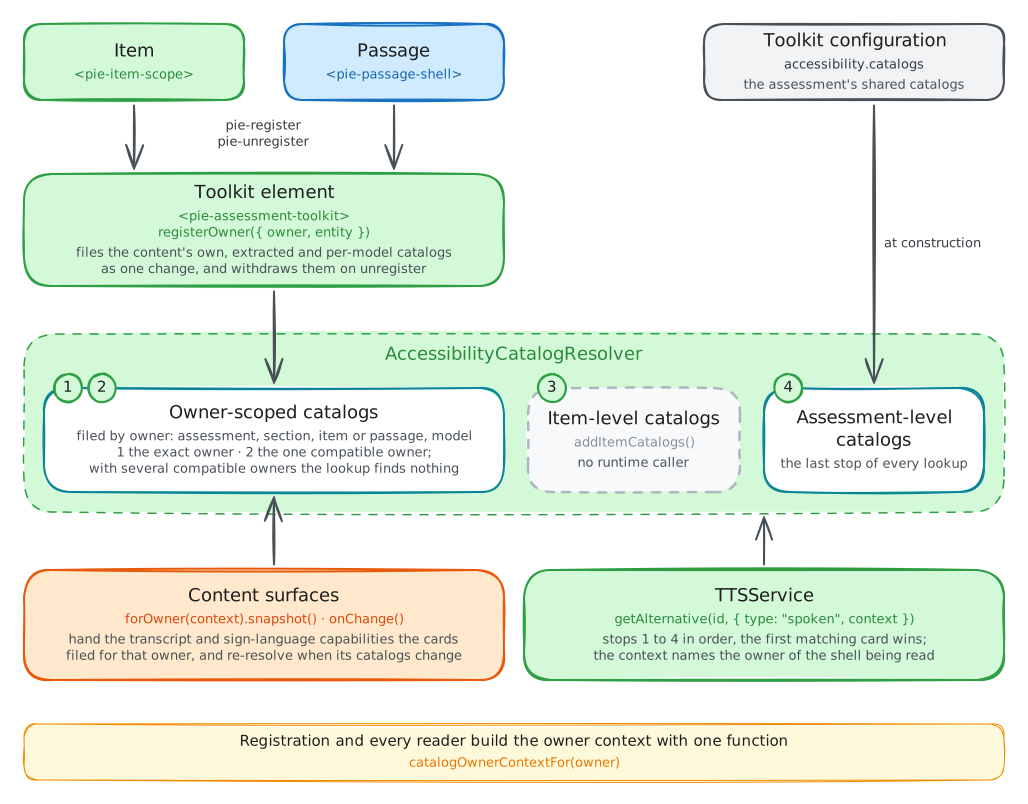
- Coordinator construction:
ToolkitCoordinatorfiles the catalogs inaccessibility.catalogsas assessment-level catalogs. - Section load: the host passes the coordinator through
sectionPlayer.runtime. - Item or passage mount: the runtime shell dispatches
pie-register, and<pie-assessment-toolkit>files the content's catalogs under its Catalog Owner withregisterOwner(...): entity-levelaccessibilityCatalogs,config.extractedCatalogs, and each model's own catalogs, the last under the model'smodelIdso two models can reuse one identifier. - Read:
TTSServiceresolvesdata-catalog-idrefreferences tospokencards before falling back to generated speech or visible text. Capabilities on the content's surfaces read their own types from a Catalog Owner Snapshot, an immutable view of one owner's cards:transcriptfrom the packaged set,sign-languageonce a host registers it. - Navigation or unmount: the shell's registration is removed with it.
Registration and lookup agree on where a catalog is filed because the resolver
owns both. Content surfaces bind to an owner through a Catalog Owner View
(forOwner(...)), and direct lookup clients such as TTS build their context
with catalogOwnerContextFor(...). The TTS deep dive's
authored catalog walkthrough
traces one read through these steps.
SSML Extraction from PIE Content
SSMLExtractor converts <speak> SSML embedded in item content into
accessibility catalogs. Embedding lets an author keep pronunciation, math
phrasing and pacing beside the visible text; extraction moves the SSML into
catalogs so the rendered markup carries none. It reads config.markup, each
model's prompt and each choice label, and for each <speak>:
- generates a catalog with a unique identifier,
- removes the
<speak>from the markup and marks the enclosing element withdata-catalog-idref, - returns the catalogs for the host to store on
config.extractedCatalogs.
Run it as a preprocessing or import step before rendering, then pass the cleaned
config with config.extractedCatalogs to the player. Shell registration files
extractedCatalogs when a shell mounts; no player or shell runs the extractor.
Signed content has no extractor: a sign-language card is authored or written
by an importer, and a signing video left in markup renders as ordinary content
to every learner.
Extraction Example
Before, as the author writes it:
const config = {
  markup: '<multiple-choice id="q1"></multiple-choice>',
  elements: {
    'multiple-choice': '@pie-element/multiple-choice@x.y.z'
  },
  models: [
    {
      id: 'q1',
      element: 'multiple-choice',
      prompt: `<div>
        <speak xml:lang="en-US">
          Which method should you use to solve
          <prosody rate="slow">x squared, minus five x, plus six,
          equals zero</prosody>?
        </speak>
        <p><strong>Which method should you use to solve x² - 5x + 6 = 0?</strong></p>
      </div>`,
      choiceMode: 'radio',
      choices: [
        {
          value: 'a',
          label: `<span><speak>The <emphasis>quadratic formula</emphasis></speak>The quadratic formula</span>`
        },
        {
          value: 'd',
          label: 'Graphing'  // No SSML: reads its visible text
        }
      ]
    }
  ]
};
After extraction, with the catalogs stored on extractedCatalogs:
const config = {
  markup: '<multiple-choice id="q1"></multiple-choice>',
  elements: {
    'multiple-choice': '@pie-element/multiple-choice@x.y.z'
  },
  models: [
    {
      id: 'q1',
      element: 'multiple-choice',
      prompt: `<div data-catalog-idref="auto-prompt-q1-0">
        <p><strong>Which method should you use to solve x² - 5x + 6 = 0?</strong></p>
      </div>`,
      choiceMode: 'radio',
      choices: [
        {
          value: 'a',
          label: `<span data-catalog-idref="auto-choice-q1-a-1">The quadratic formula</span>`
        },
        {
          value: 'd',
          label: 'Graphing'  // No SSML found, so no catalog
        }
      ]
    }
  ],
  extractedCatalogs: [
    {
      identifier: 'auto-prompt-q1-0',
      cards: [
        {
          catalog: 'spoken',
          language: 'en-US',
          content: `<speak xml:lang="en-US">
            Which method should you use to solve
            <prosody rate="slow">x squared, minus five x, plus six,
            equals zero</prosody>?
          </speak>`
        }
      ]
    },
    {
      identifier: 'auto-choice-q1-a-1',
      cards: [
        {
          catalog: 'spoken',
          language: 'en-US',
          content: `<speak>The <emphasis>quadratic formula</emphasis></speak>`
        }
      ]
    }
  ]
};
The extractor docks each catalog to the element directly around its <speak>,
which is why each choice label wraps its SSML and its visible text in one
<span>. A <speak> with no enclosing element still yields a catalog, with no
data-catalog-idref to reach it from the content, and the extractor warns. The
trailing number comes from a counter on the extractor instance that runs until
reset(), so the choices number on from the prompt.
Read-Aloud After Extraction
- Inline read-aloud (
pie-tool-tts-inline): the student presses the item's read-aloud button.TTSServicewalks the item, finds thedata-catalog-idrefregions, and speaks each region's extracted card with the visible text between them. A provider with SSML support voices the authored prosody, and the browser provider speaks the card's text (provider SSML support). - Selection read-aloud (annotation toolbar): the student selects "The
quadratic formula" and presses read-aloud. The toolbar calls
ttsService.speak(range, { contentRoot, catalogContext })with the catalog context of the shell holding the selection. The selection holds choice a'sdata-catalog-idrefnode whole, so its card is spoken with the authored<emphasis>. Selecting only "quadratic" holds part of the node, and speaks the selected visible text. - No SSML: choice d ("Graphing") carries no
data-catalog-idref, so TTS speaks its visible text.
Running the Extractor
import { SSMLExtractor } from '@pie-players/pie-assessment-toolkit';

const extractor = new SSMLExtractor();
const result = extractor.extractFromItemConfig(item.config);

// Update config with cleaned content
item.config = result.cleanedConfig;
item.config.extractedCatalogs = result.catalogs;
extractFromItemConfig leaves the config it is given unchanged and returns a
cleaned copy.
TTSService Integration
Section-player delivery goes through ToolkitCoordinator, which creates and
wires the resolver, the TTS service and highlighting together
(Section Player Integration). A test, a custom
host control or a focused service experiment drives TTSService directly, and
then initializes a provider itself:
import {
  AccessibilityCatalogResolver,
  BrowserTTSProvider,
  TTSService,
} from '@pie-players/pie-assessment-toolkit';

const resolver = new AccessibilityCatalogResolver(assessmentCatalogs, 'en-US');
const ttsService = new TTSService();

await ttsService.initialize(new BrowserTTSProvider());
ttsService.setCatalogResolver(resolver);

const prompt = document.querySelector('[data-catalog-idref="prompt-001"]');
if (prompt) {
  await ttsService.speak(prompt, { catalogId: 'prompt-001', language: 'en-US' });
}
speak throws until a provider is initialized.
PNP Integration
The learner's Personal Needs and Preferences (PNP) profile reaches tool policy on the
assessment entity. The host sets personalNeedsProfile on the assessment and
binds it to the coordinator; placement stays the host's list, and policy decides
which placed tools the learner gets:
import type { AssessmentEntity } from '@pie-players/pie-players-shared/types';

const assessment: AssessmentEntity = {
  id: 'assessment-1',
  personalNeedsProfile: {
    supports: ['textToSpeech'],
    prohibitedSupports: [],
  },
};

coordinator.updateAssessment(assessment);
A section player or toolkit that builds its own coordinator takes the same
entity on its assessment property. District policy, test administration
overrides and item settings join the profile there; the
PNP configuration guide
covers each input and their precedence. One grant has a built-in brake: while
the profile resolves screenReader enabled, the toolkit withholds
textToSpeech and autoplayAudio as a support conflict
(ADR 0004),
so a supports: ['textToSpeech'] grant does not place read-aloud for that
student.
Section Player Integration
The section player registers catalogs and renders the read-aloud tools from the
coordinator the host passes it. The coordinator takes the assessment-level
catalogs on accessibility:
import '@pie-players/pie-section-player/components/section-player-splitpane-element';
import { ToolkitCoordinator } from '@pie-players/pie-assessment-toolkit';
import { createPackagedToolRegistry } from '@pie-players/pie-default-tool-loaders';

const coordinator = new ToolkitCoordinator({
  assessmentId: assessment.id,
  toolRegistry: createPackagedToolRegistry(),
  accessibility: {
    catalogs: assessment.accessibilityCatalogs ?? [],
    language: 'en-US',
  },
  tools: {
    placement: {
      item: ['textToSpeech'],
      passage: ['textToSpeech'],
      section: ['lineReader', 'ruler'],
    },
    providers: {
      textToSpeech: {
        backend: 'browser',
      },
    },
  },
});
coordinator.updateAssessment(assessment);

const sectionPlayer = document.querySelector('pie-section-player-splitpane');
sectionPlayer.runtime = {
  ...(sectionPlayer.runtime ?? {}),
  assessmentId: assessment.id,
  coordinator,
  tools: coordinator.config.tools,
};
sectionPlayer.sectionId = section.identifier;
sectionPlayer.attemptId = attempt.id;
sectionPlayer.section = section;
From there the section player:
- Registers catalogs already present on passages, items, models and
config.extractedCatalogsas each shell mounts. - Unregisters a shell's catalogs on navigation or unmount.
- Renders the inline TTS button on each item and passage toolbar where
textToSpeechis placed and policy does not block it. - Resolves
data-catalog-idreftospokencards, then falls back to generated speech or visible text.
The section player integration guide covers the rest of the runtime wiring.
Print Player Integration
<pie-print> resolves the item's catalogs itself. A print job is one learner with
one profile, decided once, so there is no coordinator to build and no lifecycle to
manage: the profile goes on the config beside the item.
import '@pie-players/pie-print-player';

const player = document.querySelector('pie-print');
player.config = {
  // The PIE config. Catalogs written onto a model arrive with it; entity-root and
  // extractor-generated ones are passed as `accessibilityCatalogs` /
  // `extractedCatalogs` on the same object.
  item: itemEntity.config,
  options: { role: 'student' },
  accessibility: {
    personalNeedsProfile: student.personalNeedsProfile,
    // Optional, and only where a program has them.
    settings: assessment.settings,
    itemSettings: itemRef.settings,
  },
};
- Eligibility uses delivery's precedence, highest first: district block,
test administration override set to
false, item restriction, profile prohibition, a support conflict (screenReaderwithholdingtextToSpeechandautoplayAudio), override set totrue, item requirement, district requirement, profile support. A district block outranks the learner's profile on paper as it does on screen. - An alternate in play prints inline and unconditionally, above the item content. There is nothing to reveal on paper and no control to press.
- An alternate an item declares as authored presentation prints with no
accessibilityat all. An item family designed to be delivered with its transcript on screen is not an accommodation. An accommodation card with no profile supplied prints nothing. - Video alternates do not print. Print opens only the in-flow host slot; the docked-media slot, which holds video, has nothing to show on paper.
The alternates land in a .pie-print-alternates block, each preceded by a
.pie-print-alternates__label carrying the capability's name. Paper has no
accessibility tree, so the name is rendered in place of an aria-label.
Authoring Conventions
- Identifiers need to be unique within their owner. A model's catalogs are
filed under the model, so two models can reuse one identifier. Prefix
assessment-level catalogs (
shared-passage-photosynthesis), since an item catalog with the same identifier overrides them. - Placement: keep a catalog on the passage, item or model whose content it describes, so it registers and unregisters with that content. Assessment-level catalogs are for content shared across items.
- Languages are BCP 47 tags (
en-US,es-ES). Give each catalog a card in the resolver's default language, since a missing language falls back to it. PassuseFallback: falsewhere a card in another language is worse than none. - Braille cards use the code the content needs: Nemeth for math, UEB for text.
- SSML for
spokencards follows the TTS authoring guide, which covers each provider's supported subset.
References
- Section player integration guide
- PNP Configuration Guide
- QTI 3.0 Best Practices and Implementation Guide, 1EdTech: accessibility catalogs and
data-qti-suppress-tts - AfA PNP 3.0 Information Model, 1EdTech
- WCAG 2.2 Guidelines
- Web Speech API
- Nemeth Braille Code