Guides and reference: Accessibility and evidence
Guide and reference
Accessibility
PIE targets WCAG 2.2 AA. Learner profiles control supports such as read-aloud, content alternatives, color schemes and assessment tools.
Standards and status
The players and elements are reviewed against a WCAG 2.2 AA baseline(opens in new tab). Automated axe checks run against every element and the item, section and assessment players. A full manual pass with VoiceOver, NVDA and JAWS has not happened yet; open findings are tracked in the deferred-issues register(opens in new tab).
Keyboard
Every interaction works from the keyboard, with arrow keys inside composite controls.
Screen readers
Semantic markup, ARIA roles and labels, and live regions for feedback and status.
Focus
A logical focus order and a visible focus indicator.
Target size
Controls are at least 24 by 24 CSS pixels, or spaced as WCAG 2.5.8 allows.
Reflow and zoom
No horizontal scroll at 320 px; wide images and tables scroll in their own region at 400% zoom.
Color schemes
Every element takes its colors from theme tokens, so a scheme reaches it.
Personal needs profile
A learner's accommodations arrive as an AfA PNP 3.0 profile on the assessment. The toolkit maps
each support to the tool that delivers it; an id it does not know raises a tool-policy.unknownSupportId diagnostic.
| PNP support | Tool |
|---|---|
spoken | textToSpeech |
calculator-on-screen | calculator |
answer-masking | answerEliminator |
dictionary-on-screen | dictionary |
line-reader | lineReader |
sign-language | signLanguage |
transcript | transcript |
How a support combines with tool placement, district policy and test-administration overrides is the toolkit's tool policy. PNP configuration(opens in new tab)
Read-aloud
The text-to-speech tool reads the item's content region, highlighting as it speaks. Math is spoken
through speech-rule-engine, with ClearSpeak for English and MathSpeak otherwise. Mark anything that
must stay silent with data-tts-suppress; the QTI importers map data-qti-suppress-tts onto it.
| Provider | Highlighting | Package |
|---|---|---|
| Browser speech | Sentence | No server; voices vary by browser and OS |
| Amazon Polly | Word | @pie-players/tts-server-polly |
| Google Cloud TTS | Word (Standard, WaveNet); sentence (Studio) | @pie-players/tts-server-google |
| SchoolCity | Word | @pie-players/tts-server-sc, through a custom transport |
| Your own | Word or sentence | @pie-players/tts-server-core |
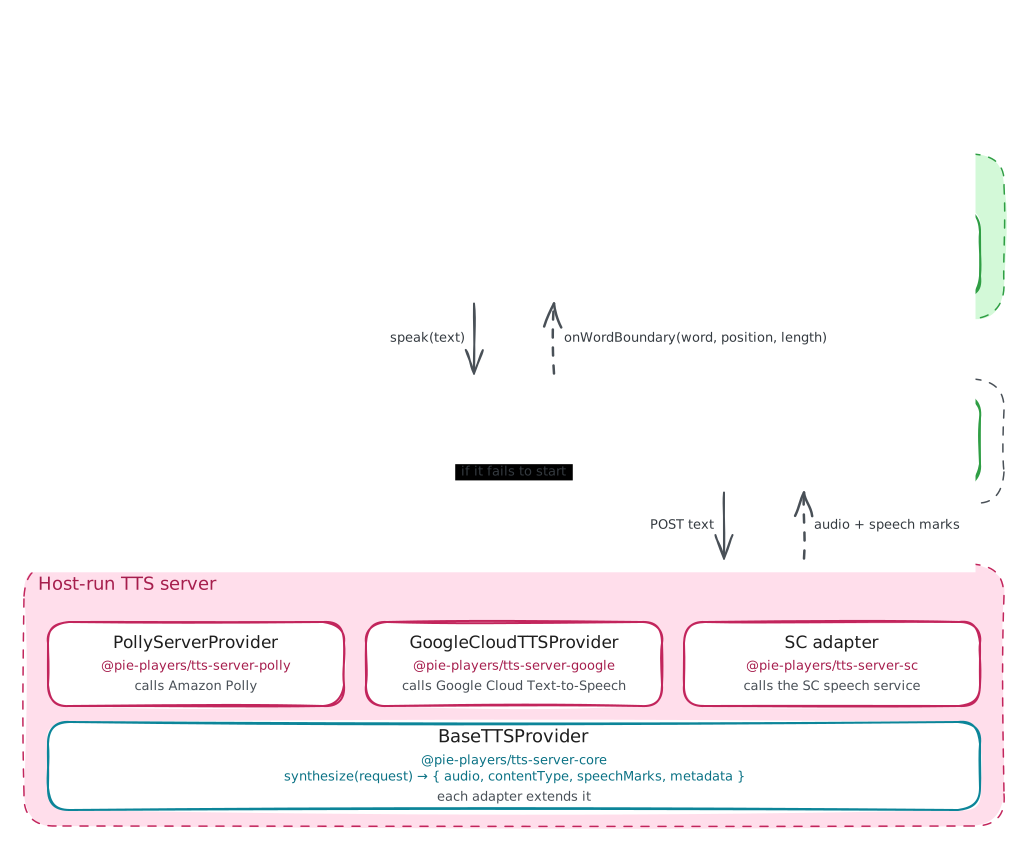
Server providers run on a route your backend hosts, /api/tts by default, so credentials
never reach the browser. If the server client cannot initialize, a provider-init framework error is raised and read-aloud falls back to browser speech. Highlighting uses the CSS
Custom Highlight API. TTS authoring guide(opens in new tab) · TTS architecture(opens in new tab)
Accessibility catalogs
A catalog holds authored alternates for one piece of content, in the QTI 3.0 model. Content points
at a catalog with data-catalog-idref; each card in it is one alternate of one type and
language.
Card types
spoken, sign-language, transcript, braille, tactile, simplified-language, audio-description and extended-description, plus your own under an ext: prefix. A spoken card carries SSML or a recording; a sign-language card
carries its video as a payload.
Lookup
The resolver looks in the element that owns the reference, then the item, then the
assessment's accessibility.catalogs. Within a catalog it tries the content
language, a widened tag, the default language, then any card of the type. Authored catalogs
win over ones extracted from embedded SSML.
Extracting embedded <speak> markup into catalogs is a step the host runs when it
stores content, not at delivery. Catalogs integration guide(opens in new tab)
Signed video, transcripts and dictation
Sign language
@pie-players/pie-tool-sign-language plays an item's or passage's sign-language card, docked beside the content. It needs the signLanguage grant and is registered by the host. The card matches the requested
sign language exactly, then an unlabeled card; one sign language never substitutes for
another. README(opens in new tab)
Transcripts
A transcript card renders in a region before the content. With visibility: "always" it shows to every learner; otherwise it needs the transcript grant. Learner control over audio autoplay is planned. Audio accommodations(opens in new tab)
Dictation
Operating-system and assistive-technology dictation works in text-entry elements and is verified against extended text entry. Built-in speech-to-text is planned and not scheduled. Non-embedded dictation(opens in new tab)
The dictionary and picture dictionary tools call a lookup function or endpoint the host supplies; PIE ships no dictionary service. Color schemes and font scaling are covered under Theming, and the language of the interface and of read-aloud under Localization.
Reference
Accessibility docs index(opens in new tab) · WCAG 2.2 AA baseline(opens in new tab) · Catalogs guide(opens in new tab) · PNP configuration(opens in new tab)