Guide and reference
Launch from an LTI host
Connect an LMS launch to the players and grade passback.
From the pie-players documentation · View source(opens in new tab)
This integration guide is for teams whose LTI tool, the application an LMS launches over LTI 1.3, renders assessments with the PIE (Portable Interactions and Elements) players. It covers the boundary between LTI protocol work and the players, the mapping from a verified launch to player inputs, attempt persistence, grade passback and the LMS iframe. "Tool" here is LTI's term: the toolkit's student tools, such as the calculator, are a separate concept.
Ownership Boundary
- The LTI tool owns OIDC login, JWT and JWKS validation, platform registration, deployment lookup, Deep Linking, Assignment and Grade Services (AGS), user identity, permissions and LMS-specific policy.
- The players own browser-side rendering, controller lifecycle, navigation and the assessment session snapshots the LTI tool persists.
Launch validation runs on the LTI tool's server. The players are the rendering layer of the page the LTI tool serves.
Launch Flow
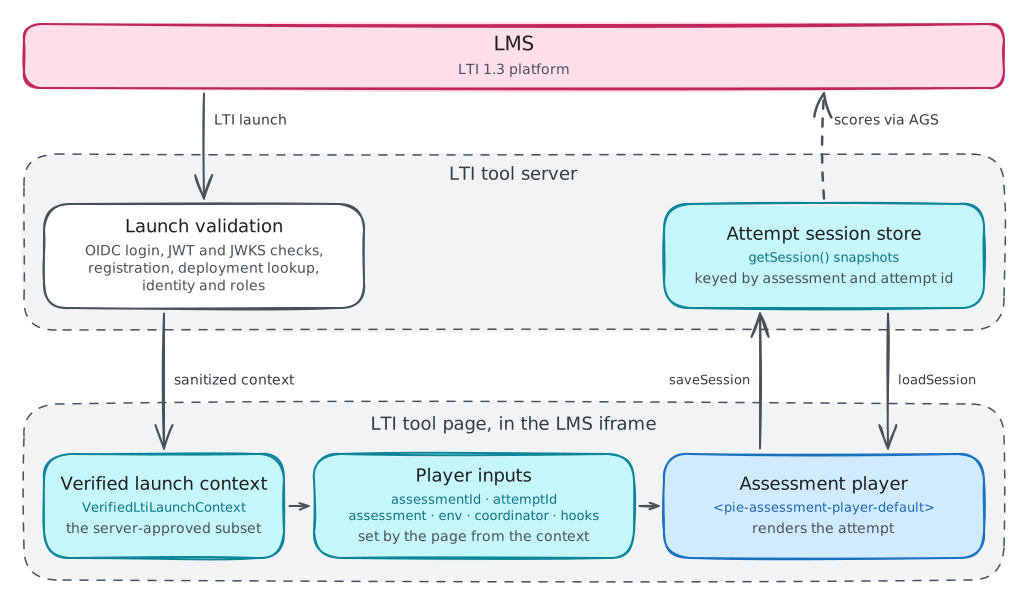
After validating the launch, the LTI tool's server gives the page a launch
context: the server-approved subset of the launch the page needs to render the
attempt. The raw id_token stays on the server.
interface VerifiedLtiLaunchContext {
  platformIssuer: string;
  deploymentId: string;
  contextId: string;
  resourceLinkId: string;
  userId: string;
  roles: string[];
  assessmentId: string;
  attemptId: string;
}
A typical mapping:
| LTI claim or LTI tool value | Launch context field | Player use |
|---|---|---|
iss and the deployment_id claim |
platformIssuer, deploymentId |
Platform lookup and persistence partition |
The context claim's id |
contextId |
Course or class context for the LTI tool's policy |
The resource_link claim's id, or a custom activity claim |
resourceLinkId |
Assessment lookup, which yields assessmentId |
sub, the user's subject |
userId |
Attempt ownership and persistence partition |
The roles claim |
roles |
env.role and the LTI tool's authorization |
| Attempt ID the LTI tool mints | attemptId |
attempt-id and persistence key |
Assessment Player Wiring
The example mounts the reference assessment player (product scope) to keep the wiring short. A production LTI tool typically mounts its own player built on the section player; the claim mapping, attempt ID and server-backed persistence apply unchanged. Configure the player once the page has loaded the assessment and the launch context:
import { ToolkitCoordinator } from "@pie-players/pie-assessment-toolkit";
import { createPackagedToolRegistry } from "@pie-players/pie-default-tool-loaders";
import type {
  AssessmentPlayerRuntimeConfig,
  AssessmentPlayerRuntimeHostContract,
} from "@pie-players/pie-assessment-player";
import "@pie-players/pie-assessment-player/components/assessment-player-default-element";

type AssessmentPlayerElement = HTMLElement &
  AssessmentPlayerRuntimeConfig &
  AssessmentPlayerRuntimeHostContract & { coordinator: ToolkitCoordinator };

const INSTRUCTOR_ROLE =
  "http://purl.imsglobal.org/vocab/lis/v2/membership#Instructor";

const launch = await fetch("/api/lti/launch-context").then((r) => r.json());
const assessment = await fetch(`/api/assessments/${launch.assessmentId}`).then((r) =>
  r.json(),
);
const sessionUrl = `/api/lti/sessions/${launch.assessmentId}/${launch.attemptId}`;

const coordinator = new ToolkitCoordinator({
  assessmentId: launch.assessmentId,
  toolRegistry: createPackagedToolRegistry(),
  hooks: {
    async createSectionSessionPersistence() {
      // Assessment-player owns the aggregate snapshot in this integration.
      return {
        async loadSession() {
          return null;
        },
        async saveSession() {},
        async clearSession() {},
      };
    },
  },
});

const player = document.querySelector<AssessmentPlayerElement>(
  "pie-assessment-player-default",
);
if (!player) throw new Error("The page has no pie-assessment-player-default");
player.assessmentId = launch.assessmentId;
player.attemptId = launch.attemptId;
player.assessment = assessment;
player.env = {
  mode: "gather",
  role: launch.roles.includes(INSTRUCTOR_ROLE) ? "instructor" : "student",
};
player.coordinator = coordinator;
player.hooks = {
  async createAssessmentSessionPersistence() {
    return {
      async loadSession() {
        return fetch(sessionUrl).then((r) => (r.ok ? r.json() : null));
      },
      async saveSession(_context, session) {
        const response = await fetch(sessionUrl, {
          method: "PUT",
          headers: { "content-type": "application/json" },
          body: JSON.stringify(session),
        });
        if (!response.ok) throw new Error(`Saving the attempt failed: ${response.status}`);
      },
      async clearSession() {
        await fetch(sessionUrl, { method: "DELETE" });
      },
    };
  },
  onError(error, { phase }) {
    console.error(`Assessment ${phase} failed`, error);
  },
};

// An answer inside a section changes the session without a navigation.
player.addEventListener("assessment-session-changed", () => {
  void player.getAssessmentController()?.persist();
});
The property assignments batch into one reconciliation, from which the player bootstraps its controller.
LTI 1.3 sends roles as URIs, so the example matches the full Instructor URI. A server that normalizes roles before writing the launch context matches its own values instead.
The persistence strategy receives the controller's getSession() snapshot,
which is the shape to store. getRuntimeState() holds derived and ephemeral
runtime fields and is never persisted. The player saves after each navigation
it performs, through its own controls or the element's navigateTo,
navigateNext and navigatePrevious, and otherwise only when the LTI tool
calls the controller's persist() or submit(). An answer inside a section
emits assessment-session-changed alone. A navigation emits
assessment-route-changed and then assessment-session-changed, so the one
listener in the example saves on both. Saves run one at a time in call order,
and a failed save reaches onError with the phase session-save.
The section-level hook is a no-op because the assessment session carries every
section's session. Without it, the toolkit's default strategy also keeps each
section session in the browser's localStorage.
Grade Passback
The players include no AGS client, and no assessment-player event carries a score. The LTI tool's server scores the stored session and posts the result to the line item the launch's AGS claim names.
The controller's submit() saves the final snapshot, then emits
assessment-submission-state-changed with { submitted: true }. When that
save fails, the error reaches onError, submit() rejects and the assessment
stays unsubmitted. Nothing in the assessment player calls submit(): the LTI
tool's own submit control calls it on the controller. The player hands out the
controller once it is ready, through getAssessmentController(),
waitForAssessmentController(), the onAssessmentControllerReady hook and the
assessment-controller-ready event.
Iframe And LMS Checklist
Most LMSs render an LTI launch inside an iframe.
- Persist attempts on the server. The players' default strategies keep sessions
in the browser's
localStorage. - Set any cookie the page needs inside the third-party iframe as
SameSite=None; Secure, and test in browsers that partition storage. - Give browser API calls short-lived credentials the server mints. The raw LTI launch token stays out of JavaScript.
- Set
Content-Security-Policyas the security model gives it for your loading strategy: a per-response nonce with'strict-dynamic', inline styles allowed, and the origins your strategy and tools fetch from. - Set
frame-ancestorsto the LMS origins that may embed the LTI tool. - Restrict the element packages content may name with an
ElementPackagePolicy(from@pie-players/pie-players-shared/loaders).allowedPackageslists exact package names orname@versionspecs, andrequireExactVersions(defaulttrue) rejects ranges and tags. Content that names another package fails before its code loads. The assessment player passes the policy to its section players:player.sectionPlayerRuntime = { player: { loaderOptions: { elementPackagePolicy } } }(escape hatches). - Keep the item player's
trust-markupoff, its default, unless a trusted content pipeline has already validated all item and passage markup. - The players post no messages to the parent window, so the LTI tool resizes the LMS iframe itself where the platform supports it.
Reference Demo
bun run dev:lti serves apps/lti-demos on port 5600 and opens it in a
browser. It stops with a hint when a package it needs is unbuilt;
bun run dev:lti -- --rebuild builds the packages first. The demo shows the
boundary with a mock verified launch:
- A server route (
/api/lti-demo/launch) returns a sanitized launch context as if LTI validation had already completed. - The page maps that context to
assessment-id,attempt-id,env, content, and persistence keys. - The assessment player renders the attempt.
- The host persists assessment sessions server-side, so reloads hydrate from
host persistence rather than browser
localStorage.
The session route (/api/lti-demo/session) stores snapshots in SQLite, in
pie-lti-demos/lti-demo-sessions.sqlite under the operating system's temporary
directory. The demo does not implement real LTI 1.3, OIDC or JWT validation,
Deep Linking, AGS or LMS-specific integrations. Those belong in an LTI tool or a
separate reference implementation.