Content and scoring
Complex Rubric
Instructor view: score against point descriptors (simple type).
Delivery
Respond, review and evaluate
Authoring
Visual editor available
Print view available
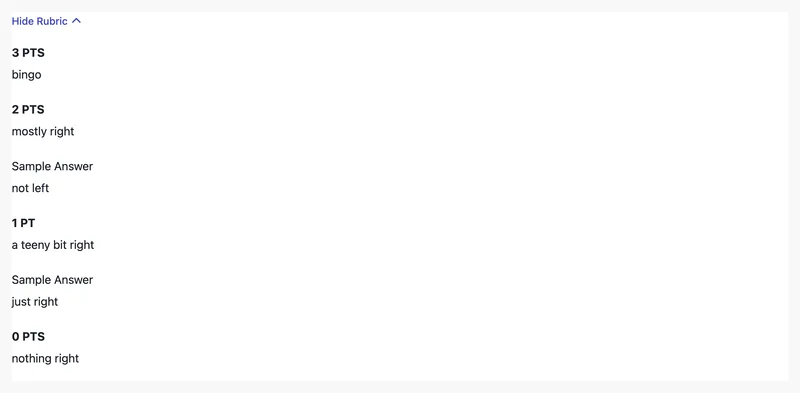
Try the interaction
Rubrics describe manual scoring criteria. This example starts in instructor view.
Live example: @pie-element/complex-rubric@8.0.4 · players 1.0.0-beta.5.
Open all examples for this element →Use it in an item
Map the tag to an exact package version and match the model ID to the markup. The item player loads the views. You can use any frontend framework.
{
  "elements": {
    "complex-rubric": "@pie-element/complex-rubric@8.0.4"
  },
  "markup": "<complex-rubric id=\"example\"></complex-rubric>",
  "models": [
    {
      "id": "example",
      "element": "complex-rubric",
      "rubricType": "simpleRubric",
      "rubrics": {
        "simpleRubric": {
          "points": [
            "nothing right",
            "a teeny bit right",
            "mostly right",
            "bingo"
          ],
          "sampleAnswers": [
            null,
            "just right",
            "not left",
            null
          ],
          "maxPoints": 3,
          "excludeZero": false
        },
        "rubricless": {
          "maxPoints": 100,
          "excludeZero": false,
          "rubriclessInstructionEnabled": true
        },
        "multiTraitRubric": {
          "visibleToStudent": true,
          "halfScoring": false,
          "excludeZero": true,
          "pointLabels": true,
          "description": false,
          "standards": false,
          "scales": [
            {
              "maxPoints": 4,
              "scorePointsLabels": [
                "Non-Scorable",
                "Developing",
                "Progressing",
                "Effective",
                "Strong"
              ],
              "traitLabel": "Trait",
              "traits": [
                {
                  "name": "Ideas",
                  "standards": [],
                  "description": "the main message",
                  "scorePointsDescriptors": [
                    "Student’s response is blank, not in English, not legible, or does not respond to the prompt.",
                    "Topic undefined and/or difficult to follow\n\nDetails are unclear",
                    "Topic too broad\n\nDetails are limited",
                    "Writing stays on topic\n\nComplete details given",
                    "Strong control of topic\n\nRelevant, accurate, specific details that support topic"
                  ]
                },
                {
                  "name": "Organization",
                  "standards": [],
                  "description": "the internal structure of the piece",
                  "scorePointsDescriptors": [
                    "Student’s response is blank, not in English, not legible, or does not respond to the prompt.",
                    "Does not have a beginning, middle and/or end\n\nDoes not have a lead and/or conclusion\n\nTransitions confusing and/or not present\n\nNot written in logical order\n\nNo sign of paragraphing / incorrect paragraphing",
                    "Weak beginning, middle and end\n\nHas evidence of a lead and/or conclusion but missing elements\n\nTransitions are used sometimes\n\nSome logical order\n\nMost paragraphing incorrect",
                    "Has an acceptable beginning, middle and end\n\nIncludes a lead and conclusion\n\nTransitions are used correctly\n\nMostly logical order\n\nMostly correct paragraphing",
                    "Has an effective beginning, middle and end\n\nPowerful introduction / lead and conclusion\n\nEffective transitions\n\nLogical order / sequencing\n\nUses appropriate paragraphing"
                  ]
                },
                {
                  "name": "Word Choice",
                  "standards": [],
                  "description": "the vocabulary a writer chooses to convey meaning",
                  "scorePointsDescriptors": [
                    "Student’s response is blank, not in English, not legible, or does not respond to the prompt.",
                    "Vocabulary is limited/used incorrectly\n\nNo figurative language; words do not convey meaning",
                    "Generally correct words\n\nAttempt at figurative language\n\nand/or words convey general meaning",
                    "Some active verbs and precise nouns\n\nEffective use of figurative language and/or words that enhance meaning",
                    "Powerful and engaging words\n\nArtful use of figurative language and/or sensory detail"
                  ]
                },
                {
                  "name": "Sentence Fluency",
                  "standards": [],
                  "description": "the rhythm and flow of the language",
                  "scorePointsDescriptors": [
                    "Student’s response is blank, not in English, not legible, or does not respond to the prompt.",
                    "No sentences are clear\n\nNo variety in sentence structure\n\nFrequent run-ons and/or fragments are present",
                    "Some sentences are clear\n\nSentence variety used rarely\n\nSome run-ons and/or fragments are present",
                    "Most sentences are clear\n\nSome sentence variety is used\n\nRun-ons and/or fragments are rare",
                    "All Sentences are clear\n\nVariety of sentence structure is used\n\nRun-ons and/or fragments are not present"
                  ]
                },
                {
                  "name": "Conventions",
                  "standards": [],
                  "description": "the mechanical correctness",
                  "scorePointsDescriptors": [
                    "Student’s response is blank, not in English, not legible, or does not respond to the prompt.",
                    "Many distracting errors are present in grammar, punctuation, capitalization and/or spelling",
                    "Errors in grammar, punctuation, capitalization and/or spelling are present and some distract from meaning",
                    "Errors in grammar, punctuation, capitalization and/or spelling are present but don’t distract from meaning",
                    "Few errors in grammar, punctuation,\n\ncapitalization and/or spelling"
                  ]
                },
                {
                  "name": "Voice",
                  "standards": [],
                  "description": "the personal tone and flavor of the author's message",
                  "scorePointsDescriptors": [
                    "Student’s response is blank, not in English, not legible, or does not respond to the prompt.",
                    "Not concerned with audience or purpose\n\nNo viewpoint (perspective) used\n\nWriting is mechanical and lifeless",
                    "Shows beginning awareness of audience/purpose\n\nSome viewpoint (perspective) used throughout the piece\n\nWriting is distant, too formal or informal",
                    "Awareness of audience; purpose is clear most of the time\n\nUses viewpoint (perspective) throughout most of the paper\n\nWriting is pleasant, agreeable and satisfying",
                    "Powerful connection with audience; purpose is clearly communicated\n\nMaintains strong viewpoint (perspective) throughout entire piece\n\nWriting is expressive, engaging and has lots of energy"
                  ]
                }
              ]
            },
            {
              "maxPoints": 5,
              "scorePointsLabels": [
                "Non-Scorable",
                "Unsatisfactory",
                "Satisfactory"
              ],
              "traitLabel": "Category",
              "traits": [
                {
                  "name": "Presentation",
                  "standards": [],
                  "description": "",
                  "scorePointsDescriptors": [
                    "Handwriting is unreadable, or response is blank, not in English, or too brief to evaluate. ",
                    "Handwriting poor\n\nOverall appearance is distracting to unacceptable",
                    "Handwriting is generally legible\n\nOverall appearance is acceptable or better"
                  ]
                }
              ]
            }
          ]
        }
      }
    }
  ]
} Responses and scoring
This element defines manual scoring criteria. Your application supplies the scoring workflow and records the grade.
Model, configuration and session reference
The model holds content, configuration controls the editor, and the session holds the response. Fields below come from generated JSON Schemas.
Schema version: @pie-element/complex-rubric@8.0.6. Example version: 8.0.4. Use the schema matching your content. Schema checks cover data structure; controller validation checks authoring rules.
model fields (7)
| Field | Type | Meaning | Default / values |
|---|---|---|---|
idRequired | string | Identifier to identify the Pie Element in html markup, Must be unique within a pie item config. | — |
elementRequired | string | The html Element tag name: the key in the item config's `elements` map, e.g. "multiple-choice" | — |
accessibilityCatalogs | array | QTI-aligned accessibility catalogs whose cards dock to content nodes by `data-catalog-idref` | — |
rubricTypeRequired | RubricType | Indicates the type of the rubric | — |
rubricsRequired | RubricModels | Contains the model for each item type. | — |
visibleToStudent | boolean | Shows the multi trait rubric to students. The controller reads it at this level; the multi trait rubric's own `visibleToStudent` is not read here. | — |
extraCSSRules | ExtraCSSRules | Host-supplied CSS scoped to the author | — |
Named object types
AccessibilityCatalog
| Field | Type | Meaning | Default / values |
|---|---|---|---|
identifierRequired | string | See the named type or the example model. | — |
cardsRequired | array | See the named type or the example model. | — |
CatalogCard
| Field | Type | Meaning | Default / values |
|---|---|---|---|
catalogRequired | string | See the named type or the example model. | — |
language | string | See the named type or the example model. | — |
content | string | See the named type or the example model. | — |
payload | CatalogCardPayload | See the named type or the example model. | — |
SignLanguageCardPayload
| Field | Type | Meaning | Default / values |
|---|---|---|---|
signLang | string | Language tag for the signed translation — BCP 47, which admits ISO 639-3 subtags for languages with no 639-1/2 code. "ase" is ASL, matching QTI 3 `xml:lang`. This is the language of the *adaptation*, not the item's base content language (AfA/PNP's `languageOfAdaptation`). The distinction is load bearing: a Spanish item's signed alternate is LSM, not ASL, so `signLang` must never be inferred from the item or assessment content language. Optional, and redundant on almost every card. The card's `language` states the same code and is the only field pie-players resolves a card on — resolution runs before anything knows the card is a signing card, so it can only key on the generic field — and the player falls back to it when this is absent. Author it only where the two differ: a card tagged with the item's content language (`language: 'en-US'`, `signLang: 'ase'`) so resolution reaches it by the default-language rung. The pie-api-aws importer emits `language` alone. | — |
mediaRequired | MediaAssetRef | See the named type or the example model. | — |
fragment | MediaFragmentRange | See the named type or the example model. | — |
MediaAssetRef
| Field | Type | Meaning | Default / values |
|---|---|---|---|
versionRequired | number | See the named type or the example model. | — |
idRequired | string | See the named type or the example model. | — |
kindRequired | MediaKind | See the named type or the example model. | — |
sourcesRequired | array | See the named type or the example model. | — |
poster | string | See the named type or the example model. | — |
thumbnail | string | See the named type or the example model. | — |
durationSeconds | number | See the named type or the example model. | — |
tracks | array | See the named type or the example model. | — |
transcript | TranscriptRef | See the named type or the example model. | — |
label | string | See the named type or the example model. | — |
description | string | See the named type or the example model. | — |
lang | string | Language of the asset itself, as authored metadata. Sign-language cards leave it unset: the card's `language` already states the adaptation language, and a second copy is a second thing to keep in agreement. | — |
MediaSource
| Field | Type | Meaning | Default / values |
|---|---|---|---|
srcRequired | string | See the named type or the example model. | — |
type | string | MIME type, e.g. "video/mp4". | — |
width | number | See the named type or the example model. | — |
height | number | See the named type or the example model. | — |
bitrate | number | See the named type or the example model. | — |
TextTrackRef
| Field | Type | Meaning | Default / values |
|---|---|---|---|
srcRequired | string | See the named type or the example model. | — |
kindRequired | string | See the named type or the example model. | —["captions","subtitles","descriptions","chapters","metadata"] |
langRequired | string | See the named type or the example model. | — |
labelRequired | string | See the named type or the example model. | — |
default | boolean | See the named type or the example model. | — |
TranscriptRef
| Field | Type | Meaning | Default / values |
|---|---|---|---|
src | string | See the named type or the example model. | — |
html | string | See the named type or the example model. | — |
plainText | string | See the named type or the example model. | — |
lang | string | See the named type or the example model. | — |
MediaFragmentRange
| Field | Type | Meaning | Default / values |
|---|---|---|---|
startSecondsRequired | number | See the named type or the example model. | — |
endSeconds | number | See the named type or the example model. | — |
SpokenAudioCardPayload
| Field | Type | Meaning | Default / values |
|---|---|---|---|
mediaRequired | MediaAssetRef | See the named type or the example model. | — |
fragment | MediaFragmentRange | See the named type or the example model. | — |
RubricModels
| Field | Type | Meaning | Default / values |
|---|---|---|---|
simpleRubric | EmbeddedRubricModel | Contains the simple rubric model. | — |
multiTraitRubric | EmbeddedMultiTraitRubricModel | Contains the multi trait rubric model. | — |
rubricless | EmbeddedRubricModel | Contains the rubricless model. | — |
EmbeddedRubricModel
| Field | Type | Meaning | Default / values |
|---|---|---|---|
points | array | Indicates the score points labels. Starting from 0 to max | ["","","",""] |
sampleAnswers | array | Indicates the sample answers labels. Starting from 0 to max. `null` hides the sample answer of that point; an empty string shows an empty one. | [null,null,null,null] |
maxPoints | number | Indicates the max limit for scoring points | 3 |
excludeZero | boolean | Indicates if point 0 should be excluded | false |
excludeZeros | boolean | Not read by the element: legacy schemas spell `excludeZero` as `excludeZeros`. | — |
excludeZeroEnabled | boolean | Shows the author's control for excluding point 0 | true |
maxPointsEnabled | boolean | Shows the author's max points dropdown | true |
rubriclessInstructionEnabled | boolean | Indicates that rubricInstruction is enabled | — |
rubriclessInstruction | string | Scoring instruction of a rubricless rubric | — |
animationsDisabled | boolean | Renders the rubric expanded, without the show/hide toggle; print sets it | — |
language | string | Language of the rubric's labels, e.g. "en-US" or "es-ES" | — |
extraCSSRules | ExtraCSSRules | Host-supplied CSS scoped to the element | — |
ExtraCSSRules
| Field | Type | Meaning | Default / values |
|---|---|---|---|
names | array | See the named type or the example model. | — |
rules | string | See the named type or the example model. | — |
EmbeddedMultiTraitRubricModel
| Field | Type | Meaning | Default / values |
|---|---|---|---|
halfScoring | boolean | Indicates if half scoring is enabled | false |
pointLabels | boolean | Indicates if point labels should be shown | true |
visibleToStudent | boolean | Indicates if should be visible to student | true |
description | boolean | Indicates if description should be shown | false |
standards | boolean | Indicates if standards should be shown | false |
excludeZero | boolean | Indicates if scoring should start at 0 or 1 | false |
spellCheckEnabled | boolean | Indicates if spellcheck is enabled for the author. Default value is true | true |
maxPointsEnabled | boolean | Shows the max points dropdown of each scale to the author | true |
addScaleEnabled | boolean | Shows the author's Add Scale button | true |
scalesRequired | array | scales | — |
animationsDisabled | boolean | Renders the rubric expanded, without the show/hide toggle; print sets it | — |
arrowsDisabled | boolean | Hides the scales' scroll arrows; print sets it | — |
language | string | Language of the rubric's labels, e.g. "en-US" or "es-ES" | — |
extraCSSRules | ExtraCSSRules | Host-supplied CSS scoped to the element | — |
Scale
| Field | Type | Meaning | Default / values |
|---|---|---|---|
maxPointsRequired | number | Indicates max limit for scoring points | — |
scorePointsLabelsRequired | array | Score labels. Starting from 0 to max. | — |
traitLabelRequired | string | Trait label | — |
traitsRequired | array | Traits | — |
Trait
| Field | Type | Meaning | Default / values |
|---|---|---|---|
nameRequired | string | Trait name | — |
standardsRequired | array | Trait standards | — |
descriptionRequired | string | Trait description | — |
scorePointsDescriptorsRequired | array | Score point descriptors. Starting from 0 to max. | — |
configuration fields (6)
| Field | Type | Meaning | Default / values |
|---|---|---|---|
width | string | How large should complex-rubric be. It replaces the `width` of the simple rubric and rubricless configurations, and the multi trait rubric's when set. | — |
rubricOptions | array | Contains the available rubric types; the author offers a choice between them when there is more than one | ["simpleRubric","multiTraitRubric","rubricless"] |
simpleRubric | RubricConfiguration | Contains the simple rubric configuration; its `width` is not read. | — |
multiTraitRubric | MultiTraitRubricConfiguration | Contains the multi trait rubric configuration. | — |
rubricless | RubricConfiguration | Contains the rubricless configuration, which takes effect with `rubricless: true`; its `width` is not read. | — |
contentDimensions | ContentDimensions | Dimensions of the authoring container | — |
Named object types
RubricConfiguration
| Field | Type | Meaning | Default / values |
|---|---|---|---|
baseInputConfiguration | EditableHtmlConfigureProp | Base editable html input configuration regarding plugins that are enabled/disabled E.g. audio, video, image | — |
settingsPanelDisabled | boolean | Indicates if the settings panel is not available | — |
showExcludeZero | ConfigureProp | Ability to exclude zero configuration | — |
showMaxPoint | ConfigureProp | Show max points dropdown configuration | — |
width | string | How large can the rubric be | — |
mathMlOptions | ConfigureMathMLProp | Configuration for editable-html | — |
maxMaxPoints | number | Indicates the max limit for scoring points; the dropdown stops at 100 | 9 |
rubricless | boolean | Indicates that it is rubricless: the author edits max points and an instruction, without point descriptors | — |
rubriclessInstruction | EditableHtmlPluginConfigure | Scoring instruction for rubricless: `settings` and `label` set its Settings Panel toggle. Its editor takes `baseInputConfiguration`; `inputConfiguration` is not read. | — |
contentDimensions | ContentDimensions | Dimensions of the authoring container | — |
showPrompt | boolean | Not read by this element: the rubric has no prompt | — |
promptLabel | string | Not read by this element: the rubric has no prompt | — |
settingsPartialScoring | boolean | Not read by this element: the rubric is not scored | — |
EditableHtmlConfigureProp
| Field | Type | Meaning | Default / values |
|---|---|---|---|
math | EditableHtmlButtonConfigure | See the named type or the example model. | — |
audio | EditableHtmlButtonConfigure | See the named type or the example model. | — |
video | EditableHtmlButtonConfigure | See the named type or the example model. | — |
image | EditableHtmlButtonConfigure | See the named type or the example model. | — |
customPlugins | array | An array of objects that determine custom plugins. A custom plugin is an object which determines how the button will look like (icon) and the event name that will be triggered when the button gets pressed (event). | — |
blockquote | EditableHtmlButtonConfigure | See the named type or the example model. | — |
h3 | EditableHtmlButtonConfigure | See the named type or the example model. | — |
characters | EditableHtmlButtonConfigure | See the named type or the example model. | — |
bold | EditableHtmlButtonConfigure | See the named type or the example model. | — |
html | EditableHtmlButtonConfigure | See the named type or the example model. | — |
italic | EditableHtmlButtonConfigure | See the named type or the example model. | — |
ol_list | EditableHtmlButtonConfigure | See the named type or the example model. | — |
redo | EditableHtmlButtonConfigure | See the named type or the example model. | — |
strikethrough | EditableHtmlButtonConfigure | See the named type or the example model. | — |
sub | EditableHtmlButtonConfigure | See the named type or the example model. | — |
sup | EditableHtmlButtonConfigure | See the named type or the example model. | — |
table | EditableHtmlButtonConfigure | See the named type or the example model. | — |
ul_list | EditableHtmlButtonConfigure | See the named type or the example model. | — |
underline | EditableHtmlButtonConfigure | See the named type or the example model. | — |
undo | EditableHtmlButtonConfigure | See the named type or the example model. | — |
textAlign | EditableHtmlButtonConfigure | See the named type or the example model. | — |
showParagraphs | EditableHtmlButtonConfigure | See the named type or the example model. | — |
separateParagraphs | EditableHtmlButtonConfigure | See the named type or the example model. | — |
pasteFormatting | EditableHtmlButtonConfigure | See the named type or the example model. | — |
superscript | EditableHtmlButtonConfigure | See the named type or the example model. | — |
subscript | EditableHtmlButtonConfigure | See the named type or the example model. | — |
languageCharacters | EditableHtmlButtonConfigure | See the named type or the example model. | — |
responseArea | EditableHtmlButtonConfigure | See the named type or the example model. | — |
EditableHtmlButtonConfigure
| Field | Type | Meaning | Default / values |
|---|---|---|---|
disabled | boolean | Indicates if the plugin is disabled or not | — |
CustomPlugin
| Field | Type | Meaning | Default / values |
|---|---|---|---|
eventRequired | string | The name of the custom event. It needs to be valid (only letters, numbers and "_" can be used). The event is emitted with the "PIE-" prefix. | — |
iconAltRequired | string | The alt for the custom button icon | — |
iconTypeRequired | string | The icon type. Currently, only "SVG" is supported. | — |
iconRequired | string | The icon string. Currently, only SVG is supported, so it needs to be a valid svg. | — |
ConfigureProp
| Field | Type | Meaning | Default / values |
|---|---|---|---|
settings | boolean | Indicates if the item has to be displayed in the Settings Panel | — |
label | string | Indicates the label for the item that has to be displayed in the Settings Panel | — |
ConfigureMathMLProp
| Field | Type | Meaning | Default / values |
|---|---|---|---|
mmlOutput | boolean | Indicates if model should have mathML output instead of latex | — |
mmlEditing | boolean | Indicates if mathML that's already in model should be editable | — |
EditableHtmlPluginConfigure
| Field | Type | Meaning | Default / values |
|---|---|---|---|
settings | boolean | Indicates if the item has to be displayed in the Settings Panel | — |
label | string | Indicates the label for the item that has to be displayed in the Settings Panel | — |
inputConfiguration | EditableHtmlConfigureProp | Configuration for editable-html | — |
ContentDimensions
| Field | Type | Meaning | Default / values |
|---|---|---|---|
maxHeight | string | number | See the named type or the example model. | — |
maxWidth | string | number | See the named type or the example model. | — |
minHeight | string | number | See the named type or the example model. | — |
minWidth | string | number | See the named type or the example model. | — |
MultiTraitRubricConfiguration
| Field | Type | Meaning | Default / values |
|---|---|---|---|
baseInputConfiguration | EditableHtmlConfigureProp | Base editable html input configuration regarding plugins that are enabled/disabled E.g. audio, video, image | — |
expandedInput | EditableHtmlPluginConfigure | Expanded input configurations: only `inputConfiguration` is read, for the standards, description and score point descriptor editors | — |
labelInput | EditableHtmlPluginConfigure | Label input configurations: only `inputConfiguration` is read, for the trait name, trait label and score point label editors | — |
excludeZeroDialogBoxContent | DialogContent | Not read by the element: the dialog shows its built-in text | — |
includeZeroDialogBoxContent | DialogContent | Not read by the element: the dialog shows its built-in text | — |
deleteScaleDialogBoxContent | DialogContent | Not read by the element: the dialog shows its built-in text | — |
maxPointsDialogBoxContent | DialogContent | Not read by the element: the dialog shows its built-in text | — |
settingsPanelDisabled | boolean | Indicates if the settings panel is not available | — |
showExcludeZero | ConfigureProp | Configuration for Excluding Zero Column | — |
showScorePointLabels | ConfigureProp | Configuration for Showing Score Point Labels | — |
showDescription | ConfigureProp | Configuration for Showing Description | — |
showVisibleToStudent | ConfigureProp | Configuration for Showing Multi-trait-rubric to Students | — |
showHalfScoring | ConfigureProp | Configuration for Showing Half Scoring Indicator | — |
spellCheck | ConfigurePropWithEnabled | Configuration for the author's spellcheck: `enabled` is not read, the model's `spellCheckEnabled` sets it | — |
showStandards | ConfigureProp | Configuration for showing the Standards column | — |
showLevelTagInput | ConfigurePropWithEnabled | Configuration for showing the Level Tag Input; `enabled` shows it | — |
dragAndDrop | ConfigurePropWithEnabled | Configuration for allowing drag & drop per traits; `enabled` allows it | — |
showMaxPoint | ConfigureProp | Configuration for the Settings Panel toggle of the model's `maxPointsEnabled` | — |
addScale | ConfigureProp | Configuration for the Settings Panel toggle of the model's `addScaleEnabled` | — |
width | string | How large (in px) should multi-trait-rubric be; without it the rubric takes the container's width | — |
contentDimensions | ContentDimensions | Dimensions of the authoring container | — |
minNoOfTraits | number | Minimum number of traits | 1 |
maxNoOfTraits | number | Maximum number of traits | 10 |
minNoOfScales | number | Minimum number of scales | 1 |
maxNoOfScales | number | Maximum number of scales | 10 |
defaultTraitLabel | string | The default trait label for new created scales. If it's not defined, it will default to the label of the first trait. | "Trait" |
mathMlOptions | ConfigureMathMLProp | Configuration for editable-html | — |
maxMaxPoints | number | Indicates the max limit for scoring points | 10 |
DialogContent
| Field | Type | Meaning | Default / values |
|---|---|---|---|
title | string | Dialog box title | — |
text | string | Dialog box text | — |
ConfigurePropWithEnabled
| Field | Type | Meaning | Default / values |
|---|---|---|---|
settings | boolean | Indicates if the item has to be displayed in the Settings Panel | — |
label | string | Indicates the label for the item that has to be displayed in the Settings Panel | — |
enabled | boolean | Indicates the value of the item if it affects config-ui (eg.: if item is a switch and displaying an input on the config-ui depends on the switch value: on/off) | — |
session fields (2)
| Field | Type | Meaning | Default / values |
|---|---|---|---|
id | string | Identifier of the session | — |
element | string | The element the session belongs to | — |
Accessibility and content requirements
PIE targets WCAG 2.2 AA. Provide clear prompts and media alternatives, and test the question with a keyboard and assistive technology. Manual testing is still incomplete; see the coverage notes below.
Accessibility and evidence · Element evidence and manual checks(opens in new tab)
Element package source(opens in new tab) · Example source(opens in new tab) · Snapshot cb30a68f